<?xml version="1.0" encoding="utf-8"?><feed xmlns="http://www.w3.org/2005/Atom" ><generator uri="https://jekyllrb.com/" version="3.10.0">Jekyll</generator><link href="https://docrouter.ai/feed.xml" rel="self" type="application/atom+xml" /><link href="https://docrouter.ai/" rel="alternate" type="text/html" /><updated>2026-08-07T22:17:00+00:00</updated><id>https://docrouter.ai/feed.xml</id><title type="html">DocRouter.AI</title><subtitle>DocRouter provides AI-powered document processing solutions that automate manual data entry from invoices, manifests, and reports.
</subtitle><author><name>Andrei Radulescu-Banu</name><email>andrei@docrouter.ai</email></author><entry><title type="html">Offline Evaluation Frameworks for AI Agents</title><link href="https://docrouter.ai/ai/engineering/offline-evaluation-for-ai-agents/" rel="alternate" type="text/html" title="Offline Evaluation Frameworks for AI Agents" /><published>2026-08-07T00:00:00+00:00</published><updated>2026-08-07T00:00:00+00:00</updated><id>https://docrouter.ai/ai/engineering/offline-evaluation-for-ai-agents</id><content type="html" xml:base="https://docrouter.ai/ai/engineering/offline-evaluation-for-ai-agents/"><![CDATA[<p>Classic software needs unit tests. Prompt-based and agent systems need them even more—and they behave differently.</p>

<p>Language models are <strong>stochastic</strong>: a one-line prompt change can ripple across many paths. Fix case ten and you may silently break cases one and two. So meaningful changes require a <strong>wide retest</strong> across representative inputs and configurations, not a single happy-path check.</p>

<p>That is what <a href="/ai/programming/tutorials/how-to-train-your-ai-agent/">offline evaluation infrastructure</a> is for: you cannot improve what you do not measure.</p>

<div class="not-prose my-8">
  <aside class="flex gap-3 items-start rounded-xl bg-amber-50 px-4 py-4 ring-1 ring-amber-100">
    <span class="flex-shrink-0 mt-0.5 w-9 h-9 rounded-full bg-amber-100 text-amber-700 flex items-center justify-center font-bold text-lg" aria-hidden="true">!</span>
    <p class="m-0 pt-1.5 text-[#1a2b4c] font-semibold leading-snug">Stochastic systems break silently across cases. Offline evaluation is how you catch that before you ship.</p>
  </aside>
</div>

<h2 id="offline-vs-online-evaluation">Offline vs online evaluation</h2>

<p><strong>Offline evaluation</strong> uses controlled, replayable datasets to measure behavior and regressions. You define representative cases and labeled expectations, run the agent, score the results, and repeat the suite after changes.</p>

<p><strong>Online evaluation</strong> measures behavior on real production traffic using telemetry, automated checks, product outcomes, and explicit user feedback. Typical setups capture tool calls and traces with <strong>OpenTelemetry</strong> and collect signals such as thumbs-up / thumbs-down or textual feedback for engineering and product teams.</p>

<div class="not-prose grid grid-cols-1 sm:grid-cols-2 gap-4 my-8">
  <div class="rounded-xl border border-slate-200 bg-slate-50 p-5">
    <p class="text-xs font-semibold uppercase tracking-wide text-slate-500 mb-2">Offline</p>
    <p class="text-[#1a2b4c] font-semibold m-0 mb-2">Controlled, replayable datasets</p>
    <p class="text-sm text-slate-600 m-0 leading-relaxed">Measure behavior and regressions before you ship—labeled cases, suite re-runs, deterministic graders, LLM rubrics.</p>
  </div>
  <div class="rounded-xl border border-blue-200 bg-blue-50/60 p-5">
    <p class="text-xs font-semibold uppercase tracking-wide text-blue-600 mb-2">Online</p>
    <p class="text-[#1a2b4c] font-semibold m-0 mb-2">Real production traffic</p>
    <p class="text-sm text-slate-600 m-0 leading-relaxed">Telemetry, automated checks, product outcomes, and user feedback (OpenTelemetry, thumbs-up / thumbs-down) for engineering and product teams.</p>
  </div>
</div>

<p>Our product <a href="https://sigagent.ai">SigAgent.AI</a> implements online evaluation for Claude agents. We will cover online evaluation in a later post.</p>

<p>This post focuses on offline evaluation.</p>

<h2 id="the-offline-evaluation-loop">The offline evaluation loop</h2>

<p>We built the <strong>Smart Agent Kit</strong> for DocRouter’s <strong>Document Agent</strong>, a coding agent that configures schemas, prompts, and tags through a multi-tool agent loop.</p>

<p>The same basic pattern applies to many other agents:</p>

<ol>
  <li>Define a <strong>dataset</strong> of representative tasks, tagged for segmentation and selective reruns.</li>
  <li>Define what “good” means using <strong>facts</strong>, <strong>reference solutions</strong>, and <strong>assertions / invariants</strong>.</li>
  <li>Run the agent offline, usually with <strong>1..k trials per task</strong>, recording results, traces, cost, and latency.</li>
  <li>Score each trial with <strong>deterministic graders first</strong>, followed by <strong>LLM judge rubrics</strong> where semantic judgment is needed.</li>
  <li>Aggregate results per task and across the test run, then rerun the full suite—or only the affected slice—after changes.</li>
</ol>

<p><img src="/assets/images/ai_agent_offline_evaluation.png" alt="Offline evaluation architecture for AI agents" style="width: 80%; height: auto;" /></p>

<p style="text-align: center; font-size: 0.875rem; color: #6b7280;"><strong>Figure 1:</strong> Offline evaluation: dataset → agent run → deterministic graders → LLM judge rubric(s) → scored results.</p>

<h2 id="one-pattern-two-domains">One pattern, two domains</h2>

<p>Figures 2 and 3 use the same architecture:</p>

<div class="not-prose my-8 overflow-x-auto">
  <div class="flex flex-wrap items-center justify-center gap-2 text-sm font-medium text-[#1a2b4c]">
    <span class="rounded-lg bg-blue-50 border border-blue-200 px-3 py-1.5">agent</span>
    <span class="text-slate-400">→</span>
    <span class="rounded-lg bg-sky-50 border border-sky-200 px-3 py-1.5">dataset</span>
    <span class="text-slate-400">→</span>
    <span class="rounded-lg bg-slate-50 border border-slate-200 px-3 py-1.5">tasks/tags</span>
    <span class="text-slate-400">→</span>
    <span class="rounded-lg bg-rose-50 border border-rose-200 px-3 py-1.5">test run</span>
    <span class="text-slate-400">→</span>
    <span class="rounded-lg bg-amber-50 border border-amber-200 px-3 py-1.5">trials</span>
    <span class="text-slate-400">→</span>
    <span class="rounded-lg bg-emerald-50 border border-emerald-200 px-3 py-1.5">per-task eval</span>
    <span class="text-slate-400">→</span>
    <span class="rounded-lg bg-slate-100 border border-slate-300 px-3 py-1.5">aggregates</span>
  </div>
</div>

<p>Figure 2 shows the <strong>Smart Agent Kit</strong>, which we built for DocRouter’s Document Agent. Figure 3 applies the same pattern to a <strong>medical insurance coverage-assessment agent</strong>. The medical example is a design, not a product we have shipped.</p>

<h3 id="smart-agent-kit--evaluating-docrouters-document-agent">Smart Agent Kit — evaluating DocRouter’s Document Agent</h3>

<p>DocRouter’s <a href="/docs/document-agent/"><strong>Document Agent</strong></a> sets up document extraction in plain language. It uses many tools: creating and validating schemas, writing prompts, attaching tags, running extraction, and more.</p>

<p>Because this is a tool-using coding agent, chat fluency is not enough to tell us whether it worked.</p>

<p>The <strong>Smart Agent Kit</strong> (<code class="language-plaintext highlighter-rouge">smaht-agent-kit</code>) evaluates the actual outcome.</p>

<div data-excalidraw="/assets/excalidraw/offline_evaluation_smart_agent_kit.excalidraw" class="excalidraw-container">
  <div class="loading-placeholder">Loading diagram...</div>
</div>

<div style="text-align: center; margin-top: 1rem;">
  <a href="/excalidraw-edit?file=/assets/excalidraw/offline_evaluation_smart_agent_kit.excalidraw" target="_blank" style="color: #2563eb; text-decoration: none; font-weight: 500;">
    📝 Edit in Excalidraw
  </a>
</div>

<p style="text-align: center; margin-top: 0.5rem; font-size: 0.875rem; color: #6b7280;"><strong>Figure 2:</strong> Smart Agent Kit — agent under test → dataset → tasks/tags → test run → 1..k trials → per-task evaluation → test-run / dataset aggregates.</p>

<p>The important pieces are:</p>

<ul>
  <li>A <strong>dataset</strong> contains configuration tasks such as creating an invoice schema, building a CV extraction prompt, or repairing an invalid schema.</li>
  <li>Tasks carry <strong>tags</strong> such as <code class="language-plaintext highlighter-rouge">schema</code>, <code class="language-plaintext highlighter-rouge">validation</code>, <code class="language-plaintext highlighter-rouge">invoice</code>, and <code class="language-plaintext highlighter-rouge">regression</code>, allowing selective reruns.</li>
  <li>A <strong>test run</strong> selects a full dataset or a tagged slice.</li>
  <li>Each selected task runs <strong>1..k trials</strong>.</li>
  <li>Every trial records the resulting artifacts, the tool-call trace, cost, and latency.</li>
  <li>Deterministic graders and LLM rubrics score each trial.</li>
  <li>Trial scores aggregate into a <strong>per-task evaluation</strong>, then into test-run and dataset metrics.</li>
</ul>

<p>Tool traces are primarily a <strong>diagnostic signal</strong>. Agents can take different valid paths and produce different valid artifacts. Requiring one exact tool sequence—or one golden schema—would make the evaluation unnecessarily brittle.</p>

<p>The kit evaluates the <strong>tool-using coding agent</strong>, not PDF extraction accuracy itself.</p>

<h2 id="what-does-correct-mean">What does “correct” mean?</h2>

<p>Calling everything “ground truth” is a subtle trap, especially for coding and configuration agents.</p>

<p>A task may admit several correct schemas or prompts. If we say:</p>

<blockquote>
  <p>expected schema = ground truth</p>
</blockquote>

<p>we can accidentally turn that into:</p>

<blockquote>
  <p>the schema must look like the one we happened to write.</p>
</blockquote>

<p>Instead, separate three concepts:</p>

<div class="not-prose grid sm:grid-cols-3 gap-3 my-8">
  <div class="rounded-xl border border-emerald-200 bg-emerald-50/70 p-4">
    <p class="text-xs font-semibold uppercase tracking-wide text-emerald-700 mb-1">Ground-truth facts</p>
    <p class="text-sm text-[#1a2b4c] font-medium m-0 mb-2">Objectively must be true</p>
    <p class="text-sm text-slate-600 m-0">Required field names, valid JSON, expected tag</p>
  </div>
  <div class="rounded-xl border border-blue-200 bg-blue-50/70 p-4">
    <p class="text-xs font-semibold uppercase tracking-wide text-blue-700 mb-1">Reference solution</p>
    <p class="text-sm text-[#1a2b4c] font-medium m-0 mb-2">One known-good example</p>
    <p class="text-sm text-slate-600 m-0">A schema/prompt pair known to work—not the only allowed shape</p>
  </div>
  <div class="rounded-xl border border-amber-200 bg-amber-50/70 p-4">
    <p class="text-xs font-semibold uppercase tracking-wide text-amber-700 mb-1">Assertions / invariants</p>
    <p class="text-sm text-[#1a2b4c] font-medium m-0 mb-2">Any acceptable solution must satisfy</p>
    <p class="text-sm text-slate-600 m-0">“Includes patient name and dates”; “schema validates”</p>
  </div>
</div>

<div class="not-prose my-8">
  <aside class="rounded-xl border-l-4 border-blue-500 bg-slate-50 px-5 py-4">
    <p class="m-0 text-[#1a2b4c] font-semibold leading-snug">A reference solution is not necessarily the only correct solution. Grade the <span class="text-blue-600">outcome</span>, not one particular path to that outcome.</p>
  </aside>
</div>

<p>For the Document Agent, much of the evaluation can therefore be deterministic: JSON parses, schema validation passes, required fields and tags exist, extraction executes, and required invariants hold.</p>

<p>LLM judges are useful where semantics matter—for example, whether a prompt captures the requested intent or a schema adequately covers a concept.</p>

<h2 id="the-same-pattern-for-medical-insurance">The same pattern for medical insurance</h2>

<p>Figure 3 applies the same architecture to a medical insurance <strong>Benefits Examiner</strong> agent. Assume the agent uses tools for policy lookup, claim details, knowledge-base retrieval, and related tasks.</p>

<div data-excalidraw="/assets/excalidraw/offline_evaluation_medical_claims.excalidraw" class="excalidraw-container">
  <div class="loading-placeholder">Loading diagram...</div>
</div>

<div style="text-align: center; margin-top: 1rem;">
  <a href="/excalidraw-edit?file=/assets/excalidraw/offline_evaluation_medical_claims.excalidraw" target="_blank" style="color: #2563eb; text-decoration: none; font-weight: 500;">
    📝 Edit in Excalidraw
  </a>
</div>

<p style="text-align: center; margin-top: 0.5rem; font-size: 0.875rem; color: #6b7280;"><strong>Figure 3:</strong> Medical insurance evaluation — the same dataset → task → trial → evaluation pattern applied to structured coverage assessments.</p>

<p>A trial might produce:</p>

<ul>
  <li><strong>Benefit decisions</strong> — service line, payable / deny / pend / partial, plan citation, network status, cost share, medical necessity</li>
  <li><strong>Open facts</strong> — missing clinical, coding, authorization, eligibility, or COB information</li>
  <li><strong>Examiner summary</strong> — narrative explanation</li>
  <li><strong>Headline determination</strong> — payable / deny / pend / partial</li>
</ul>

<p>Here the labeling distinction matters even more.</p>

<div class="not-prose grid sm:grid-cols-2 gap-3 my-8">
  <div class="rounded-xl border border-emerald-200 bg-emerald-50/70 p-4">
    <p class="text-xs font-semibold uppercase tracking-wide text-emerald-700 mb-1">Ground-truth facts</p>
    <p class="text-sm text-slate-700 m-0">Claim and policy attributes: dates, codes, eligibility, network status</p>
  </div>
  <div class="rounded-xl border border-rose-200 bg-rose-50/70 p-4">
    <p class="text-xs font-semibold uppercase tracking-wide text-rose-700 mb-1">Expert-labeled decisions</p>
    <p class="text-sm text-slate-700 m-0">Headline and benefit dispositions: payable / deny / pend / partial</p>
  </div>
  <div class="rounded-xl border border-blue-200 bg-blue-50/70 p-4">
    <p class="text-xs font-semibold uppercase tracking-wide text-blue-700 mb-1">Reference solution</p>
    <p class="text-sm text-slate-700 m-0">Examiner write-up / complete assessment</p>
  </div>
  <div class="rounded-xl border border-amber-200 bg-amber-50/70 p-4">
    <p class="text-xs font-semibold uppercase tracking-wide text-amber-700 mb-1">Assertions</p>
    <p class="text-sm text-slate-700 m-0">Must cite the plan; must surface this open fact; required benefit lines</p>
  </div>
</div>

<p>A strong agent result can be promoted into the labeled set, but only <strong>after domain-expert review</strong>. A high LLM-judge score should nominate a result for review, not silently turn it into tomorrow’s ground truth.</p>

<p>This is an important secondary role for offline evaluation: it helps you <strong>grow the labeled dataset</strong> safely over time.</p>

<h2 id="trials-and-stochasticity">Trials and stochasticity</h2>

<p>A single agent run is a sample, not the agent.</p>

<p>Keep four terms distinct:</p>

<table>
  <thead>
    <tr>
      <th>Term</th>
      <th>Meaning</th>
    </tr>
  </thead>
  <tbody>
    <tr>
      <td><strong>Dataset</strong></td>
      <td>Versioned collection of tasks</td>
    </tr>
    <tr>
      <td><strong>Task</strong></td>
      <td>One test case</td>
    </tr>
    <tr>
      <td><strong>Trial</strong></td>
      <td>One execution of the agent on that task</td>
    </tr>
    <tr>
      <td><strong>Test run</strong></td>
      <td>One suite execution over selected tasks/tags</td>
    </tr>
  </tbody>
</table>

<p>Each trial is graded individually. Trial scores then aggregate into a <strong>per-task evaluation</strong>, and task-level results roll up into the overall test run.</p>

<p>Multiple trials matter because agents are stochastic. If task 17 scores 85 today and 72 after a prompt change, one run cannot tell you whether the agent really became worse.</p>

<p>Two useful summaries are:</p>

<div class="not-prose grid grid-cols-1 sm:grid-cols-2 gap-4 my-8">
  <div class="rounded-xl border border-blue-200 bg-blue-50/60 p-5">
    <p class="font-mono text-lg font-bold text-blue-700 m-0 mb-2">pass@k</p>
    <p class="text-sm text-[#1a2b4c] font-semibold m-0 mb-2">At least one of k trials succeeds</p>
    <p class="text-sm text-slate-600 m-0">Measures <strong>capability</strong> with multiple attempts</p>
  </div>
  <div class="rounded-xl border border-amber-200 bg-amber-50/70 p-5">
    <p class="font-mono text-lg font-bold text-amber-700 m-0 mb-2">pass^k</p>
    <p class="text-sm text-[#1a2b4c] font-semibold m-0 mb-2">All k trials succeed</p>
    <p class="text-sm text-slate-600 m-0">Measures <strong>reliability</strong> / consistency</p>
  </div>
</div>

<p>But running ten trials on every task quickly becomes expensive. In practice:</p>

<ul>
  <li>use <strong>one trial</strong> for fast development feedback,</li>
  <li>use <strong>multiple trials</strong> for release baselines and critical tasks,</li>
  <li>spend extra trials on tasks known to have high variance.</li>
</ul>

<h2 id="grading-deterministic-first-llm-judges-second">Grading: deterministic first, LLM judges second</h2>

<p>“LLM-as-judge” should not mean handing the entire evaluation problem to another model.</p>

<p>Use <strong>deterministic checks</strong> wherever possible:</p>

<ul>
  <li>schema validation</li>
  <li>required fields</li>
  <li>artifact presence</li>
  <li>expected tags</li>
  <li>required tool use when genuinely required</li>
  <li>assertion checks</li>
  <li>structural comparison only when the output really has one canonical shape</li>
</ul>

<p>Then use one or more <strong>LLM judge rubrics</strong> for semantic questions such as completeness, intent match, prompt quality, or domain reasoning.</p>

<p>The pipeline becomes:</p>

<div class="not-prose my-8 overflow-x-auto">
  <div class="flex flex-wrap items-center justify-center gap-2 text-sm font-medium">
    <span class="rounded-lg bg-emerald-50 border border-emerald-200 text-emerald-800 px-3 py-1.5">Deterministic checks</span>
    <span class="text-slate-400">→</span>
    <span class="rounded-lg bg-blue-50 border border-blue-200 text-blue-800 px-3 py-1.5">LLM rubric(s)</span>
    <span class="text-slate-400">→</span>
    <span class="rounded-lg bg-amber-50 border border-amber-200 text-amber-800 px-3 py-1.5">Per-task aggregate</span>
    <span class="text-slate-400">→</span>
    <span class="rounded-lg bg-slate-100 border border-slate-300 text-slate-800 px-3 py-1.5">Test-run aggregate</span>
  </div>
</div>

<p>LLM judges should themselves be evaluated. A judge model does not have to be the same model as the agent. Periodically compare judge scores against human or domain-expert judgments and adjust the rubric when they diverge.</p>

<div class="not-prose my-8">
  <aside class="flex gap-3 items-start rounded-xl bg-amber-50 px-4 py-4 ring-1 ring-amber-100">
    <span class="flex-shrink-0 mt-0.5 w-9 h-9 rounded-full bg-amber-100 text-amber-700 flex items-center justify-center text-sm font-bold" aria-hidden="true">≠</span>
    <p class="m-0 pt-1.5 text-[#1a2b4c] font-semibold leading-snug">Treat LLM judges as scalable graders, not ground truth.</p>
  </aside>
</div>

<h2 id="make-evaluation-cheap-enough-to-use">Make evaluation cheap enough to use</h2>

<p>Offline evaluation only works if engineers actually rerun it.</p>

<p>Three features make that practical.</p>

<div class="not-prose grid sm:grid-cols-3 gap-3 my-8">
  <div class="rounded-xl border border-slate-200 bg-slate-50 p-4">
    <p class="text-xs font-semibold uppercase tracking-wide text-slate-500 mb-1">Tags</p>
    <p class="text-sm text-slate-700 m-0">Segment and rerun only what changed—diagnose where regressions concentrate</p>
  </div>
  <div class="rounded-xl border border-amber-200 bg-amber-50/70 p-4">
    <p class="text-xs font-semibold uppercase tracking-wide text-amber-700 mb-1">Cost &amp; latency</p>
    <p class="text-sm text-slate-700 m-0">Track spend and speed as first-class metrics alongside quality</p>
  </div>
  <div class="rounded-xl border border-blue-200 bg-blue-50/60 p-4">
    <p class="text-xs font-semibold uppercase tracking-wide text-blue-700 mb-1">Tool traces</p>
    <p class="text-sm text-slate-700 m-0">Scores say whether; traces say how—debug without brittle path scripts</p>
  </div>
</div>

<p>First, <strong>tags</strong> let you segment the dataset. After a narrow schema-tool change, run <code class="language-plaintext highlighter-rouge">schema</code> and <code class="language-plaintext highlighter-rouge">validation</code>; after a model or system-prompt change, run the full suite. Tags also show where regressions concentrate—for example, only on <code class="language-plaintext highlighter-rouge">complex</code> claims or <code class="language-plaintext highlighter-rouge">behavioral</code> cases.</p>

<p>Second, track <strong>cost and latency</strong> as evaluation metrics. An agent that becomes slightly more accurate but three times slower or more expensive may still be a regression.</p>

<p>Third, keep <strong>tool traces</strong> with every trial. Scores tell you whether something failed; traces tell you how. A useful debugging loop is:</p>

<div class="not-prose my-8 overflow-x-auto">
  <div class="flex flex-wrap items-center justify-center gap-2 text-sm font-medium text-[#1a2b4c]">
    <span class="rounded-lg bg-rose-50 border border-rose-200 px-3 py-1.5">failing task</span>
    <span class="text-slate-400">→</span>
    <span class="rounded-lg bg-slate-50 border border-slate-200 px-3 py-1.5">inspect trial trace</span>
    <span class="text-slate-400">→</span>
    <span class="rounded-lg bg-blue-50 border border-blue-200 px-3 py-1.5">fix agent/tool</span>
    <span class="text-slate-400">→</span>
    <span class="rounded-lg bg-emerald-50 border border-emerald-200 px-3 py-1.5">rerun affected slice</span>
  </div>
</div>

<p>Independent trials can also run in parallel to reduce wall-clock time without changing the evaluation methodology.</p>

<h2 id="reproducibility-requires-versioning">Reproducibility requires versioning</h2>

<p>A timestamped result folder is useful, but it is not enough.</p>

<p>A test run should record the versions and configuration of both the system being evaluated and the evaluator itself:</p>

<div class="not-prose my-8 rounded-xl border border-slate-200 bg-slate-50 p-5">
  <p class="text-xs font-semibold uppercase tracking-wide text-slate-500 mb-3">Record with every test run</p>
  <ul class="grid sm:grid-cols-2 gap-x-6 gap-y-2 m-0 pl-0 list-none text-sm text-slate-700">
    <li class="flex gap-2"><span class="text-blue-600 font-bold">·</span> dataset version</li>
    <li class="flex gap-2"><span class="text-blue-600 font-bold">·</span> selected tasks and tags</li>
    <li class="flex gap-2"><span class="text-blue-600 font-bold">·</span> agent/code version</li>
    <li class="flex gap-2"><span class="text-blue-600 font-bold">·</span> model and model configuration</li>
    <li class="flex gap-2"><span class="text-blue-600 font-bold">·</span> prompts and tool definitions</li>
    <li class="flex gap-2"><span class="text-blue-600 font-bold">·</span> grader/rubric versions</li>
    <li class="flex gap-2"><span class="text-blue-600 font-bold">·</span> trial count (k)</li>
  </ul>
</div>

<p>Otherwise “87 last week, 92 today” may be impossible to reproduce—or even interpret.</p>

<p>With versioned run configuration, historical evaluation becomes a trustworthy comparison of <strong>quality, cost, latency, and reliability</strong>.</p>

<h2 id="closing">Closing</h2>

<p>Offline evaluation turns agent development into engineering.</p>

<p>The essential pattern is straightforward:</p>

<p><strong>representative datasets → repeatable trials → deterministic checks → semantic grading → aggregates → traces → reruns</strong></p>

<p>The difficult part is defining “correct” without accidentally requiring one golden output or one golden tool path.</p>

<p>That is why the distinction between <strong>facts, reference solutions, and assertions</strong> matters. It lets an evaluator enforce what must be true while still allowing agents to find different valid solutions.</p>

<p>We built the Smart Agent Kit around that principle for DocRouter’s Document Agent. The medical insurance example shows that the same architecture can transfer to a very different domain.</p>

<div class="not-prose my-10 rounded-xl bg-[#1a2b4c] text-white px-6 py-5 space-y-2">
  <p class="m-0 text-sm uppercase tracking-wide text-blue-200 font-semibold">Takeaway</p>
  <p class="m-0 text-lg font-semibold leading-snug">Start labeled cases early. Measure every meaningful change. Keep traces. Track cost and latency with quality. Treat evaluation as part of the product—not a one-off demo script.</p>
</div>

<h2 id="further-reading">Further reading</h2>

<ul>
  <li><a href="https://www.anthropic.com/engineering/demystifying-evals-for-ai-agents">Demystifying evals for AI agents</a> — Anthropic Engineering</li>
</ul>

<style>
.excalidraw-container {
  width: 100%;
  border: 2px solid #e0e0e0;
  border-radius: 8px;
  box-shadow: 0 2px 8px rgba(0,0,0,0.1);
  background: white;
  display: block;
  margin: 2rem 0;
  min-height: 400px;
}

.excalidraw-container svg {
  width: 100%;
  height: auto;
  display: block;
  margin: 0;
}

.loading-placeholder {
  padding: 2rem;
  text-align: center;
  color: #666;
}
</style>

<script type="module" src="/assets/js/excalidraw/render-excalidraw.js"></script>]]></content><author><name>Andrei Radulescu-Banu</name></author><category term="ai" /><category term="engineering" /><summary type="html"><![CDATA[Offline evaluation for DocRouter’s Document Agent (Smart Agent Kit), plus the same pattern applied to medical insurance claim evaluation.]]></summary><media:thumbnail xmlns:media="http://search.yahoo.com/mrss/" url="https://docrouter.ai/assets/images/offline-evaluation-ai-agents-splash.png" /><media:content medium="image" url="https://docrouter.ai/assets/images/offline-evaluation-ai-agents-splash.png" xmlns:media="http://search.yahoo.com/mrss/" /></entry><entry><title type="html">Document AI in Practice: Why Simple LLM Pipelines Fail</title><link href="https://docrouter.ai/ai/engineering/document-ai-in-practice-why-simple-llm-pipelines-fail/" rel="alternate" type="text/html" title="Document AI in Practice: Why Simple LLM Pipelines Fail" /><published>2026-08-06T00:00:00+00:00</published><updated>2026-08-06T00:00:00+00:00</updated><id>https://docrouter.ai/ai/engineering/document-ai-in-practice-why-simple-llm-pipelines-fail</id><content type="html" xml:base="https://docrouter.ai/ai/engineering/document-ai-in-practice-why-simple-llm-pipelines-fail/"><![CDATA[<div class="not-prose space-y-14 text-slate-700 text-base leading-relaxed">

  <p class="text-lg md:text-xl text-slate-600 leading-relaxed max-w-3xl">
    Why simple LLM pipelines often fail when documents become large, messy, and operationally important—and how production systems are designed differently.
  </p>

  <!-- Section 1 -->
  <section class="space-y-5">
    <h2 class="text-2xl md:text-3xl font-bold text-[#1a2b4c] leading-tight tracking-tight">
      Uploading a PDF to an LLM is easy.<br class="hidden sm:block" />
      <span class="text-blue-600">Building reliable document AI is not.</span>
    </h2>

    <p>
      Almost every major language model now allows users to attach a PDF or Microsoft Word document and ask questions about it. That creates the impression that document processing has become simple:
    </p>

    <ol class="list-decimal pl-5 m-0 space-y-1 text-sm">
      <li>Upload a document</li>
      <li>Write a prompt</li>
      <li>Receive structured results</li>
    </ol>

    <p>
      For a short, clean document and a one-time task, that may be enough. At production scale, document processing becomes a much more complicated engineering problem. The central question is no longer simply:
    </p>

    <blockquote class="m-0 mx-auto border-l-4 border-blue-500 bg-slate-50 rounded-r-lg px-8 py-4 text-slate-700 italic" style="max-width: 36rem;">
      Can a language model read this document?
    </blockquote>

    <p class="font-medium text-[#1a2b4c]">The more useful questions are:</p>

    <ul class="grid sm:grid-cols-2 gap-x-8 gap-y-1 list-disc pl-5 m-0 text-sm">
      <li>Which model should process it?</li>
      <li>How much will processing cost?</li>
      <li>Can the entire document fit into the model's context?</li>
      <li>Does it contain handwriting, tables, images, or unusual formatting?</li>
      <li>Is it written in another language or script?</li>
      <li>Does processing require several steps?</li>
      <li>Do results need checking against an external system?</li>
      <li>What happens when the model is uncertain or wrong?</li>
    </ul>

    <figure class="m-0">
      <img src="/assets/images/document-ai-useful-questions.png" alt="The useful questions in document AI — a decision framework" class="w-full rounded-xl border border-slate-200 shadow-sm" />
      <figcaption class="mt-2 text-center text-sm text-slate-500">
        The useful questions in document AI — a decision framework
      </figcaption>
    </figure>
  </section>

  <!-- Section 2 -->
  <section class="space-y-5">
    <p class="enterprise-section-label mb-0">Model selection</p>
    <h2 class="text-2xl md:text-3xl font-bold text-[#1a2b4c] leading-tight tracking-tight mt-1">
      Different models have different strengths
    </h2>

    <p>
      Language models are not interchangeable. Some are especially strong conversational assistants. Others are optimized for coding, reasoning, speed, multilingual work, or visual understanding.
    </p>

    <p>
      A model that performs extremely well on software-development tasks may not be the best choice for extracting information from a complex insurance packet. A strong general-purpose conversational model may struggle with dense tables, handwritten notes, low-quality scans, or unfamiliar document layouts.
    </p>

    <p class="font-medium text-[#1a2b4c]">Document-processing quality can depend on many factors:</p>

    <ul class="grid sm:grid-cols-2 gap-x-8 gap-y-1 list-disc pl-5 m-0 text-sm">
      <li>The type of document</li>
      <li>The quality of the scan</li>
      <li>The number of pages</li>
      <li>The complexity of the layout</li>
      <li>The language used</li>
      <li>The expected output</li>
      <li>The amount of reasoning required</li>
      <li>The model's visual and OCR capabilities</li>
    </ul>

    <figure class="m-0">
      <img src="/assets/images/document-ai-quality-factors.png" alt="What affects document-processing quality?" class="w-full rounded-xl border border-slate-200 shadow-sm" />
      <figcaption class="mt-2 text-center text-sm text-slate-500">
        What affects document-processing quality?
      </figcaption>
    </figure>

    <p>
      Choosing a model should be treated as an evaluation problem, not as a matter of brand preference.
    </p>

    <aside class="flex gap-3 items-start rounded-xl bg-amber-50 px-4 py-4 ring-1 ring-amber-100">
      <span class="flex-shrink-0 mt-0.5 w-9 h-9 rounded-full bg-amber-100 text-amber-700 flex items-center justify-center" aria-hidden="true">
        <svg class="w-5 h-5" fill="none" stroke="currentColor" stroke-width="1.75" viewBox="0 0 24 24">
          <path stroke-linecap="round" stroke-linejoin="round" d="M9.663 17h4.673M12 3v1m6.364 1.636l-.707.707M21 12h-1M4 12H3m3.343-5.657l-.707-.707m2.828 9.9a5 5 0 117.072 0l-.548.547A3.374 3.374 0 0014 18.469V19a2 2 0 11-4 0v-.531c0-.895-.356-1.754-.988-2.386l-.548-.547z" />
        </svg>
      </span>
      <p class="m-0 pt-1.5 text-[#1a2b4c] font-semibold leading-snug">The best model is the one that performs reliably on your actual documents and your actual extraction requirements.</p>
    </aside>
  </section>

  <!-- Section 3 -->
  <section class="space-y-5">
    <p class="enterprise-section-label mb-0">Cost at scale</p>
    <h2 class="text-2xl md:text-3xl font-bold text-[#1a2b4c] leading-tight tracking-tight mt-1">
      Quality is only half of the equation
    </h2>

    <p>
      The highest-quality model is not always the right model. Document processing at scale can become expensive. A workflow that looks inexpensive when tested on ten documents may become costly when it processes hundreds of thousands of pages.
    </p>

    <p class="font-medium text-[#1a2b4c]">The total cost can include:</p>

    <ul class="grid sm:grid-cols-2 gap-x-8 gap-y-1 list-disc pl-5 m-0 text-sm">
      <li>OCR</li>
      <li>Input tokens</li>
      <li>Output tokens</li>
      <li>Multiple model calls</li>
      <li>Retries</li>
      <li>Validation steps</li>
      <li>Human review</li>
      <li>Data storage</li>
      <li>Workflow infrastructure</li>
    </ul>

    <figure class="m-0">
      <img src="/assets/images/document-ai-cost-at-scale.png" alt="What drives document-processing cost at scale?" class="w-full rounded-xl border border-slate-200 shadow-sm" />
      <figcaption class="mt-2 text-center text-sm text-slate-500">
        What drives document-processing cost at scale?
      </figcaption>
    </figure>

    <p>
      A more capable model may require fewer retries and less human review. A cheaper model may work perfectly well for straightforward classification or extraction tasks.
    </p>

    <aside class="flex gap-3 items-start rounded-xl bg-amber-50 px-4 py-4 ring-1 ring-amber-100">
      <span class="flex-shrink-0 mt-0.5 w-9 h-9 rounded-full bg-amber-100 text-amber-700 flex items-center justify-center" aria-hidden="true">
        <svg class="w-5 h-5" fill="none" stroke="currentColor" stroke-width="1.75" viewBox="0 0 24 24">
          <path stroke-linecap="round" stroke-linejoin="round" d="M9.663 17h4.673M12 3v1m6.364 1.636l-.707.707M21 12h-1M4 12H3m3.343-5.657l-.707-.707m2.828 9.9a5 5 0 117.072 0l-.548.547A3.374 3.374 0 0014 18.469V19a2 2 0 11-4 0v-.531c0-.895-.356-1.754-.988-2.386l-.548-.547z" />
        </svg>
      </span>
      <p class="m-0 pt-1.5 text-[#1a2b4c] font-semibold leading-snug">Select the least expensive architecture that produces results at the required level of quality.</p>
    </aside>

    <p>That architecture may use one model for every document. More often, it uses several:</p>

    <ul class="grid sm:grid-cols-2 gap-x-8 gap-y-3 list-disc pl-5 m-0 text-sm">
      <li>
        <span class="font-semibold text-[#1a2b4c]">Fast, inexpensive model</span>
        <span class="block text-slate-600">Classification and straightforward routing</span>
      </li>
      <li>
        <span class="font-semibold text-[#1a2b4c]">Specialized OCR</span>
        <span class="block text-slate-600">Scanned pages and layout-heavy forms</span>
      </li>
      <li>
        <span class="font-semibold text-[#1a2b4c]">Stronger reasoning model</span>
        <span class="block text-slate-600">Difficult cases and dense packets</span>
      </li>
      <li>
        <span class="font-semibold text-[#1a2b4c]">Human reviewer</span>
        <span class="block text-slate-600">Uncertain or high-stakes results</span>
      </li>
    </ul>
  </section>

  <!-- Section 4 -->
  <section class="space-y-5">
    <p class="enterprise-section-label mb-0">Large packets</p>
    <h2 class="text-2xl md:text-3xl font-bold text-[#1a2b4c] leading-tight tracking-tight mt-1">
      Large documents require orchestration
    </h2>

    <div class="grid sm:grid-cols-2 gap-4">
      <div class="rounded-xl border border-slate-200 bg-slate-50 p-5">
        <p class="text-xs font-semibold uppercase tracking-wide text-slate-500 mb-2">Simple case</p>
        <p class="text-lg font-bold text-[#1a2b4c] mb-1">10-page PDF</p>
        <p class="text-sm text-slate-600 m-0">Often processed in a single request</p>
      </div>
      <div class="rounded-xl border border-blue-200 bg-blue-50/60 p-5">
        <p class="text-xs font-semibold uppercase tracking-wide text-blue-600 mb-2">Production case</p>
        <p class="text-lg font-bold text-[#1a2b4c] mb-1">500-page packet</p>
        <p class="text-sm text-slate-600 m-0">Medical, legal, financial, or insurance—needs a workflow</p>
      </div>
    </div>

    <p>
      Even when a model supports a very large context window, passing the entire document in one request may not produce the best results. Important information may be scattered across hundreds of pages. Sections may need to be classified, separated, summarized, compared, or reconciled.
    </p>

    <p class="font-medium text-[#1a2b4c]">A large-document workflow might need to:</p>

    <ol class="grid sm:grid-cols-2 gap-x-8 gap-y-1 list-decimal pl-5 m-0 text-sm">
      <li>Split the packet into logical sections</li>
      <li>Classify each section</li>
      <li>Route each document type to a specialized processor</li>
      <li>Extract structured data</li>
      <li>Compare information across documents</li>
      <li>Identify contradictions or missing information</li>
      <li>Reconcile the results into a final output</li>
    </ol>

    <p>This is not a single prompt. It is an orchestrated workflow.</p>

    <figure class="m-0">
      <img src="/assets/images/document-ai-large-document-orchestration.png" alt="Why large documents require orchestration" class="w-full rounded-xl border border-slate-200 shadow-sm" />
      <figcaption class="mt-2 text-center text-sm text-slate-500">
        Why large documents require orchestration
      </figcaption>
    </figure>

    <p>
      Some models and platforms provide internal agentic capabilities that can perform several actions iteratively. In other cases, the surrounding application must manage the steps, preserve state, call tools, handle failures, and combine the outputs.
    </p>

    <aside class="flex gap-3 items-start rounded-xl bg-amber-50 px-4 py-4 ring-1 ring-amber-100">
      <span class="flex-shrink-0 mt-0.5 w-9 h-9 rounded-full bg-amber-100 text-amber-700 flex items-center justify-center" aria-hidden="true">
        <svg class="w-5 h-5" fill="none" stroke="currentColor" stroke-width="1.75" viewBox="0 0 24 24">
          <path stroke-linecap="round" stroke-linejoin="round" d="M9.663 17h4.673M12 3v1m6.364 1.636l-.707.707M21 12h-1M4 12H3m3.343-5.657l-.707-.707m2.828 9.9a5 5 0 117.072 0l-.548.547A3.374 3.374 0 0014 18.469V19a2 2 0 11-4 0v-.531c0-.895-.356-1.754-.988-2.386l-.548-.547z" />
        </svg>
      </span>
      <p class="m-0 pt-1.5 text-[#1a2b4c] font-semibold leading-snug">The orchestration layer becomes just as important as the model itself.</p>
    </aside>
  </section>

  <!-- Section 5 -->
  <section class="space-y-5">
    <p class="enterprise-section-label mb-0">Messy inputs</p>
    <h2 class="text-2xl md:text-3xl font-bold text-[#1a2b4c] leading-tight tracking-tight mt-1">
      Not every page is machine-readable
    </h2>

    <p>Real-world documents are messy. They may contain:</p>

    <ul class="grid sm:grid-cols-2 gap-x-8 gap-y-1 list-disc pl-5 m-0 text-sm">
      <li>Handwriting</li>
      <li>Fax artifacts</li>
      <li>Rotated pages</li>
      <li>Stamps</li>
      <li>Signatures</li>
      <li>Checkboxes</li>
      <li>Tables</li>
      <li>Embedded images</li>
      <li>Low-resolution scans</li>
      <li>Multiple documents combined into one packet</li>
    </ul>

    <p>
      Language models can often interpret many of these elements, but performance varies. Handwriting is particularly challenging, especially when the scan quality is poor or the writing is highly individual.
    </p>

    <p class="font-medium text-[#1a2b4c]">The right approach often combines several technologies:</p>

    <ul class="grid sm:grid-cols-2 gap-x-8 gap-y-1 list-disc pl-5 m-0 text-sm">
      <li>Traditional OCR</li>
      <li>Handwriting recognition</li>
      <li>Layout detection</li>
      <li>Computer vision</li>
      <li>Multimodal language models</li>
      <li>Human verification</li>
    </ul>

    <figure class="m-0">
      <img src="/assets/images/document-ai-messy-pages.png" alt="Not every page is machine-readable" class="w-full rounded-xl border border-slate-200 shadow-sm" />
      <figcaption class="mt-2 text-center text-sm text-slate-500">
        Not every page is machine-readable
      </figcaption>
    </figure>

    <aside class="flex gap-3 items-start rounded-xl bg-amber-50 px-4 py-4 ring-1 ring-amber-100">
      <span class="flex-shrink-0 mt-0.5 w-9 h-9 rounded-full bg-amber-100 text-amber-700 flex items-center justify-center" aria-hidden="true">
        <svg class="w-5 h-5" fill="none" stroke="currentColor" stroke-width="1.75" viewBox="0 0 24 24">
          <path stroke-linecap="round" stroke-linejoin="round" d="M9.663 17h4.673M12 3v1m6.364 1.636l-.707.707M21 12h-1M4 12H3m3.343-5.657l-.707-.707m2.828 9.9a5 5 0 117.072 0l-.548.547A3.374 3.374 0 0014 18.469V19a2 2 0 11-4 0v-.531c0-.895-.356-1.754-.988-2.386l-.548-.547z" />
        </svg>
      </span>
      <p class="m-0 pt-1.5 text-[#1a2b4c] font-semibold leading-snug">The language model does not need to solve every problem by itself.</p>
    </aside>
  </section>

  <!-- Section 6 -->
  <section class="space-y-5">
    <p class="enterprise-section-label mb-0">Global operations</p>
    <h2 class="text-2xl md:text-3xl font-bold text-[#1a2b4c] leading-tight tracking-tight mt-1">
      Language and script matter
    </h2>

    <p>
      Global document-processing systems must also handle multilingual content. A model may perform well in English but produce weaker results in another language. Performance can vary further when documents use non-Latin scripts or mix several languages on the same page.
    </p>

    <p class="font-medium text-[#1a2b4c]">The system may need to determine:</p>

    <ul class="grid sm:grid-cols-2 gap-x-8 gap-y-1 list-disc pl-5 m-0 text-sm">
      <li>What language is present</li>
      <li>Whether multiple languages are used</li>
      <li>Whether translation is required</li>
      <li>Whether to extract before or after translation</li>
      <li>Which model performs best for that language</li>
      <li>Whether original text must be preserved for audit</li>
    </ul>

    <figure class="m-0">
      <img src="/assets/images/document-ai-language-and-script.png" alt="Language and script matter" class="w-full rounded-xl border border-slate-200 shadow-sm" />
      <figcaption class="mt-2 text-center text-sm text-slate-500">
        Language and script matter
      </figcaption>
    </figure>

    <p>
      Multilingual processing should be tested by language, document type, and script—not assumed from a model's general language-support claims.
    </p>
  </section>

  <!-- Section 7 -->
  <section class="space-y-5">
    <p class="enterprise-section-label mb-0">Workflow design</p>
    <h2 class="text-2xl md:text-3xl font-bold text-[#1a2b4c] leading-tight tracking-tight mt-1">
      Many document tasks require multiple steps
    </h2>

    <p>A document-processing task may sound simple:</p>

    <blockquote class="m-0 mx-auto border-l-4 border-blue-500 bg-slate-50 rounded-r-lg px-8 py-4 text-slate-700 italic" style="max-width: 36rem;">
      Review insurance claim, and validate policy coverage.
    </blockquote>

    <p class="font-medium text-[#1a2b4c]">A production workflow may require much more:</p>

    <ol class="grid sm:grid-cols-2 gap-x-8 gap-y-1 list-decimal pl-5 m-0 text-sm">
      <li>Identify the document type</li>
      <li>Locate the relevant section</li>
      <li>Extract the requested fields</li>
      <li>Normalize names and dates</li>
      <li>Validate required values</li>
      <li>Compare the information with another document</li>
      <li>Check the result against a database</li>
      <li>Flag discrepancies for review</li>
      <li>Save the result in a downstream system</li>
    </ol>

    <p>Each step may use a different model, rule, service, or external tool.</p>

    <figure class="m-0">
      <img src="/assets/images/document-ai-multi-step-workflows.png" alt="Many document tasks require multiple steps" class="w-full rounded-xl border border-slate-200 shadow-sm" />
      <figcaption class="mt-2 text-center text-sm text-slate-500">
        Many document tasks require multiple steps
      </figcaption>
    </figure>

    <aside class="flex gap-3 items-start rounded-xl bg-amber-50 px-4 py-4 ring-1 ring-amber-100">
      <span class="flex-shrink-0 mt-0.5 w-9 h-9 rounded-full bg-amber-100 text-amber-700 flex items-center justify-center" aria-hidden="true">
        <svg class="w-5 h-5" fill="none" stroke="currentColor" stroke-width="1.75" viewBox="0 0 24 24">
          <path stroke-linecap="round" stroke-linejoin="round" d="M9.663 17h4.673M12 3v1m6.364 1.636l-.707.707M21 12h-1M4 12H3m3.343-5.657l-.707-.707m2.828 9.9a5 5 0 117.072 0l-.548.547A3.374 3.374 0 0014 18.469V19a2 2 0 11-4 0v-.531c0-.895-.356-1.754-.988-2.386l-.548-.547z" />
        </svg>
      </span>
      <p class="m-0 pt-1.5 text-[#1a2b4c] font-semibold leading-snug">Document AI should be viewed as workflow design rather than prompt design.</p>
    </aside>
  </section>

  <!-- Section 8 -->
  <section class="space-y-5">
    <p class="enterprise-section-label mb-0">Systems integration</p>
    <h2 class="text-2xl md:text-3xl font-bold text-[#1a2b4c] leading-tight tracking-tight mt-1">
      External tools are often essential
    </h2>

    <p>
      Language models process the information placed in their context, but many business decisions depend on information outside the document. For example, the workflow may need to:
    </p>

    <ul class="grid sm:grid-cols-2 gap-x-8 gap-y-1 list-disc pl-5 m-0 text-sm">
      <li>Verify a customer against a database</li>
      <li>Confirm that an identifier exists</li>
      <li>Retrieve an insurance policy</li>
      <li>Check a payment amount</li>
      <li>Compare a document against a contract</li>
      <li>Validate an address</li>
      <li>Look up historical records</li>
      <li>Update a claims or case-management system</li>
    </ul>

    <p>
      The model must therefore be able to interact with external tools and systems. That introduces additional engineering requirements:
    </p>

    <ul class="grid sm:grid-cols-2 gap-x-8 gap-y-1 list-disc pl-5 m-0 text-sm">
      <li>Authentication</li>
      <li>Permissions</li>
      <li>Error handling</li>
      <li>Audit trails</li>
      <li>Data validation</li>
      <li>Retry logic</li>
      <li>Human approval</li>
    </ul>

    <p>
      A useful document-processing platform must coordinate both unstructured documents and structured systems.
    </p>
  </section>

  <!-- Section 9 -->
  <section class="space-y-5">
    <p class="enterprise-section-label mb-0">DocRouter</p>
    <h2 class="text-2xl md:text-3xl font-bold text-[#1a2b4c] leading-tight tracking-tight mt-1">
      One platform, many processing paths
    </h2>

    <p>
      DocRouter is designed around the idea that no single model, cloud, or processing pattern is right for every document. It integrates with multiple cloud providers, OCR systems, and language models. A workflow can use a direct, single-shot model call for a simple task or a multi-step process for a large and complex document packet.
    </p>

    <p class="font-medium text-[#1a2b4c]">DocRouter workflows can include:</p>

    <ul class="grid sm:grid-cols-2 gap-x-8 gap-y-1 list-disc pl-5 m-0 text-sm">
      <li>Document classification</li>
      <li>OCR</li>
      <li>Structured extraction</li>
      <li>Multi-model routing</li>
      <li>Agents</li>
      <li>External tools</li>
      <li>Database validation</li>
      <li>Branching logic</li>
      <li>Human review</li>
      <li>Final reconciliation</li>
    </ul>

    <figure class="m-0">
      <img src="/assets/images/document-ai-docrouter-approach.png" alt="DocRouter orchestration: multi-model routing, tools, and human review" class="w-full rounded-xl border border-slate-200 shadow-sm" />
      <figcaption class="mt-2 text-center text-sm text-slate-500">
        DocRouter orchestration: multi-model routing, tools, and human review
      </figcaption>
    </figure>

    <p>
      This flexibility makes it possible to start with a straightforward pipeline and add more sophisticated processing only where it is needed.
    </p>

    <div class="grid sm:grid-cols-3 gap-3">
      <div class="rounded-xl border border-emerald-200 bg-emerald-50/70 p-4">
        <p class="text-xs font-semibold uppercase tracking-wide text-emerald-700 mb-1">Simple document</p>
        <p class="text-sm text-slate-700 m-0">Passes through automatically</p>
      </div>
      <div class="rounded-xl border border-blue-200 bg-blue-50/70 p-4">
        <p class="text-xs font-semibold uppercase tracking-wide text-blue-700 mb-1">Difficult document</p>
        <p class="text-sm text-slate-700 m-0">Routed to a stronger model</p>
      </div>
      <div class="rounded-xl border border-amber-200 bg-amber-50/70 p-4">
        <p class="text-xs font-semibold uppercase tracking-wide text-amber-700 mb-1">Low confidence</p>
        <p class="text-sm text-slate-700 m-0">Sent to a human reviewer</p>
      </div>
    </div>

    <p>
      The goal is not to place a human in every workflow. It is to involve a human only when automation cannot produce a sufficiently reliable result.
    </p>
  </section>

  <!-- Section 10 -->
  <section class="space-y-5">
    <p class="enterprise-section-label mb-0">Architecture</p>
    <h2 class="text-2xl md:text-3xl font-bold text-[#1a2b4c] leading-tight tracking-tight mt-1">
      Flexibility is the real requirement
    </h2>

    <p>
      Document AI is evolving quickly. Models improve, prices change, new OCR systems appear, and customer requirements become more sophisticated. A production system must therefore make it easy to:
    </p>

    <ul class="grid sm:grid-cols-2 gap-x-8 gap-y-1 list-disc pl-5 m-0 text-sm">
      <li>Define new workflows</li>
      <li>Test alternative models</li>
      <li>Compare cost and quality</li>
      <li>Add processing steps</li>
      <li>Integrate external systems</li>
      <li>Review difficult cases</li>
      <li>Move workflows into production</li>
      <li>Replace components without rebuilding everything</li>
    </ul>

    <aside class="flex gap-3 items-start rounded-xl bg-amber-50 px-4 py-4 ring-1 ring-amber-100">
      <span class="flex-shrink-0 mt-0.5 w-9 h-9 rounded-full bg-amber-100 text-amber-700 flex items-center justify-center" aria-hidden="true">
        <svg class="w-5 h-5" fill="none" stroke="currentColor" stroke-width="1.75" viewBox="0 0 24 24">
          <path stroke-linecap="round" stroke-linejoin="round" d="M9.663 17h4.673M12 3v1m6.364 1.636l-.707.707M21 12h-1M4 12H3m3.343-5.657l-.707-.707m2.828 9.9a5 5 0 117.072 0l-.548.547A3.374 3.374 0 0014 18.469V19a2 2 0 11-4 0v-.531c0-.895-.356-1.754-.988-2.386l-.548-.547z" />
        </svg>
      </span>
      <p class="m-0 pt-1.5 text-[#1a2b4c] font-semibold leading-snug">The winning architecture is the one that can adapt when the best model changes tomorrow.</p>
    </aside>
  </section>

  <!-- Closing -->
  <section class="space-y-5">
    <p class="enterprise-section-label mb-0">Production capabilities</p>
    <h2 class="text-2xl md:text-3xl font-bold text-[#1a2b4c] leading-tight tracking-tight mt-1">
      What DocRouter.AI solves
    </h2>

    <p>
      These are not open research questions for us. They are the problems DocRouter.AI was built to address in production:
    </p>

    <ul class="grid sm:grid-cols-2 gap-x-8 gap-y-2 list-none p-0 m-0 text-sm">
      <li class="flex gap-2 items-start">
        <span class="text-emerald-600 font-bold flex-shrink-0" aria-hidden="true">✓</span>
        <span>Evaluate language models on real documents—not vendor benchmarks</span>
      </li>
      <li class="flex gap-2 items-start">
        <span class="text-emerald-600 font-bold flex-shrink-0" aria-hidden="true">✓</span>
        <span>Choose OCR or a multimodal model based on the page, not a single default</span>
      </li>
      <li class="flex gap-2 items-start">
        <span class="text-emerald-600 font-bold flex-shrink-0" aria-hidden="true">✓</span>
        <span>Process packets with hundreds of pages through orchestrated workflows</span>
      </li>
      <li class="flex gap-2 items-start">
        <span class="text-emerald-600 font-bold flex-shrink-0" aria-hidden="true">✓</span>
        <span>Compare quality, latency, and cost across models and pipelines</span>
      </li>
      <li class="flex gap-2 items-start">
        <span class="text-emerald-600 font-bold flex-shrink-0" aria-hidden="true">✓</span>
        <span>Build reliable multi-step workflows with branching, tools, and state</span>
      </li>
      <li class="flex gap-2 items-start">
        <span class="text-emerald-600 font-bold flex-shrink-0" aria-hidden="true">✓</span>
        <span>Use human review only for uncertain or high-stakes results</span>
      </li>
      <li class="flex gap-2 items-start">
        <span class="text-emerald-600 font-bold flex-shrink-0" aria-hidden="true">✓</span>
        <span>Validate model output against external systems before it becomes a business decision</span>
      </li>
    </ul>

    <div class="rounded-xl bg-[#1a2b4c] text-white px-6 py-5 space-y-2">
      <p class="m-0 text-slate-200">
        Document AI is no longer limited by whether a model can read a PDF.
      </p>
      <p class="m-0 font-semibold text-white">
        With DocRouter.AI, you can process diverse documents reliably, economically, and at scale.
      </p>
    </div>

    <div class="flex flex-col sm:flex-row gap-3 pt-2 justify-center">
      <a href="https://calendly.com/analytiqhub" target="_blank" rel="noopener noreferrer" class="enterprise-btn-primary inline-flex items-center justify-center px-6 py-3 rounded-lg font-semibold text-sm no-underline">
        Schedule a demo
      </a>
      <a href="/assets/files/document-ai-in-practice-why-simple-llm-pipelines-fail.pdf" class="enterprise-btn-secondary inline-flex items-center justify-center px-6 py-3 rounded-lg font-semibold text-sm no-underline">
        Download the white paper
      </a>
    </div>
  </section>

</div>]]></content><author><name>Andrei Radulescu-Banu</name></author><category term="ai" /><category term="engineering" /><summary type="html"><![CDATA[Uploading a PDF to an LLM is easy. Building reliable document AI is not. The first edition of Document AI in Practice explores why simple pipelines fail when documents become large, messy, and operationally important.]]></summary><media:thumbnail xmlns:media="http://search.yahoo.com/mrss/" url="https://docrouter.ai/assets/images/document-ai-in-practice-splash.png" /><media:content medium="image" url="https://docrouter.ai/assets/images/document-ai-in-practice-splash.png" xmlns:media="http://search.yahoo.com/mrss/" /></entry><entry><title type="html">Flow Durability: What Happens When a Worker Dies?</title><link href="https://docrouter.ai/ai/engineering/flow-durability-temporal-vs-docrouter/" rel="alternate" type="text/html" title="Flow Durability: What Happens When a Worker Dies?" /><published>2026-06-23T00:00:00+00:00</published><updated>2026-06-23T00:00:00+00:00</updated><id>https://docrouter.ai/ai/engineering/flow-durability-temporal-vs-docrouter</id><content type="html" xml:base="https://docrouter.ai/ai/engineering/flow-durability-temporal-vs-docrouter/"><![CDATA[<p>When you build a workflow system, one of the hardest problems is not making things
run — it is making them keep running correctly after something goes wrong. Servers
crash. Processes are killed by the OS. Kubernetes reschedules pods mid-execution.
Cloud spot instances vanish without warning. Whatever your infrastructure, workers
die while work is in progress, and the system has to decide what to do about it.</p>

<p>This post explains the two main approaches to this problem — the one taken by
Temporal and the one taken by DocRouter — and the tradeoffs behind each.</p>

<hr />

<h2 id="the-core-problem">The Core Problem</h2>

<p>A workflow is a sequence of nodes. Each node does some work: calls an LLM, fetches
a document, writes a result to a database, sends a message to an external system.
Nodes take time, and time creates risk. If the worker process executing node N is
killed before N finishes, you are left with a partially executed workflow. The
question is: what does the system do next?</p>

<p>There are three possible answers:</p>

<ol>
  <li><strong>Mark the workflow as failed</strong> and let the operator decide what to do.</li>
  <li><strong>Restart the workflow from scratch</strong>, re-executing every node from the beginning.</li>
  <li><strong>Resume the workflow from the last completed node</strong>, skipping work already done.</li>
</ol>

<p>Each answer involves a different set of assumptions about the nodes in your workflow.</p>

<hr />

<h2 id="temporal-replay-semantics">Temporal: Replay Semantics</h2>

<p>Temporal takes a fundamentally different approach from most workflow systems. It does
not think in terms of “the worker died.” Instead, Temporal models a workflow as an
append-only event history. Every significant event — task scheduled, task completed,
timer fired, signal received — is durably written to Temporal’s persistence layer
before anything acts on it.</p>

<p>When a worker is assigned a workflow task, it does not execute the workflow from
scratch. It <em>replays</em> the event history. The workflow code runs again from the top,
but for any event that already exists in the history, the code fast-forwards through
it rather than re-executing the underlying work. Only when replay reaches the
frontier of the history — the point where new work needs to happen — does the worker
actually call out to external systems.</p>

<p>This means that from Temporal’s perspective, worker death is not a special case. A
workflow task that was in-flight when a worker died simply gets rescheduled. Another
worker picks it up, replays the history to the same point, and continues. The
workflow itself never “knows” the previous worker existed.</p>

<h3 id="what-this-requires-from-your-code">What this requires from your code</h3>

<p>Replay semantics place a strict requirement on workflow code: it must be
<em>deterministic</em>. Given the same event history, the workflow code must make exactly
the same decisions every time it replays. This rules out certain operations directly
inside workflow code:</p>

<ul>
  <li>You cannot call <code class="language-plaintext highlighter-rouge">time.now()</code> — use Temporal’s timer APIs instead.</li>
  <li>You cannot generate random numbers — Temporal provides a seeded random source.</li>
  <li>You cannot make direct network calls from workflow code — all I/O must go through
<em>activities</em>, which are the units of work that interact with the outside world.</li>
</ul>

<p>Activities are the escape valve. They can be non-deterministic, have side effects,
and take as long as they need. Temporal records the result of each activity
completion in the event history. On replay, a completed activity’s result is read
from history rather than re-executed.</p>

<h3 id="heartbeating">Heartbeating</h3>

<p>Long-running activities report progress back to Temporal via <em>heartbeats</em>. If an
activity stops heartbeating, Temporal considers it lost and schedules it again
(subject to retry policy). Activities are expected to be idempotent — if they are
re-executed, the end state should be the same as if they ran once.</p>

<h3 id="the-cost">The cost</h3>

<p>Temporal’s guarantees come at a price. The infrastructure overhead is significant:
Temporal requires its own server cluster with a separate database, typically
Cassandra or PostgreSQL, maintained alongside your application. The programming model
has a learning curve — developers must understand the determinism constraint and
structure their code accordingly. For simple workflows or small teams, the
operational burden can outweigh the benefits.</p>

<hr />

<h2 id="docrouter-checkpoint-based-recovery">DocRouter: Checkpoint-Based Recovery</h2>

<p>DocRouter takes a pragmatic approach suited to its architecture. Workflows run as
Python functions executing a directed graph of nodes. There is no separate workflow
server — the same MongoDB database that stores documents, forms, and results also
stores execution state. The worker is a straightforward async Python process.</p>

<h3 id="heartbeats-and-stale-detection">Heartbeats and stale detection</h3>

<p>Every running execution records a <code class="language-plaintext highlighter-rouge">last_heartbeat_at</code> timestamp in MongoDB, updated
every few seconds by the engine. If a worker dies, the heartbeat stops. A recovery
process — running both at worker startup and periodically during normal operation —
scans for executions whose heartbeat has not been updated within a configurable
window (default: 300 seconds). These are considered orphaned.</p>

<h3 id="checkpoints">Checkpoints</h3>

<p>Rather than replaying event history, DocRouter uses checkpoints. After each node
completes successfully, the engine does two things atomically:</p>

<ol>
  <li>Writes the node’s full output to <code class="language-plaintext highlighter-rouge">run_data[node_id]</code> in the execution document.</li>
  <li>Appends the node’s id to a <code class="language-plaintext highlighter-rouge">completed_nodes</code> list using MongoDB’s <code class="language-plaintext highlighter-rouge">$addToSet</code>.</li>
</ol>

<p>The two-step structure is deliberate. <code class="language-plaintext highlighter-rouge">run_data</code> stores the actual output;
<code class="language-plaintext highlighter-rouge">completed_nodes</code> is the authoritative record of which nodes finished cleanly. A
node that was executing when the worker died will have nothing in <code class="language-plaintext highlighter-rouge">completed_nodes</code>
for that node id — its <code class="language-plaintext highlighter-rouge">run_data</code> entry, if any, may be a partial write.</p>

<h3 id="recovery-decisions">Recovery decisions</h3>

<p>When a stale execution is detected, the system makes one of three decisions based on
the execution’s state and the flow’s settings:</p>

<p><strong>Stop requested.</strong> If the user had requested a cooperative stop before the worker
died, the execution is marked <code class="language-plaintext highlighter-rouge">stopped</code>. No resume is attempted — the user’s intent
was to stop.</p>

<p><strong>Checkpoint resume.</strong> If the flow has <code class="language-plaintext highlighter-rouge">resume_on_restart: true</code> in its settings and
at least one node is in <code class="language-plaintext highlighter-rouge">completed_nodes</code>, a new execution document is created. It is
seeded with the <code class="language-plaintext highlighter-rouge">run_data</code> and <code class="language-plaintext highlighter-rouge">completed_nodes</code> from the interrupted execution. The
original execution is marked <code class="language-plaintext highlighter-rouge">interrupted</code>. When the worker picks up the new
execution, the engine skips any node whose id appears in <code class="language-plaintext highlighter-rouge">completed_nodes</code>, reusing
its cached output from <code class="language-plaintext highlighter-rouge">run_data</code>. Only nodes that were not completed — including the
one that was in-flight — are re-executed.</p>

<p><strong>Scratch retry.</strong> If <code class="language-plaintext highlighter-rouge">resume_on_restart: true</code> but there are no checkpoints (the
worker died before any node completed), the execution is reset to <code class="language-plaintext highlighter-rouge">queued</code> with
cleared state. It will be re-executed from scratch.</p>

<p><strong>Finalize as interrupted.</strong> If <code class="language-plaintext highlighter-rouge">resume_on_restart</code> is not enabled, the execution is
marked <code class="language-plaintext highlighter-rouge">interrupted</code> with an error describing the cause. No automatic retry is
attempted. The user can still trigger a manual resume from the UI.</p>

<h3 id="what-this-requires-from-your-nodes">What this requires from your nodes</h3>

<p>The checkpoint model makes a simpler assumption than Temporal’s determinism
requirement: nodes in <code class="language-plaintext highlighter-rouge">completed_nodes</code> had their side effects committed. The
checkpoint is only written after the node returns successfully, so if the worker died
mid-node, that node is not in <code class="language-plaintext highlighter-rouge">completed_nodes</code> and will be re-executed.</p>

<p>This is safe for nodes that read or extract data — OCR, LLM extraction, schema
validation. For nodes that write to external systems — sending an email, posting to
a webhook, writing to an ERP — re-execution after a crash could cause a double
write. DocRouter’s approach to this is the same as most practical workflow systems:
design action nodes to be idempotent where possible, and use the <code class="language-plaintext highlighter-rouge">interrupted</code> status
(without auto-resume) for flows where that is not achievable.</p>

<h3 id="the-tradeoff">The tradeoff</h3>

<p>DocRouter’s approach is lighter to operate than Temporal. There is no separate
workflow server to run and maintain. The persistence layer is the same MongoDB
instance already used for everything else. The programming model for node authors is
unrestricted Python — no determinism constraints, no special APIs for timers or
random numbers.</p>

<p>The cost is weaker durability guarantees. Temporal can recover a workflow from any
point in its history, with full fidelity, regardless of how long recovery takes.
DocRouter recovers from the last completed node checkpoint. If a node takes a long
time and produces no intermediate checkpoints, and the worker dies during that node,
the node must be re-executed from scratch. For long-running LLM calls or OCR jobs
this is usually acceptable; for workflows with tightly coupled external state it
requires more care.</p>

<hr />

<h2 id="comparison">Comparison</h2>

<table>
  <thead>
    <tr>
      <th> </th>
      <th>Temporal</th>
      <th>DocRouter</th>
    </tr>
  </thead>
  <tbody>
    <tr>
      <td><strong>Recovery unit</strong></td>
      <td>Activity (fine-grained)</td>
      <td>Node (coarse-grained)</td>
    </tr>
    <tr>
      <td><strong>State storage</strong></td>
      <td>Temporal server + dedicated DB</td>
      <td>MongoDB (shared with app)</td>
    </tr>
    <tr>
      <td><strong>Replay model</strong></td>
      <td>Full event history replay</td>
      <td>Checkpoint skip</td>
    </tr>
    <tr>
      <td><strong>Code constraints</strong></td>
      <td>Deterministic workflow code</td>
      <td>None</td>
    </tr>
    <tr>
      <td><strong>In-flight node on crash</strong></td>
      <td>Rescheduled, retried</td>
      <td>Re-executed from scratch</td>
    </tr>
    <tr>
      <td><strong>Infrastructure overhead</strong></td>
      <td>High (separate cluster)</td>
      <td>Low (existing MongoDB)</td>
    </tr>
    <tr>
      <td><strong>Double side-effect risk</strong></td>
      <td>Managed via activity idempotency</td>
      <td>Managed via <code class="language-plaintext highlighter-rouge">completed_nodes</code> contract</td>
    </tr>
    <tr>
      <td><strong>Long-running node mid-crash</strong></td>
      <td>Activity heartbeat → reschedule</td>
      <td>Re-executed from scratch</td>
    </tr>
  </tbody>
</table>

<hr />

<h2 id="why-this-design-for-docrouter">Why This Design for DocRouter?</h2>

<p>DocRouter’s primary workload is document extraction pipelines: OCR a document, run
it through an LLM, validate the output against a schema, store the result. Most
nodes are pure read-and-extract operations. They produce the same result if run
twice. The crash-recovery risk is low for this workload, and when it does occur, the
checkpoint model handles it efficiently.</p>

<p>For the cases where idempotency matters — integration nodes writing to external
systems — DocRouter’s <code class="language-plaintext highlighter-rouge">interrupted</code> status and manual resume give operators
visibility and control without the complexity of a full Temporal deployment.</p>

<p>The result is a system that fits within a standard web application stack, can be
self-hosted on a single server, and recovers correctly from the most common failure
modes without requiring developers to learn a new programming model.</p>]]></content><author><name>Andrei Radulescu-Banu</name></author><category term="ai" /><category term="engineering" /><summary type="html"><![CDATA[How Temporal and DocRouter approach the hardest problem in workflow systems: keeping executions correct after a worker process dies mid-run.]]></summary><media:thumbnail xmlns:media="http://search.yahoo.com/mrss/" url="https://docrouter.ai/assets/images/flow-durability-splash.png" /><media:content medium="image" url="https://docrouter.ai/assets/images/flow-durability-splash.png" xmlns:media="http://search.yahoo.com/mrss/" /></entry><entry><title type="html">DocRouter Flows: Visual Workflow Automation for Intelligent Document Processing</title><link href="https://docrouter.ai/ai/engineering/docrouter-flows-visual-workflow-automation-for-intelligent-document-processing/" rel="alternate" type="text/html" title="DocRouter Flows: Visual Workflow Automation for Intelligent Document Processing" /><published>2026-06-21T00:00:00+00:00</published><updated>2026-06-21T00:00:00+00:00</updated><id>https://docrouter.ai/ai/engineering/docrouter-flows-visual-workflow-automation-for-intelligent-document-processing</id><content type="html" xml:base="https://docrouter.ai/ai/engineering/docrouter-flows-visual-workflow-automation-for-intelligent-document-processing/"><![CDATA[<p><a href="https://n8n.io">n8n</a> helped popularize a developer-friendly way to build automation workflows: a visual, node-based canvas where users connect steps into a pipeline, run the workflow, inspect inputs and outputs, and iterate quickly. DocRouter Flows applies that broader <strong>visual workflow pattern</strong> to intelligent document processing.</p>

<p>DocRouter is an open-source <strong>Intelligent Document Processing (IDP)</strong> platform, released under the <strong>Apache 2.0 license</strong>. It is designed for extracting structured data from unstructured documents — PDFs, scanned forms, emails with attachments — using OCR, LLMs, and human-in-the-loop review. <strong>Flows</strong> is the automation layer that connects those capabilities into end-to-end document pipelines.</p>

<div class="rounded-xl border-2 border-blue-200 bg-gradient-to-br from-blue-50 to-indigo-50/90 p-5 md:p-6 my-6 shadow-md ring-1 ring-blue-100/50">
  <div class="grid grid-cols-1 md:grid-cols-2 gap-4 md:gap-6">
    <p class="text-gray-800"><strong class="text-blue-900">Before:</strong> Upload documents in DocRouter, connect webhooks to n8n or custom code, and glue OCR and LLM steps together yourself.</p>
    <p class="text-gray-800"><strong class="text-blue-900">Now:</strong> Build a document-native pipeline on a visual canvas — <strong>Gmail → Split → OCR → LLM → ERP</strong> — with one product and a full execution log.</p>
  </div>
</div>

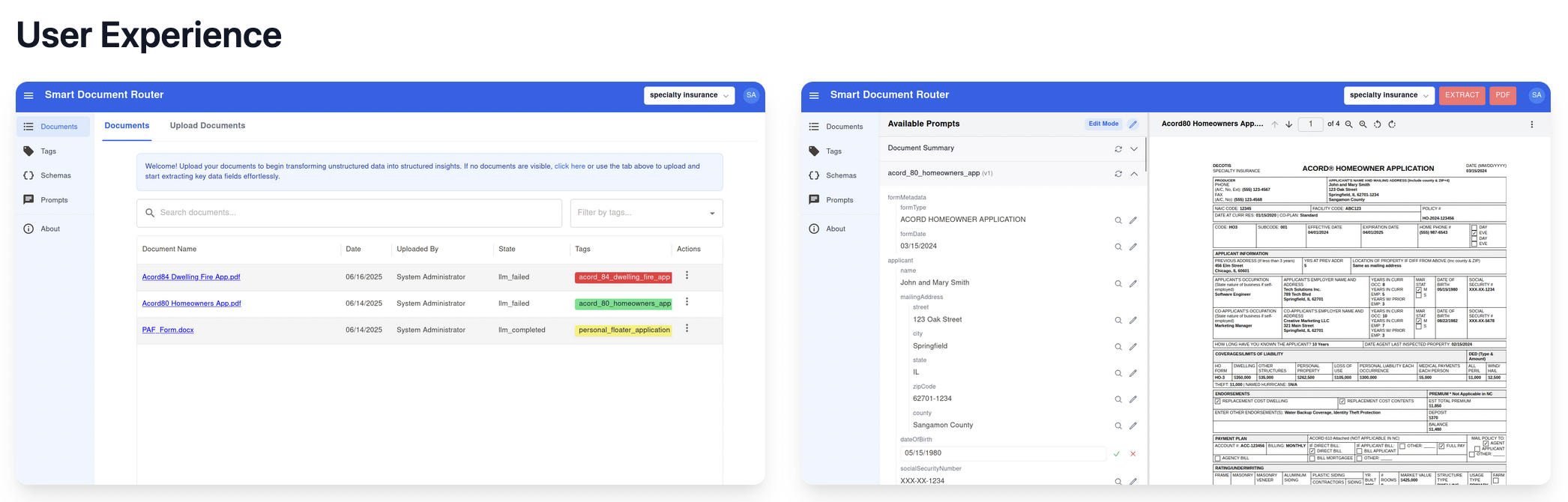
<p>Here is what a workflow looks like in the DocRouter Flows editor — a visual canvas of connected nodes, with per-step input and output you can inspect after each run:</p>

<p><img src="/assets/images/docrouter_flow_post_to_erp_or_db.png" alt="Gmail trigger through Document Split, OCR, LLM, and post-processing to ERP" /></p>

<p>And here is how you configure a node. Click any node to open its panel on the right. The <strong>Run LLM</strong> node, for example, lets you select one of your organisation’s configured <a href="/docs/prompts/">DocRouter prompts</a> from a searchable list. It runs that prompt against the <strong>binary input items</strong> arriving from upstream nodes — typically one PDF page or attachment per item. When an OCR node is connected to the second input port, the model also receives the matching page text alongside the binary.</p>

<p><img src="/assets/images/docrouter_flow_llm_node.png" alt="Run LLM node configuration — prompt selection, input schema, and output panel" /></p>

<hr />

<h2 id="familiar-workflow-concepts-in-docrouter-flows">Familiar workflow concepts in DocRouter Flows</h2>

<p>DocRouter Flows uses workflow concepts that will feel familiar to users of modern visual automation tools, including n8n, Zapier, Make, and similar systems.</p>

<p><strong>Visual flow design.</strong> Flows are built on a graph-based canvas. You drag nodes from a palette, drop them onto the canvas, and connect outputs to inputs.</p>

<p><strong>Typed input and output items.</strong> Every node receives and produces a list of <em>items</em>. Each item can carry structured JSON data and binary attachments such as PDFs, images, or other files. This lets a workflow pass extracted text and the original document together through the pipeline.</p>

<p><strong>Expressions.</strong> Node parameters can reference upstream data — prefixed with <code class="language-plaintext highlighter-rouge">=</code> — so a later step can dynamically use fields extracted earlier in the flow. For example, a parameter can pull a patient name from an LLM node’s output without writing custom glue code.</p>

<p><strong>Pinned data.</strong> Node outputs can be saved as test fixtures. Downstream nodes reuse pinned data instead of re-executing upstream steps — essential when iterating on one part of a flow without re-running expensive OCR or LLM calls.</p>

<p><strong>Execution logs.</strong> Every flow run records per-node status, timing, inputs, outputs, code-node print output, and errors. The visual editor lets you inspect what happened at each step after a run.</p>

<p><strong>Per-node error handling.</strong> Each node has an <strong>on error</strong> setting: stop the run (default) or continue and pass an error-envelope item downstream, allowing workflows to degrade gracefully.</p>

<p><strong>Merge and branch nodes.</strong> Branch nodes route items based on conditions. Merge nodes combine inputs from multiple paths. Together they cover common control-flow patterns without custom code.</p>

<p><strong>Code and HTTP nodes.</strong> A Python code node supports custom transformations in a sandboxed runtime. A generic HTTP node connects to REST APIs that do not yet have dedicated connectors.</p>

<p><strong>Triggers.</strong> Flows can start from webhooks, schedules, document events, or polling connectors such as email and cloud storage sources.</p>

<p><strong>Credential management.</strong> OAuth tokens and API keys are stored at the organization level and injected at runtime, keeping secrets out of the workflow graph.</p>

<p><strong>Disabled nodes.</strong> Any node can be disabled and skipped during execution, making it easy to test one part of a flow without running every step.</p>

<hr />

<h2 id="what-is-different-docrouter-is-an-idp-platform">What is different: DocRouter is an IDP platform</h2>

<p>General-purpose automation tools excel at connecting SaaS apps. DocRouter is purpose-built for intelligent document processing, and that shapes both which node types exist and how the platform is licensed.</p>

<h3 id="document-native-node-types">Document-native node types</h3>

<p>DocRouter adds nodes designed for document pipelines:</p>

<ul>
  <li><strong>Document Split</strong> — splits a multi-page PDF into one item per page, with configurable start, stop, and step slicing.</li>
  <li><strong>OCR</strong> — runs optical character recognition on PDF pages using configurable providers. Produces per-page text output on a typed port.</li>
  <li><strong>LLM Run</strong> — sends items to a configured LLM prompt. Accepts OCR text on a second typed port so the model always sees the right page’s text alongside the item. Supports batching.</li>
  <li><strong>Document event trigger</strong> — fires automatically when a document is uploaded to DocRouter, filtered by tag or other criteria. This is the entry point for fully automated document processing pipelines.</li>
</ul>

<p>The typed port between OCR and LLM nodes is worth highlighting: the OCR node’s output handle is a distinct type that only connects to the LLM node’s second input. This prevents wiring mistakes and makes the pairing — one OCR result per page, matched to the corresponding LLM input item — explicit in the graph.</p>

<h3 id="apache-20-license">Apache 2.0 license</h3>

<p>DocRouter is Apache 2.0: you can embed it in any product, modify it, and redistribute it without restriction. This makes it suitable for ISVs building document automation into vertical SaaS products, healthcare platforms, legal tech, or financial services applications.</p>

<hr />

<h2 id="use-case-1-connecting-cloud-document-sources">Use Case 1: Connecting Cloud Document Sources</h2>

<p>DocRouter includes trigger and action nodes for the four most common enterprise document sources.</p>

<table>
  <thead>
    <tr>
      <th>Source</th>
      <th>What the trigger does</th>
      <th>What the action nodes do</th>
    </tr>
  </thead>
  <tbody>
    <tr>
      <td>Gmail</td>
      <td>Poll for new messages matching a search query</td>
      <td>Send, reply, update labels</td>
    </tr>
    <tr>
      <td>Microsoft Outlook</td>
      <td>Poll for new messages by received date</td>
      <td>Send, reply, forward, move, flag</td>
    </tr>
    <tr>
      <td>Google Drive</td>
      <td>Watch a folder for new or updated files</td>
      <td>Search, download, create folder, move, delete</td>
    </tr>
    <tr>
      <td>Microsoft OneDrive</td>
      <td>Watch a path for new or updated files</td>
      <td>Search, list, download, upload</td>
    </tr>
  </tbody>
</table>

<p>The four connectors above are examples, not a closed list. Once the connector architecture is in place — manifest schema, credential types, poll triggers, and the declarative HTTP executor — <strong>adding a new integration is a matter of minutes</strong>. Each connector follows the same pattern: define parameters, wire OAuth or API-key credentials, and describe the HTTP calls the node makes. The platform handles the rest (polling, item emission, binary attachment handling, execution logging).</p>

<p>That consistency is what makes AI coding assistants like <a href="https://cursor.com">Cursor</a> so effective here. Point an assistant at an existing connector and the target API’s documentation, and it can scaffold a new node package quickly: the conventions are explicit, the examples are right there in the repo, and there is little bespoke glue to invent. We have used this workflow ourselves — see <a href="/ai/programming/engineering/tutorials/how-we-built-docrouter-n8n-nodes-with-cursor/">How We Built the DocRouter n8n Nodes With Cursor</a> — and the same approach applies inside DocRouter Flows. Need a Box, Dropbox, or Salesforce connector? The platform patterns are already built; filling in the next one is routine.</p>

<p>Setting up a connector takes three steps:</p>

<ol>
  <li><strong>Create a credential.</strong> Go to Settings → Credentials, choose the connector type (e.g. Gmail OAuth2), and complete the OAuth flow. DocRouter stores the refresh token for your organisation.</li>
  <li><strong>Add the trigger node.</strong> Drag the trigger onto the canvas, select the credential, set a poll interval, and optionally filter (e.g. Gmail search query <code class="language-plaintext highlighter-rouge">from:vendor@acme.com has:attachment</code>).</li>
  <li><strong>Wire the rest of the flow.</strong> The trigger emits one item per new email or file. Binary attachments arrive in the item’s <code class="language-plaintext highlighter-rouge">binary</code> payload, ready to pass directly to a Document Split or OCR node.</li>
</ol>

<p>A minimal connector flow looks like this:</p>

<div class="language-plaintext highlighter-rouge"><div class="highlight"><pre class="highlight"><code>[Gmail trigger]
      │  (binary: pdf attachment)
      ▼
[Document Split]      ← one item per page
      │
   ┌──┴─────────────┐
   ▼                ▼
[Run OCR] ─────▶ [Run LLM]   ← OCR output pairs with LLM input
                    │
                    ▼
        [Code (Python)]        ← validate and shape fields for your ERP schema
                    │
                    ▼
          [HTTP Request]       ← POST to ERP or database
</code></pre></div></div>

<p><img src="/assets/images/docrouter_flow_post_to_erp_or_db.png" alt="Gmail trigger through Document Split, OCR, LLM, and post-processing to ERP" /></p>

<p>The code node is where you adapt LLM output to whatever your downstream system expects — field renaming, type coercion, dropping low-confidence rows, or collapsing per-page results into one payload:</p>

<div class="language-python highlighter-rouge"><div class="highlight"><pre class="highlight"><code><span class="k">def</span> <span class="nf">run</span><span class="p">(</span><span class="n">items</span><span class="p">,</span> <span class="n">context</span><span class="p">):</span>
    <span class="s">"""Normalize LLM extraction fields before posting to ERP."""</span>
    <span class="n">out</span> <span class="o">=</span> <span class="p">[]</span>
    <span class="k">for</span> <span class="n">item</span> <span class="ow">in</span> <span class="n">items</span><span class="p">:</span>
        <span class="n">data</span> <span class="o">=</span> <span class="n">item</span><span class="p">.</span><span class="n">get</span><span class="p">(</span><span class="s">"extraction"</span><span class="p">)</span> <span class="ow">or</span> <span class="n">item</span>
        <span class="n">out</span><span class="p">.</span><span class="n">append</span><span class="p">({</span>
            <span class="s">"vendor_name"</span><span class="p">:</span> <span class="p">(</span><span class="n">data</span><span class="p">.</span><span class="n">get</span><span class="p">(</span><span class="s">"vendor_name"</span><span class="p">)</span> <span class="ow">or</span> <span class="s">""</span><span class="p">).</span><span class="n">strip</span><span class="p">(),</span>
            <span class="s">"invoice_number"</span><span class="p">:</span> <span class="n">data</span><span class="p">.</span><span class="n">get</span><span class="p">(</span><span class="s">"invoice_number"</span><span class="p">),</span>
            <span class="s">"invoice_date"</span><span class="p">:</span> <span class="n">data</span><span class="p">.</span><span class="n">get</span><span class="p">(</span><span class="s">"invoice_date"</span><span class="p">),</span>
            <span class="s">"total_amount"</span><span class="p">:</span> <span class="nb">float</span><span class="p">(</span><span class="n">data</span><span class="p">.</span><span class="n">get</span><span class="p">(</span><span class="s">"total_amount"</span><span class="p">)</span> <span class="ow">or</span> <span class="mi">0</span><span class="p">),</span>
            <span class="s">"currency"</span><span class="p">:</span> <span class="n">data</span><span class="p">.</span><span class="n">get</span><span class="p">(</span><span class="s">"currency"</span><span class="p">)</span> <span class="ow">or</span> <span class="s">"USD"</span><span class="p">,</span>
            <span class="s">"line_items"</span><span class="p">:</span> <span class="n">data</span><span class="p">.</span><span class="n">get</span><span class="p">(</span><span class="s">"line_items"</span><span class="p">)</span> <span class="ow">or</span> <span class="p">[],</span>
        <span class="p">})</span>
    <span class="k">return</span> <span class="n">out</span>
</code></pre></div></div>

<p>The HTTP Request node then references these fields with expressions — for example, <code class="language-plaintext highlighter-rouge">={{ $json.invoice_number }}</code> in the POST body — and sends the result to your ERP or database endpoint.</p>

<p>The same pattern works identically starting from an Outlook, Google Drive, or OneDrive trigger — only the first node changes.</p>

<hr />

<h2 id="use-case-2-multi-step-document-processing-with-human-in-the-loop">Use Case 2: Multi-Step Document Processing with Human-in-the-Loop</h2>

<p>Full automation is not always appropriate. A field may be missing, LLM confidence may be low, or a regulation may require human sign-off before data enters a system of record. DocRouter handles this by combining the branch node, the code node, and webhook callbacks into a review pattern.</p>

<h3 id="the-scenario">The scenario</h3>

<p>A hospital receives pre-surgery document batches by email. Each batch is a single PDF that mixes pages for multiple patients: surgery schedules, consent forms, insurance cards, lab results — in no guaranteed order. The pipeline must:</p>

<ol>
  <li>Split the PDF into pages.</li>
  <li>Run OCR and LLM extraction on each page to identify the patient and document type.</li>
  <li>Group pages by patient.</li>
  <li>Auto-file records where the grouping is confident.</li>
  <li>Route records with ambiguous page assignments to a human reviewer.</li>
</ol>

<h3 id="the-flow">The flow</h3>

<div class="language-plaintext highlighter-rouge"><div class="highlight"><pre class="highlight"><code>[Document event trigger]   ← fires on document.uploaded, filtered by tag
          │
          ▼
[Document Split]           ← one item per page
          │
    ┌─────┴─────────┐
    ▼               ▼
[Run OCR] ─────▶ [Run LLM]     ← extract patient name, DOB, MRN, document type
                    │
                    ▼
        [Code (Python)]    ← group pages by patient; flag unknowns
                 │
                 ▼
           [Branch]        ← route on human_review flag
              │   │
              │   └──▶  [HTTP Request]   ← auto-file to EHR (clean records)
              │
              └──▶  [HTTP Request]       ← post to review queue / Slack / ticketing
</code></pre></div></div>

<p><img src="/assets/images/docrouter_flow_document_split.png" alt="Document upload through split, OCR, LLM, grouping, and branch to EHR or Slack" /></p>

<p>The code node runs a patient-grouping algorithm: it normalises names, dates of birth, and medical record numbers, assigns pages to patient groups using MRN as the primary key (falling back to name + DOB), and marks any page that could not be placed as an unknown. If any unknowns remain, it sets a <code class="language-plaintext highlighter-rouge">human_review</code> flag on the output item.</p>

<p>The branch node reads that flag. Clean records flow automatically to the EHR integration. Records with unknowns are posted to a review queue — a Slack channel, a ticketing system, or a custom review UI — where a human can examine the flagged pages and resolve the grouping.</p>

<h3 id="synchronous-approval-with-a-webhook">Synchronous approval with a webhook</h3>

<p>For cases where the flow must wait for a human response before continuing, a second flow handles the approval callback:</p>

<ol>
  <li>The first flow posts a review request to an external approval service, including a callback URL pointing to a DocRouter webhook trigger.</li>
  <li>The reviewer inspects the document in their tool and clicks Approve or Reject.</li>
  <li>The external tool calls the callback URL with the approval payload.</li>
  <li>The webhook trigger fires the approval flow, which routes approved records to the EHR and rejected records to a correction queue.</li>
</ol>

<p>The result is a complete human-in-the-loop cycle with a full audit trail: every execution records per-node inputs, outputs, timing, and logs, visible in the Executions panel.</p>

<hr />

<h2 id="summary">Summary</h2>

<p>DocRouter Flows brings visual workflow automation to intelligent document processing. It uses a familiar node-and-canvas model, but the platform is purpose-built for documents: OCR, LLM extraction, document splitting, document event triggers, review routing, audit logs, and human-in-the-loop workflows.</p>

<p>Tools like n8n are excellent general-purpose automation platforms. DocRouter Flows focuses on a narrower problem: turning unstructured documents into structured, actionable data inside production document pipelines.</p>

<p>DocRouter is Apache 2.0 licensed, so teams can embed, modify, and deploy it in commercial or internal systems where document automation is a core product capability.</p>]]></content><author><name>Andrei Radulescu-Banu</name></author><category term="ai" /><category term="engineering" /><summary type="html"><![CDATA[How DocRouter Flows applies visual node-and-canvas workflow automation to intelligent document processing — typed items, pin data, execution logs, and document-native OCR and LLM nodes.]]></summary><media:thumbnail xmlns:media="http://search.yahoo.com/mrss/" url="https://docrouter.ai/assets/images/docrouter-flows-splash.png" /><media:content medium="image" url="https://docrouter.ai/assets/images/docrouter-flows-splash.png" xmlns:media="http://search.yahoo.com/mrss/" /></entry><entry><title type="html">How to Build a Learning Agent: Architecture, Knowledge Base, and Production Lessons</title><link href="https://docrouter.ai/ai/programming/engineering/how-to-build-a-learning-agent-architecture-knowledge-base-and-production-lessons/" rel="alternate" type="text/html" title="How to Build a Learning Agent: Architecture, Knowledge Base, and Production Lessons" /><published>2026-06-20T00:00:00+00:00</published><updated>2026-06-20T00:00:00+00:00</updated><id>https://docrouter.ai/ai/programming/engineering/how-to-build-a-learning-agent-architecture-knowledge-base-and-production-lessons</id><content type="html" xml:base="https://docrouter.ai/ai/programming/engineering/how-to-build-a-learning-agent-architecture-knowledge-base-and-production-lessons/"><![CDATA[<p>Building a production-grade learning agent is fundamentally different from wiring up a general-purpose chatbot. A true learning agent maintains strict boundaries, grounds every factual claim in curated knowledge, orchestrates specialized behaviors, remembers users across sessions, and generates structured artifacts that drive real growth. It must feel intelligent and safe while remaining observable and operable.</p>

<p>This post walks through exactly how we designed, built, and operate such a system—end to end.</p>

<h2 id="what-makes-a-learning-agent-different">What Makes a Learning Agent Different</h2>

<p>A learning agent is purpose-built for structured human development. Users engage in three distinct modes:</p>

<ul>
  <li><strong>Learn mode</strong>: Socratic exploration of concepts. The agent never lectures; it guides discovery, requires verification, and keeps every example or definition strictly inside the knowledge base.</li>
  <li><strong>Prepare mode</strong>: Application to real, upcoming situations. The agent helps users pressure-test decisions and craft opening moves.</li>
  <li><strong>Reflect mode</strong>: Extraction of insight from past experience. The agent distinguishes between surface tactics (“I’ll try harder”) and deeper pattern recognition (“I realized I feared conflict because…”).</li>
</ul>

<p>The agent refuses to become a general chatbot. Off-topic queries are declined. Every response is either retrieved from the knowledge base or explicitly hedged.</p>

<h2 id="high-level-architecture">High-Level Architecture</h2>

<p>The system is deliberately layered so each part can evolve independently:</p>

<div data-excalidraw="/assets/excalidraw/learning-agent.excalidraw" class="excalidraw-container">
  <div class="loading-placeholder">Loading diagram...</div>
</div>
<div style="text-align: center; margin-top: 1rem;">
  <a href="/excalidraw-edit?file=/assets/excalidraw/learning-agent.excalidraw" target="_blank" style="color: #2563eb; text-decoration: none; font-weight: 500;">
    📝 Edit in Excalidraw
  </a>
</div>
<p style="text-align: center; margin-top: 0.5rem; font-size: 0.875rem; color: #6b7280;"><strong>Figure 1:</strong> Learning agent architecture.</p>

<style>
.excalidraw-container {
  width: 100%;
  border: 2px solid #e0e0e0;
  border-radius: 8px;
  box-shadow: 0 2px 8px rgba(0,0,0,0.1);
  background: white;
  display: block;
  margin: 2rem 0;
  min-height: 400px;
}

.excalidraw-container svg {
  width: 100%;
  height: auto;
  display: block;
  margin: 0;
}

.loading-placeholder {
  padding: 2rem;
  text-align: center;
  color: #666;
}
</style>

<script type="module" src="/assets/js/excalidraw/render-excalidraw.js"></script>

<p><strong>Core technology choices</strong>:</p>
<ul>
  <li><strong>Frontend</strong>: React + TypeScript — implements the three journeys and real-time streaming UI.</li>
  <li><strong>Backend</strong>: An async Python web framework — the orchestrator agent and subagents.</li>
  <li><strong>AI</strong>: A managed LLM API — we use Sonnet-class models for reasoning agents and faster, cheaper models for routing and fact extraction. Any capable provider works here.</li>
  <li><strong>Knowledge</strong>: A hybrid RAG knowledge base (BM25 + vector retrieval) backed by object storage. Source documents include the core text plus structured curriculum files (definitions, applications, and examples for each learning unit).</li>
  <li><strong>Memory</strong>: A cross-session memory layer that extracts and embeds facts into a vector store.</li>
  <li><strong>State</strong>: PostgreSQL.</li>
  <li><strong>Workflows</strong>: A workflow engine for all background processing.</li>
  <li><strong>Observability</strong>: An LLM observability platform (traces), OpenTelemetry + an ops metrics stack, product analytics.</li>
  <li><strong>GitOps</strong>: GitOps tooling on Kubernetes.</li>
  <li><strong>Local dev</strong>: A containerized dev environment + Docker Compose + pre-commit hooks.</li>
</ul>

<h2 id="the-request-lifecycle-mental-model">The Request Lifecycle (Mental Model)</h2>

<p>Every user message follows a predictable, observable path:</p>

<ol>
  <li><strong>Ingress</strong> — POST or streaming endpoint receives the message. Auth middleware validates the JWT (using your identity provider’s public key). Rate-limit and concurrency semaphores protect expensive paths.</li>
  <li><strong>Guardrail check</strong> — Input guardrail (managed service or mock) runs before any LLM call.</li>
  <li><strong>Persistence</strong> — User message is written to PostgreSQL immediately. The question is also copied to a background thread for memory fact extraction so it does not block the request path.</li>
  <li><strong>Memory retrieve</strong> — Relevant user facts are fetched from the memory layer (vector search) and held for prompt assembly.</li>
  <li><strong>Agent selection</strong> — Based on <strong>chat state</strong> (<code class="language-plaintext highlighter-rouge">Orchestrator</code>, <code class="language-plaintext highlighter-rouge">Learn</code>, <code class="language-plaintext highlighter-rouge">Prepare</code>, or <code class="language-plaintext highlighter-rouge">Reflect</code>), the runtime selects the active agent.</li>
  <li><strong>Prompt assembly</strong> — The agent LLM prompt is built from: system prompt for the selected agent, conversation history (including prior tool call request/reply pairs), the new user question, tool definitions, and retrieved memory facts appended last (to preserve prompt cache).</li>
  <li><strong>LLM call with tools</strong> — All agents share two tools: <code class="language-plaintext highlighter-rouge">KnowledgeBaseTool</code> and <code class="language-plaintext highlighter-rouge">UpdateChatStateTool</code>. The LLM is invoked with the assembled prompt and tool list.</li>
  <li><strong>Tool loop</strong> — The LLM either requests a tool call or responds directly. Typically it calls <code class="language-plaintext highlighter-rouge">KnowledgeBaseTool</code> first; tool output is appended to context and the LLM is called again. It may then call <code class="language-plaintext highlighter-rouge">UpdateChatStateTool</code> to save chat state—either enabling a subagent (Learn, Prepare, or Reflect) or returning control to the orchestrator. When no further tools are needed, the agent streams the final answer via Server-Sent Events.</li>
  <li><strong>Output guardrails</strong> — Checked every N characters during the stream. Violations truncate the response cleanly.</li>
  <li><strong>Completion</strong> — LLM response is persisted. Background tasks fire: memory write (the user’s question was already copied to a background thread at ingress), search index update, and full telemetry emission.</li>
  <li><strong>Artifact generation</strong> — At natural close points the agent emits a special <code class="language-plaintext highlighter-rouge">{...}</code> json record in its text response (not via a tool). The frontend extracts it, transforms it, and POSTs it to be stored as JSONB.</li>
</ol>

<h2 id="chat-state-agents-and-tools">Chat State, Agents, and Tools</h2>

<p>Each conversation carries a <strong>chat state</strong>: <code class="language-plaintext highlighter-rouge">Orchestrator</code>, <code class="language-plaintext highlighter-rouge">Learn</code>, <code class="language-plaintext highlighter-rouge">Prepare</code>, or <code class="language-plaintext highlighter-rouge">Reflect</code>. This state determines which agent handles the next turn. When an agent calls <code class="language-plaintext highlighter-rouge">UpdateChatStateTool</code>, the new state is saved and survives restarts.</p>

<p><strong>Orchestrator Agent</strong> — Determines which chat phase the conversation is in and delegates to the appropriate subagent. It <strong>never</strong> speaks directly to the user.</p>

<p><strong>Subagents</strong> (Learn, Prepare, Reflect) — Handle user-facing dialogue when chat state matches their mode. Depending on state, they stream a response or return control to the orchestrator.</p>

<p>Tool request/response pairs are formatted as ordinary chat messages in the conversation chain, so prior tool calls remain visible in context on subsequent turns.</p>

<h3 id="shared-tools">Shared tools</h3>

<p>All three subagents share the same two tools:</p>

<p><strong>KnowledgeBaseTool</strong></p>
<ul>
  <li>Query curriculum content through semantic search / RAG retrieval</li>
</ul>

<p><strong>UpdateChatStateTool</strong></p>
<ul>
  <li>Saves the new chat state</li>
  <li>Enables a subagent (Learn, Prepare, or Reflect) or returns control to the orchestrator</li>
</ul>

<p>Cards (Learn, Reflect, Prepare) are <strong>not</strong> created through a tool. They are emitted as JSON in the agent’s text response (<code class="language-plaintext highlighter-rouge">{...}</code>).</p>

<h3 id="orchestrator-routing">Orchestrator routing</h3>
<p>The orchestrator is the single entry point for every message. It <strong>never</strong> speaks directly to the user. Its only job is classification and clean handoff.</p>

<p>Routing heuristics (implemented via structured output + confidence scoring):</p>
<ul>
  <li>Direct “What is X?” or “Explain X” questions → Learn</li>
  <li>Retrospective language (“I had…”, “We tried…”, “I realized…”) → Reflect</li>
  <li>Situations, upcoming decisions, tensions, “How should I…” → Prepare</li>
  <li>Low confidence on Learn or Reflect → fallback to Prepare</li>
</ul>

<p>When routing completes, the orchestrator calls <code class="language-plaintext highlighter-rouge">UpdateChatStateTool</code> to save state as Learn, Prepare, or Reflect. When a subagent finishes its flow, it calls the same tool to set state back to <code class="language-plaintext highlighter-rouge">Orchestrator</code>.</p>

<p>This separation keeps each agent’s prompt focused and makes debugging easier—you always know which agent is active from chat state.</p>

<h2 id="specialized-agent-behaviors">Specialized Agent Behaviors</h2>

<p>Each agent has its own prompt file, model, and hard constraints.</p>

<p><strong>Learn Agent</strong> (Sonnet)</p>
<ul>
  <li>Flow: Calibrate → Prime → Ground → Explore → Transfer → Verify (mandatory) → Close</li>
  <li>Verify step forces the user to articulate the concept in their own words.</li>
  <li>Close emits a structured Learn Card.</li>
  <li>Constraints: 2–3 sentence turns, zero invented examples, no “Great point!” affirmations, KB-only retrieval.</li>
</ul>

<p><strong>Prepare Agent</strong> (Sonnet)</p>
<ul>
  <li>First-turn rule: Lead with a directional hypothesis using an embedded concept index. Do <strong>not</strong> call the knowledge base on turn 1 (latency + not yet needed).</li>
  <li>Close emits a Prepare Card containing situation, insight, and suggested opening.</li>
</ul>

<p><strong>Reflect Agent</strong> (Sonnet)</p>
<ul>
  <li>Core distinction: insight vs. tactic. The agent gently redirects “I’ll try harder next time” toward examining underlying assumptions.</li>
  <li>Canonical concept names must surface by turn 2–3 using the exact names from the curriculum index.</li>
  <li>Close emits a Reflect Card.</li>
</ul>

<p>All three agents share three policy files injected at the system-prompt level:</p>
<ul>
  <li>Hostile-framing policy (hedge unverified claims)</li>
  <li>No-code-generation policy</li>
  <li>No-tool-leakage policy (tools must execute silently)</li>
</ul>

<h2 id="grounding-and-safety">Grounding and Safety</h2>

<p><strong>Knowledge retrieval</strong> happens exclusively through <code class="language-plaintext highlighter-rouge">KnowledgeBaseTool</code>—semantic search over the curated knowledge base. Agents are instructed to retrieve concept definitions on first reference and narrative examples only when going deeper.</p>

<p><strong>Guardrails</strong> operate at two layers:</p>
<ol>
  <li>Prompt-level policies (above).</li>
  <li>A managed guardrails service (input + output) — content filters, topic denials, PII entity redaction, regex for secrets removal, and profanity word lists.</li>
</ol>

<p>Output guardrails run during streaming so a violation mid-response truncates cleanly and logs the redaction event to the observability platform.</p>

<h2 id="structuring-the-knowledge-base-as-curriculum">Structuring the Knowledge Base as Curriculum</h2>

<p>A learning agent’s knowledge base is not a pile of PDFs waiting to be chunked. It is a <strong>curriculum</strong>: a catalog of learning units, each documenting a core idea and how to apply it in practice. That structure is what makes retrieval useful—the agent gets definitions, applications, and stories in context, not random paragraphs.</p>

<h3 id="what-each-learning-unit-contains">What each learning unit contains</h3>

<p>Every unit in the curriculum follows a consistent schema. The exact field names vary by domain, but the layers are always the same:</p>

<table>
  <thead>
    <tr>
      <th>Layer</th>
      <th>Purpose</th>
      <th>Typical content</th>
    </tr>
  </thead>
  <tbody>
    <tr>
      <td><strong>Concept</strong></td>
      <td>What the idea means</td>
      <td>Definition, core idea, anchor quotes</td>
    </tr>
    <tr>
      <td><strong>Context</strong></td>
      <td>Why it matters broadly</td>
      <td>Summary and key points at a field or societal level</td>
    </tr>
    <tr>
      <td><strong>Organizational application</strong></td>
      <td>How teams apply it</td>
      <td>Practices, norms, and decision patterns</td>
    </tr>
    <tr>
      <td><strong>Personal application</strong></td>
      <td>How an individual applies it</td>
      <td>Mindset shifts and concrete behaviors</td>
    </tr>
    <tr>
      <td><strong>Examples</strong></td>
      <td>Grounded narrative cases</td>
      <td>Situation → action → outcome, with tags for retrieval</td>
    </tr>
    <tr>
      <td><strong>Guidance</strong></td>
      <td>How to use it well</td>
      <td>Decision rules, diagnostics, common errors, do/don’t lists</td>
    </tr>
    <tr>
      <td><strong>Relationships</strong></td>
      <td>Links across the curriculum</td>
      <td>Related, reinforcing, or tension concepts</td>
    </tr>
  </tbody>
</table>

<p>Beyond standalone units, the curriculum can include <strong>lessons</strong> (intro → concept → application sections) and <strong>scenarios</strong> (guided practice prompts tied to specific units). Relationship metadata connects them so agents and the UI can suggest what to explore next.</p>

<h3 id="example-a-unit-on-accountability">Example: a unit on accountability</h3>

<p><strong>Concept</strong> — Accountability means bearing the consequences of a decision or action, with recognition proportional to contribution. It is not punishment; it is clarity about who owns an outcome and what happens next.</p>

<p><strong>Applications</strong> — At the organizational level: every initiative needs a clear owner; well-designed experiments that fail still deserve recognition for the learning they produce. At the personal level: own your decisions, ask for clarity on decision rights before acting, and treat feedback as input for improvement rather than judgment.</p>

<p><strong>Examples</strong> — Narrative cases make the idea concrete:</p>

<ul>
  <li><em>The well-designed experiment</em> — A team runs a carefully scoped pilot. Results show the approach will not work, but the experiment was sound. Leadership recognizes the learning produced and shares it across teams; the owner stays motivated to experiment again.</li>
  <li><em>Unclear ownership</em> — A cross-functional project stalls because no one knows who owns key decisions. Leadership pauses, assigns a single owner with explicit authority, and the team adopts documenting decision rights at kickoff.</li>
</ul>

<p>Each example follows the same <strong>situation → action → outcome</strong> pattern so agents can retrieve and retell grounded stories instead of inventing plausible-sounding ones.</p>

<h3 id="example-a-unit-on-distributed-knowledge">Example: a unit on distributed knowledge</h3>

<p><strong>Concept</strong> — Useful knowledge is dispersed: no single person holds everything needed for good decisions. Progress depends on surfacing what each person knows about their context, strengths, and constraints.</p>

<p><strong>Applications</strong> — Organizations build networks for sharing ideas, encourage challenge, and run experiments rather than assuming leadership has all the answers. Individuals develop domain expertise, share it openly, and seek input before deciding on behalf of others.</p>

<p><strong>Examples</strong>:</p>

<ul>
  <li><em>Dispersed knowledge</em> — A leader facing a decision that affects multiple functions seeks input from people who understand local constraints. The decision improves; contributors feel empowered rather than overridden.</li>
  <li><em>Standing on shoulders</em> — A newcomer wants to replace existing processes from scratch. A mentor explains that accumulated organizational know-how is an asset to build on—even while outdated assumptions should still be challenged.</li>
</ul>

<h3 id="how-agents-query-the-curriculum">How agents query the curriculum</h3>

<p>Agents do not rely on parametric memory for curriculum content. They call <code class="language-plaintext highlighter-rouge">KnowledgeBaseTool</code> with targeted queries:</p>

<ul>
  <li>First time naming a concept: <code class="language-plaintext highlighter-rouge">"[Concept name] definition core idea"</code></li>
  <li>Going deeper with stories: <code class="language-plaintext highlighter-rouge">"[Concept name] example story application"</code></li>
  <li>Connecting to the user’s situation: <code class="language-plaintext highlighter-rouge">"[Concept name] application [context keyword]"</code></li>
</ul>

<p>Retrieved chunks supply definitions, case studies, and application guidance. Card artifacts pull their <code class="language-plaintext highlighter-rouge">concept</code> field from this retrieved material—the one place where the agent must be accurate to the source, not paraphrasing from training data.</p>

<p>Cards themselves are not tools. They are JSON emitted in the agent’s text response once the user has articulated personal understanding.</p>

<h3 id="two-delivery-paths-one-curriculum">Two delivery paths, one curriculum</h3>

<table>
  <thead>
    <tr>
      <th>Path</th>
      <th>Role</th>
    </tr>
  </thead>
  <tbody>
    <tr>
      <td><strong>Hybrid knowledge base</strong> (object storage → chunked → RAG)</td>
      <td>Runtime grounding for chat agents via <code class="language-plaintext highlighter-rouge">KnowledgeBaseTool</code></td>
    </tr>
    <tr>
      <td><strong>Structured JSON documents</strong> (bundled or served via content API)</td>
      <td>Browseable library UI, concept detail pages, and editorial workflows</td>
    </tr>
  </tbody>
</table>

<p>Both reflect the same architecture: a catalog of learning units, each with <strong>definition + multi-level application + narrative examples + relationships</strong>. That consistency is what keeps coaching tied to your material rather than generic LLM knowledge—and what makes it possible to audit whether the agent stayed on curriculum.</p>

<h2 id="cross-session-memory">Cross-Session Memory</h2>

<p>Generic agents forget everything between conversations. A learning agent should not.</p>

<p>After every exchange a background task passes the conversation to the memory layer, which uses an LLM to extract atomic facts. These facts are embedded and stored in a vector store. Before the next agent LLM call, relevant facts are retrieved via vector search and injected into the prompt—appended last, alongside tool definitions and conversation history, to preserve prompt cache.</p>

<h2 id="structured-artifacts-and-the-personal-dashboard">Structured Artifacts and the Personal Dashboard</h2>

<p>At the end of a conversation the subagent emits a card for display in the UI that includes:</p>
<ul>
  <li>The core concept and its definition (grounded in the knowledge base)</li>
  <li>How the user connected the concept to their situation</li>
  <li>How the user plans to apply the concept when next encountering the situation</li>
  <li>What other situations the concept applies to</li>
  <li>The user’s breakthrough realization, if any</li>
</ul>

<p>The agent prompt describes how the card should be generated. The card is written by the LLM as JSON at the end of its text response—not through a tool call—and parsed and rendered by the UI as a bordered summary with a concept header and key-value items.</p>

<p>These cards are also saved back in the Postgres database, stored as JSONB. They power the personal dashboard, which additionally shows:</p>
<ul>
  <li>Follow-up reflection prompts generated by a background workflow after a conversation goes idle.</li>
  <li>AI-generated insight sections (pattern detection across concepts, depth recommendations, growth evidence) computed by a background pipeline once the user has sufficient history.</li>
  <li>Suggested next concepts and practice nudges.</li>
</ul>

<p>All heavy insight work happens in background workflows running either periodically or triggered by events.</p>

<h2 id="observability-as-the-operating-surface">Observability as the Operating Surface</h2>

<p>You cannot operate an agentic system without ops monitoring. The agent emits:</p>
<ul>
  <li>Full LLM observability traces for every LLM call (including token usage, guardrail decisions, and redaction events).</li>
  <li>OpenTelemetry metrics and spans for the entire request path.</li>
  <li>Structured logs with correlation IDs.</li>
  <li>Product analytics events.</li>
</ul>

<p>When something goes wrong—empty retrieval, guardrail trigger, client disconnect, orchestrator routing failure—we have the exact trace and can reproduce it.</p>

<h2 id="local-development--safe-deployment">Local Development &amp; Safe Deployment</h2>

<p>Developers work inside a containerized dev environment that is portable across Linux, Mac, and Windows. It includes:</p>
<ul>
  <li>Docker Compose with a local PostgreSQL instance</li>
  <li>Version-managed tooling</li>
  <li>Git pre-commit/pre-push hooks (linting, type checks, security scans)</li>
  <li>AI editors that can run infrastructure CLI commands for debugging — invaluable for quick and accurate troubleshooting of ops issues.</li>
</ul>

<p>Production deploys via GitOps. Most changes are safe to make in prompt files, agent routing logic, or dashboard components. Schema changes, new guardrail policies, or workflow engine modifications require more ceremony and testing.</p>

<h2 id="key-lessons">Key Lessons</h2>

<ol>
  <li><strong>Orchestrator + subagents + chat state</strong> beats a single monolithic prompt. Persisted chat state and a single <code class="language-plaintext highlighter-rouge">UpdateChatStateTool</code> keep routing predictable.</li>
  <li><strong>Structure the knowledge base as curriculum</strong>, not documents. Definitions, applications, and narrative examples in a consistent schema make retrieval—and auditability—dramatically better than raw PDF chunks alone.</li>
  <li><strong>Dual guardrails</strong> (prompt-level + managed service) catch different classes of problems and make the system defensible. Evaluate managed guardrail services carefully—they vary significantly in flexibility and configurability.</li>
  <li><strong>Memory must be observable and rate-limited</strong>. The memory layer + vector store works well once you add the right connection hygiene and semaphores.</li>
  <li><strong>Background workflows are non-negotiable</strong> for card generation and insight pipelines. They keep the real-time path fast and the dashboard snappy.</li>
  <li><strong>Observability is the product</strong>. Without LLM observability traces and structured metrics you are flying blind the moment an agent does something surprising.</li>
</ol>

<h2 id="closing-thoughts">Closing Thoughts</h2>

<p>A production learning agent is not “just an LLM with retrieval.” It is a carefully orchestrated socio-technical system: persisted chat state, grounded knowledge via shared tools, persistent memory, streaming UX, background insight pipelines, multi-layer safety, and deep observability.</p>

<p>The architecture described here has proven robust in production. It scales, it fails gracefully, and—most importantly—users and operators alike can understand what the system is doing at any moment.</p>

<p>If you’re building something similar, start with the mental model of request flow, chat state, and the two shared agent tools. Layer on a structured curriculum for the knowledge base early—it pays off in grounding quality. Everything else (memory, guardrails, background workflows, dashboard artifacts) becomes much easier once that foundation is solid.</p>

<p>What part of building learning agents are you wrestling with right now? I’d love to hear about it.</p>]]></content><author><name>Andrei Radulescu-Banu</name></author><category term="ai" /><category term="programming" /><category term="engineering" /><summary type="html"><![CDATA[Architecture, knowledge base design, and production lessons for building a learning agent.]]></summary><media:thumbnail xmlns:media="http://search.yahoo.com/mrss/" url="https://docrouter.ai/assets/images/learning-agent-splash.png" /><media:content medium="image" url="https://docrouter.ai/assets/images/learning-agent-splash.png" xmlns:media="http://search.yahoo.com/mrss/" /></entry><entry><title type="html">How AI Agent Memory Works (and How We Integrated Mem0)</title><link href="https://docrouter.ai/ai/engineering/agents/rag/how-mem0-works-and-how-we-integrated-it/" rel="alternate" type="text/html" title="How AI Agent Memory Works (and How We Integrated Mem0)" /><published>2026-05-06T00:00:00+00:00</published><updated>2026-05-06T00:00:00+00:00</updated><id>https://docrouter.ai/ai/engineering/agents/rag/how-mem0-works-and-how-we-integrated-it</id><content type="html" xml:base="https://docrouter.ai/ai/engineering/agents/rag/how-mem0-works-and-how-we-integrated-it/"><![CDATA[<p>When you build an agent that chats with users over days or weeks, you quickly hit a ceiling: <strong>context windows</strong> are finite, and “just include the whole conversation” doesn’t scale. You need <strong>durable memory</strong> that’s:</p>

<ul>
  <li><strong>Incrementally updated</strong> as the conversation evolves</li>
  <li><strong>Deduplicated and reconciled</strong> (so it doesn’t accumulate contradictions)</li>
  <li><strong>Fast to retrieve</strong> at the start of each turn</li>
  <li><strong>Cheap enough</strong> to run on every message</li>
</ul>

<p>In a Learning Agent developed recently, we integrated <a href="https://github.com/mem0ai/mem0">mem0</a> to do exactly that: extract durable facts from conversations and store them in a <strong>PostgreSQL vector database</strong> (pgvector), then retrieve the most relevant memories and inject them back into the agent prompt.</p>

<p>This post explains how the integration works end-to-end, using the architecture diagram below as the blueprint.</p>

<div data-excalidraw="/assets/excalidraw/mem0-agent-system-diagram.excalidraw" class="excalidraw-container">
  <div class="loading-placeholder">Loading diagram...</div>
</div>

<p style="text-align: center; margin-top: 0.5rem; font-size: 0.875rem; color: #6b7280;">
  <strong>Figure 1:</strong> Agent + memory flow (mem0 integration).
</p>

<div style="text-align: center; margin-top: 1rem;">
  <a href="/excalidraw-edit?file=/assets/excalidraw/mem0-agent-system-diagram.excalidraw" target="_blank" style="color: #2563eb; text-decoration: none; font-weight: 500;">
    Edit in Excalidraw
  </a>
</div>

<hr />

<h2 id="mental-model-two-parallel-paths">Mental model: two parallel paths</h2>

<p>mem0 integration is easiest to understand as <strong>two paths that run in parallel</strong> on each user message:</p>

<div class="not-prose grid grid-cols-1 sm:grid-cols-2 gap-4 my-6">
  <div class="rounded-xl border border-slate-200 dark:border-slate-600 bg-gradient-to-br from-amber-50/90 to-orange-50/70 dark:from-amber-950/35 dark:to-orange-950/25 p-5 shadow-sm ring-1 ring-amber-100/70 dark:ring-amber-800/30">
    <span class="inline-flex items-center rounded-full bg-amber-100/90 dark:bg-amber-900/50 px-2.5 py-0.5 text-xs font-semibold uppercase tracking-wide text-amber-900 dark:text-amber-100">In the background</span>
    <h3 class="text-lg font-semibold text-slate-900 dark:text-slate-50 mt-3 mb-2">Memory ingestion</h3>
    <p class="text-sm text-slate-700 dark:text-slate-300 m-0 leading-relaxed">Store or update long-term facts.</p>
  </div>
  <div class="rounded-xl border border-slate-200 dark:border-slate-600 bg-gradient-to-br from-blue-50/90 to-indigo-50/70 dark:from-blue-950/35 dark:to-indigo-950/25 p-5 shadow-sm ring-1 ring-blue-100/70 dark:ring-blue-800/30">
    <span class="inline-flex items-center rounded-full bg-blue-100/90 dark:bg-blue-900/50 px-2.5 py-0.5 text-xs font-semibold uppercase tracking-wide text-blue-900 dark:text-blue-100">In the foreground</span>
    <h3 class="text-lg font-semibold text-slate-900 dark:text-slate-50 mt-3 mb-2">Memory retrieval</h3>
    <p class="text-sm text-slate-700 dark:text-slate-300 m-0 leading-relaxed">Fetch relevant facts to condition the next agent response.</p>
  </div>
</div>

<p>Memory ingestion is a slow operation. Facts need to be extracted from the user prompt, deduplicated, and reconciled with already-stored facts.</p>

<p>Users, on the other hand, should get a response quickly, based on the last user prompt and on retrieval of previously stored memories. Memory ingestion should not block the chat experience.</p>

<hr />

<h2 id="memory-ingestion-background-path">Memory ingestion (background path)</h2>

<p>When the user enters a new message, we trigger a background task to select, save and reconcile new facts in the memory store.</p>

<p>The actual memory writes happen <strong>while</strong> or <strong>after</strong> the response is returned, keeping the <strong>time-to-first-token</strong> fast.</p>

<h3 id="what-mem0-stores">What mem0 stores</h3>

<p>mem0’s job is to convert raw conversation into <strong>small, high-signal “facts”</strong> such as:</p>

<ul>
  <li>Stable user profile info (role, work context, preferences)</li>
  <li>A single current goal (with updates overwriting older ones)</li>
  <li>Progress on “principles” (mentioned → explored → applied)</li>
  <li>Session summaries and open loops that span sessions</li>
</ul>

<p>Facts are stored as strings in the vector DB, where they become searchable through both vector and token search, for example:</p>

<div class="language-plaintext highlighter-rouge"><div class="highlight"><pre class="highlight"><code>"Name: Mike Smith"
"Role: Plant Manager"
"Work context: Texas refinery, 40 direct reports"
"Hobbies: soccer, hiking, theater"
</code></pre></div></div>

<h3 id="the-prompts-we-configure-for-mem0">The prompts we configure for mem0</h3>

<p>mem0 ships with default prompts for multiple internal operations, but we <strong>override three key prompts</strong> to make memory behave like a disciplined coaching “profile” instead of a grab-bag of notes:</p>

<ul>
  <li><strong><code class="language-plaintext highlighter-rouge">custom_fact_extraction_prompt</code></strong>: turns the latest turn (user and/or assistant text) into a short list of <em>candidate facts</em>
    <ul>
      <li>Focuses on facts important for our application</li>
      <li>Explicitly excludes PII/credentials and low-signal chatter.</li>
    </ul>
  </li>
  <li><strong><code class="language-plaintext highlighter-rouge">custom_update_memory_prompt</code></strong>: reconciles <em>candidate facts</em> against what’s already stored and emits a full “edit plan” using <strong>ADD / UPDATE / DELETE / NONE</strong>.
    <ul>
      <li>This is where dedupe and contradiction-handling happens (e.g. we don’t want to store“Role: Manager” repeated multiple times).</li>
      <li>The vector database is then updated based on the resulting edit plan</li>
    </ul>
  </li>
  <li><strong><code class="language-plaintext highlighter-rouge">custom_memory_answer_prompt</code></strong>: used when mem0 is asked to answer based on stored memories.
    <ul>
      <li>It’s written as an internal component: return the relevant facts <strong>without</strong> mentioning “memories” or retrieval mechanics, so the <em>agent</em> can incorporate them naturally.</li>
    </ul>
  </li>
</ul>

<h3 id="the-llm-used-for-ingestion-and-reconciliation">The LLM used for ingestion and reconciliation</h3>

<p>mem0 uses an LLM twice during ingestion:</p>

<ol>
  <li><strong>Fact extraction</strong>: identify candidate facts from the new turn.</li>
  <li><strong>Reconciliation / update</strong>: decide how those facts modify existing memory (<strong>ADD / UPDATE / DELETE / NONE</strong>).</li>
</ol>

<p>We run these steps on a low-latency, cost-efficient model: <strong>Claude Haiku</strong> (via <strong>AWS Bedrock</strong>) for both ingestion and reconciliation. GPT Mini or Gemini Flash models would work just as well.</p>

<h2 id="memory-retrieval-request-path">Memory retrieval (request path)</h2>

<p><strong>Memory Retrieve</strong> runs at the start of each agent turn: we load durable memory and attach it to the agent context.</p>

<p>This happens while we’re building the agent LLM prompt. Memory retrieval runs concurrently with other non-dependent work (like syncing any conversation context directory from object storage), but it’s still on the critical path for prompt construction.</p>

<h3 id="retrieval-uses-embeddings-not-keyword-search">Retrieval uses embeddings (not keyword search)</h3>

<p>To fetch “what matters now,” we embed the user’s current situation and run a nearest-neighbor search over stored memories.</p>

<p>For retrieval embeddings we use <strong>Amazon Titan Embed Text v2</strong> (via <strong>AWS Bedrock</strong>), which produces <strong>1024-dimensional vectors</strong>. Those vectors are stored and searched in Postgres using <strong>pgvector</strong>.</p>

<hr />

<h2 id="storage-postgres-and-pgvector">Storage: Postgres and pgvector</h2>

<p>Memory lives in a Postgres database with the <code class="language-plaintext highlighter-rouge">vector</code> extension enabled (pgvector). In production, this is <strong>AWS Aurora Postgres</strong>, and we connect through <strong>RDS Proxy</strong> for connection multiplexing. mem0 uses the <code class="language-plaintext highlighter-rouge">pgvector</code> provider.</p>

<p>At a high level, each memory row contains:</p>

<ul>
  <li><strong>The memory text</strong></li>
  <li><strong>The user id</strong> it belongs to</li>
  <li><strong>Metadata</strong> (conversation id, message id, agent id, etc.)</li>
  <li><strong>An embedding vector</strong> (Titan v2, 1024 dims)</li>
</ul>

<p>mem0 also maintains an internal migrations table (e.g. <code class="language-plaintext highlighter-rouge">mem0migrations</code>) so it can evolve its schema safely over time.</p>

<hr />

<h2 id="using-memory-in-the-agent-prompt">Using memory in the agent prompt</h2>

<p>Once retrieved, memories are injected into the request metadata and/or prompt context so the agent can respond as if it “remembers”:</p>

<ul>
  <li>Who the user is and what context they’re operating in</li>
  <li>What they were working on last time</li>
  <li>The current open loop (what to follow up on)</li>
</ul>

<p>The key design point is that we <strong>don’t</strong> try to jam all past dialogue into context. Instead we provide:</p>

<ul>
  <li>The agent’s system prompt</li>
  <li>Tool definitions</li>
  <li>The recent conversation window (last (N) messages)</li>
  <li>A compact, semantically-retrieved memory summary.</li>
</ul>

<p>That makes the system more stable across long sessions while keeping costs and latency bounded. The memory summary is included last, so we can use LLM caching for the previous parts of the prompt.</p>

<hr />

<h2 id="summary">Summary</h2>

<p>mem0 gives you a clean separation of concerns:</p>

<ul>
  <li><strong>Ingestion</strong> (Claude Haiku): extract candidate facts and reconcile them into durable memory.</li>
  <li><strong>Storage</strong> (Postgres + pgvector): persist memories as vectors + metadata, organized into collections.</li>
  <li><strong>Retrieval</strong> (Titan embeddings) and <strong>Reconciliation</strong> (Claude Sonnet): pull the most relevant facts at the start of each turn and inject them into the agent prompt.</li>
</ul>

<p>The result is an agent that feels consistent over time without relying on ever-growing context windows—and without turning “memory” into an unbounded pile of stale notes.</p>

<style>
.excalidraw-container {
  width: 100%;
  border: 2px solid #e0e0e0;
  border-radius: 8px;
  box-shadow: 0 2px 8px rgba(0,0,0,0.1);
  background: white;
  display: block;
  margin: 2rem 0;
  min-height: 400px;
}
.excalidraw-container svg {
  width: 100%;
  height: auto;
  display: block;
  margin: 0;
}
.loading-placeholder {
  padding: 2rem;
  text-align: center;
  color: #666;
}
</style>

<script type="module" src="/assets/js/excalidraw/render-excalidraw.js"></script>]]></content><author><name>Andrei Radulescu-Banu</name></author><category term="ai" /><category term="engineering" /><category term="agents" /><category term="rag" /><summary type="html"><![CDATA[A practical walkthrough of mem0 in production: async memory ingestion, reconciliation (dedupe + deletes), retrieval with Titan embeddings, and storage in Postgres/pgvector.]]></summary><media:thumbnail xmlns:media="http://search.yahoo.com/mrss/" url="https://docrouter.ai/assets/images/mem0-integration-splash.png" /><media:content medium="image" url="https://docrouter.ai/assets/images/mem0-integration-splash.png" xmlns:media="http://search.yahoo.com/mrss/" /></entry><entry><title type="html">The AI Retrieval Stack</title><link href="https://docrouter.ai/ai/engineering/the-ai-retrieval-stack/" rel="alternate" type="text/html" title="The AI Retrieval Stack" /><published>2026-04-12T00:00:00+00:00</published><updated>2026-04-12T00:00:00+00:00</updated><id>https://docrouter.ai/ai/engineering/the-ai-retrieval-stack</id><content type="html" xml:base="https://docrouter.ai/ai/engineering/the-ai-retrieval-stack/"><![CDATA[<p>The <strong>AI retrieval stack</strong> is the pipeline that takes a query and returns relevant results. Getting it right requires answering a set of workload questions before choosing any particular tool:</p>

<ul>
  <li>What is the <strong>unit of retrieval</strong>? (sentences, paragraphs, chunks, files, documents)</li>
  <li>Does the application need <strong>semantic similarity</strong>, <strong>exact-match search</strong>, or both?</li>
  <li>What <strong>metadata filters</strong> matter? (tenant, date, repo, workflow state, permissions)</li>
  <li>Is the product fundamentally a <strong>search engine</strong>, a <strong>database with search</strong>, or a <strong>retrieval substrate</strong>?</li>
  <li>Is the workload closer to <strong>consumer AI search</strong>, <strong>enterprise document retrieval</strong>, <strong>codebase chunk retrieval</strong>, or <strong>multimodal retrieval</strong>?</li>
</ul>

<p>A typical stack looks like:</p>

<div class="language-text highlighter-rouge"><div class="highlight"><pre class="highlight"><code>content
  ↓
parsing / chunking / field selection
  ↓
embeddings
  ↓
retrieval
  + lexical retrieval
  + vector retrieval
  + metadata filters
  + reranking
  + application logic
  ↓
final results
</code></pre></div></div>

<p>Each layer has its own decisions. In practice, the right architecture depends less on the phrase <strong>“vector database”</strong> and more on the shape of the workload.</p>

<hr />

<h2 id="vector-databases-role-in-the-stack">Vector databases: role in the stack</h2>

<p>An embedding model maps a raw object — a sentence, paragraph, image, or code chunk — into a point in high-dimensional space. Nearby points correspond to similar meaning.</p>

<p>A <strong>vector database</strong> stores and indexes those vectors so that approximate nearest-neighbor (ANN) search is practical at production scale. It typically provides:</p>

<ul>
  <li>storage for vectors and IDs</li>
  <li>ANN indexes</li>
  <li>metadata filters</li>
  <li>updates and deletes</li>
  <li>multitenancy or namespace isolation</li>
  <li>replication, scaling, and operations</li>
</ul>

<p>That makes a vector database more than an in-process nearest-neighbor library but less than a complete search product. It handles one stage of the pipeline well. The rest — chunking, lexical search, reranking, and application logic — lives outside it.</p>

<p>An <strong>ANN index</strong> (approximate nearest-neighbor index) is the data structure that makes vector lookup fast at scale. Given a query embedding, the goal is to retrieve the <strong>top-k</strong> vectors closest under a distance metric (often cosine distance or L2). Doing that <strong>exactly</strong> would require comparing the query to every stored vector, which is too slow and too memory-heavy when there are millions or billions of points in hundreds or thousands of dimensions. ANN indexes <strong>avoid scanning the full corpus</strong> by organizing vectors (for example via clustering, graphs, hashing, or compressed representations) so the engine visits only a small candidate set. The tradeoff is explicit: <strong>recall</strong> (how often the true nearest neighbors appear in the top-<em>k</em>) versus <strong>latency</strong>, memory, and ingest cost — tuned with index parameters and revisited as data and traffic grow.</p>

<p>For many applications, the decisions around chunking, hybrid retrieval, filters, and reranking matter more than the specific ANN backend.</p>

<hr />

<h2 id="embeddings-inputs-outputs-geometry">Embeddings: inputs, outputs, geometry</h2>

<p>Think of an embedding model as a function that maps a <strong>raw object</strong> to a <strong>point in d-dimensional space</strong>.</p>

<p>Typical pipeline:</p>

<div class="language-text highlighter-rouge"><div class="highlight"><pre class="highlight"><code>Raw input → tokenizer / preprocessing → neural encoder → embedding vector
                                                      ↓
                    search · clustering · classification · recommendation · RAG
</code></pre></div></div>

<p>You rarely inspect the coordinates directly. What matters is <strong>relative position</strong>:</p>

<ul>
  <li>similar meaning → nearby vectors</li>
  <li>unrelated meaning → distant vectors</li>
</ul>

<p>Training usually tries to make this geometry useful for the task by <strong>pulling</strong> related examples together and <strong>pushing</strong> unrelated examples apart.</p>

<h3 id="common-training-patterns">Common training patterns</h3>

<ul>
  <li><strong>Masked / causal language modeling</strong> — predict missing or next tokens; useful representations emerge in the hidden states</li>
  <li><strong>Contrastive learning</strong> — positive pairs should be close, negatives far apart</li>
  <li><strong>Supervised classification with an embedding bottleneck</strong> — encoder → embedding → classifier</li>
  <li><strong>Triplet loss</strong> — anchor, positive, negative; enforce $d(\text{anchor}, \text{positive}) \ll d(\text{anchor}, \text{negative})$</li>
</ul>

<p>For retrieval-focused models, <strong>hard negatives</strong> usually matter a lot more than easy random negatives. For example, “Python list comprehension” vs “Python for loops tutorial” teaches a retrieval model much more than “Python list comprehension” vs “banana smoothie”.</p>

<hr />

<h2 id="choosing-an-embedding-model">Choosing an embedding model</h2>

<p>Choosing an embedding model is not just a benchmark exercise. It depends on the shape of the retrieval problem.</p>

<p>The main decision axes are:</p>

<ul>
  <li><strong>Modality</strong> — is the corpus text-only, image-heavy, or truly multimodal?</li>
  <li><strong>Task</strong> — is the goal retrieval, clustering, classification, recommendation, or reranking support?</li>
  <li><strong>Query/document asymmetry</strong> — should queries and stored documents use different embedding modes?</li>
  <li><strong>Domain</strong> — is the corpus general text, code, legal, finance, biomedical, or something else with specialized language?</li>
  <li><strong>Language coverage</strong> — is the corpus multilingual, or is cross-lingual retrieval important?</li>
  <li><strong>Dimension and storage cost</strong> — higher-dimensional vectors may improve quality, but they also increase storage, bandwidth, and retrieval cost</li>
  <li><strong>Latency, privacy, and deployment constraints</strong> — can the embeddings be generated through a hosted API, or do they need to run in a private environment?</li>
</ul>

<p>A practical sequence is:</p>

<div class="language-text highlighter-rouge"><div class="highlight"><pre class="highlight"><code>modality → task → domain → language coverage → query/document asymmetry → cost/latency → provider choice
</code></pre></div></div>

<p>For many teams, the right first move is to start with a strong general-purpose retrieval embedding model, measure it on a realistic evaluation set, and only then decide whether a domain-specific or multimodal model is justified.</p>

<p>One subtle but important point: query embeddings are not always the same as document embeddings. <a href="https://docs.cohere.com/reference/embed">Cohere’s Embed API</a> explicitly distinguishes <code class="language-plaintext highlighter-rouge">search_query</code> and <code class="language-plaintext highlighter-rouge">search_document</code>. <a href="https://docs.cloud.google.com/vertex-ai/generative-ai/docs/embeddings/task-types">Vertex AI</a> supports task-type-aware embeddings for document retrieval, question answering, fact verification, clustering, and more.</p>

<p><a href="https://blog.voyageai.com/2026/01/15/voyage-4/">Voyage AI’s Voyage 4 announcement</a> describes <strong>asymmetric retrieval</strong>: the Voyage 4 models share one <strong>compatible embedding space</strong>, so vectors produced by different models (for example, queries with <code class="language-plaintext highlighter-rouge">voyage-4-lite</code> against documents indexed with <code class="language-plaintext highlighter-rouge">voyage-4-large</code>) still match under the same similarity search. That is useful when <strong>embedding the corpus is a one-time or infrequent cost</strong> but <strong>embedding queries is continuous at serving time</strong>—you can favor a larger model for stored documents and a smaller, faster model for live queries, trading a little operational complexity for better accuracy per dollar and lower query latency. The Voyage embeddings API still exposes <code class="language-plaintext highlighter-rouge">query</code> vs. <code class="language-plaintext highlighter-rouge">document</code> <code class="language-plaintext highlighter-rouge">input_type</code> for retrieval-oriented behavior.</p>

<h3 id="domain-specific-and-task-specific-embeddings">Domain-specific and task-specific embeddings</h3>

<p>A strong general-purpose embedding model is often the right place to start. But it is not always the right place to stop.</p>

<p>Some retrieval problems benefit from <strong>domain-specific embeddings</strong> because the meaning of similarity is different in different fields. Code, legal documents, financial text, and biomedical corpora often contain specialized language, structure, and relevance criteria that a generic model may not represent as well.</p>

<p>Task-specific behavior matters too. A model optimized for <strong>document retrieval</strong> may not be ideal for clustering, and a model optimized for <strong>queries</strong> may not be ideal for stored corpus documents.</p>

<p>In practice, the progression often looks like this:</p>

<div class="language-text highlighter-rouge"><div class="highlight"><pre class="highlight"><code>general retrieval model
→ realistic evaluation set
→ identify failure cases
→ domain-specific or task-specific model if needed
</code></pre></div></div>

<p>That sequence is usually better than prematurely fine-tuning or choosing a niche model before understanding the retrieval workload. <a href="https://docs.voyageai.com/docs/faq">Voyage</a> explicitly recommends domain-specific models for areas like law, finance, and code, while <a href="https://docs.cohere.com/docs/embeddings">Cohere</a> and <a href="https://docs.cloud.google.com/vertex-ai/generative-ai/docs/embeddings/task-types">Vertex AI</a> expose task-aware embedding modes for retrieval and related use cases.</p>

<h3 id="embedding-provider-cheat-sheet">Embedding provider cheat sheet</h3>

<p>The choice of vector database is only half the story. The embedding provider matters just as much.</p>

<table>
  <thead>
    <tr>
      <th style="text-align: left">Provider</th>
      <th style="text-align: left">Strengths</th>
      <th style="text-align: left">Best fit</th>
    </tr>
  </thead>
  <tbody>
    <tr>
      <td style="text-align: left"><strong><a href="https://platform.openai.com/docs/api-reference/embeddings">OpenAI</a></strong></td>
      <td style="text-align: left">Strong general-purpose text embeddings; simple API; good default for many retrieval tasks</td>
      <td style="text-align: left">teams that want a straightforward hosted baseline</td>
    </tr>
    <tr>
      <td style="text-align: left"><strong><a href="https://docs.cohere.com/docs/embeddings">Cohere</a></strong></td>
      <td style="text-align: left">Retrieval-oriented embedding stack; explicit query/document modes; strong semantic search and RAG ergonomics</td>
      <td style="text-align: left">semantic search and RAG systems that want query/document-aware embeddings</td>
    </tr>
    <tr>
      <td style="text-align: left"><strong><a href="https://docs.voyageai.com/docs/embeddings">Voyage AI</a></strong></td>
      <td style="text-align: left">Retrieval-focused models; query/document modes; domain-specific models for code, law, and finance; contextualized chunk embeddings; multimodal support</td>
      <td style="text-align: left">teams optimizing retrieval quality in specialized domains</td>
    </tr>
    <tr>
      <td style="text-align: left"><strong><a href="https://docs.cloud.google.com/vertex-ai/generative-ai/docs/embeddings/get-text-embeddings">Google Vertex AI</a></strong></td>
      <td style="text-align: left">Task-type-aware embeddings; configurable output dimensionality for text embeddings; multimodal embeddings for text, image, and video</td>
      <td style="text-align: left">teams already in GCP, or teams needing task-specific and multimodal support</td>
    </tr>
  </tbody>
</table>

<p>A useful way to think about providers is:</p>

<ul>
  <li><strong>OpenAI</strong> — strong general-purpose baseline</li>
  <li><strong>Cohere</strong> — retrieval-first and RAG-friendly</li>
  <li><strong>Voyage</strong> — retrieval specialist, especially for domain-specific workloads</li>
  <li><strong>Vertex AI</strong> — task-aware and multimodal, especially attractive inside Google Cloud</li>
</ul>

<p>Provider choice is not only about benchmark quality. It also depends on deployment model, privacy requirements, batch throughput, dimensionality control, multimodal support, and compliance constraints.</p>

<p>Embedding models are additionally available as <strong>open weights</strong> on <a href="https://huggingface.co/models">Hugging Face</a> for self-hosted inference, fine-tuning, or experimentation alongside the hosted providers above; which checkpoint to use still depends on modality, languages, license, and your own retrieval evaluation rather than any universal pick.</p>

<hr />

<h2 id="after-training-how-vectors-are-used">After training: how vectors are used</h2>

<p>Vectors support several kinds of applications:</p>

<ul>
  <li><strong>semantic search</strong> — nearest-neighbor retrieval</li>
  <li><strong>classification</strong> — linear probes or downstream heads</li>
  <li><strong>clustering</strong> — grouping similar items</li>
  <li><strong>recommendation</strong> — users and items embedded in a shared space</li>
  <li><strong>RAG</strong> — retrieve chunks to condition an LLM</li>
  <li><strong>code retrieval</strong> — retrieve relevant files, symbols, or chunks</li>
  <li><strong>multimodal search</strong> — align text and images or other modalities</li>
</ul>

<p>In many systems, vectors are the <strong>first-stage retriever</strong>, not the final answer generator.</p>

<hr />

<h2 id="multimodal-retrieval-when-ocr-is-not-enough">Multimodal retrieval: when OCR is not enough</h2>

<p>Many retrieval systems are described as “multimodal,” but there are really three different cases.</p>

<h3 id="1-text-only-retrieval">1. Text-only retrieval</h3>

<p>This is the simplest case. The corpus is already text, or can be reduced to text without losing much meaning.</p>

<p>Examples:</p>

<ul>
  <li>plain documents</li>
  <li>knowledge bases</li>
  <li>contracts</li>
  <li>source code</li>
  <li>emails</li>
</ul>

<h3 id="2-ocr-first-retrieval">2. OCR-first retrieval</h3>

<p>This is common for scanned PDFs and forms. The retrieval pipeline extracts text with OCR, then treats the result as ordinary text retrieval.</p>

<p>This works well when most of the important information is still captured in words.</p>

<h3 id="3-true-multimodal-retrieval">3. True multimodal retrieval</h3>

<p>This is needed when the <strong>visual structure itself carries meaning</strong>, not just the text.</p>

<p>Examples:</p>

<ul>
  <li>screenshots</li>
  <li>slide decks</li>
  <li>diagrams</li>
  <li>tables where layout matters</li>
  <li>charts and figures</li>
  <li>image-heavy PDFs</li>
  <li>document page images</li>
  <li>search by screenshot or image</li>
</ul>

<p>In these settings, OCR alone can lose important information. A multimodal embedding model can place text, images, and mixed inputs into a shared retrieval space.</p>

<p>This matters in practice because many enterprise corpora are only partially textual. A text-heavy invoice workflow may be well served by OCR plus text embeddings. A slide deck, dashboard screenshot, or visually complex form may require true multimodal retrieval.</p>

<p>A useful rule of thumb is:</p>

<div class="language-text highlighter-rouge"><div class="highlight"><pre class="highlight"><code>if the meaning survives text extraction → OCR-first may be enough
if the meaning depends on layout, figures, or images → consider multimodal embeddings
</code></pre></div></div>

<p><a href="https://docs.cloud.google.com/vertex-ai/generative-ai/docs/embeddings/get-multimodal-embeddings">Vertex AI multimodal embeddings</a> generate vectors from image, text, and video in a shared semantic space. <a href="https://docs.voyageai.com/docs/multimodal-embeddings">Voyage multimodal embeddings</a> support text and content-rich images such as figures, screenshots, slide decks, and document images. <a href="https://docs.cohere.com/reference/embed">Cohere embeddings</a> also support text, image, and mixed inputs for newer embedding models.</p>

<hr />

<h2 id="chunking-and-indexing-strategy">Chunking and indexing strategy</h2>

<p>Retrieval quality is often dominated by <strong>what</strong> gets indexed and <strong>how</strong> it gets chunked.</p>

<p>Questions to answer early:</p>

<ul>
  <li>What is the <strong>retrieval unit</strong>? A sentence, paragraph, page, section, table, file, or whole document?</li>
  <li>Should chunks <strong>overlap</strong>, or should they be strictly disjoint?</li>
  <li>Should metadata such as title, section name, page number, repo path, or document type be copied into every chunk?</li>
  <li>Should some structures — tables, forms, headers, footnotes, captions, code blocks — be indexed separately?</li>
  <li>Is there a parent-child relationship between chunks and larger source documents?</li>
</ul>

<p>The right strategy depends on the workload:</p>

<ul>
  <li><strong>enterprise document retrieval</strong> often benefits from section-aware, field-aware, or table-aware chunking</li>
  <li><strong>code retrieval</strong> often benefits from symbol-aware or file-aware chunking</li>
  <li><strong>slide decks and screenshots</strong> may require page-level or multimodal chunking</li>
  <li><strong>RAG</strong> often benefits from chunks that are small enough to retrieve precisely but large enough to preserve local context</li>
</ul>

<p>A useful heuristic is:</p>

<div class="language-text highlighter-rouge"><div class="highlight"><pre class="highlight"><code>chunk for the unit you want to retrieve, not the unit you happen to store
</code></pre></div></div>

<p>This is one reason why the retrieval stack is broader than the vector database. The database stores the vectors, but chunking determines what those vectors mean.</p>

<hr />

<h2 id="precision-recall-and-the-practical-knobs">Precision, recall, and the practical knobs</h2>

<p><strong>Precision</strong> — among returned hits, how many are relevant?</p>

\[\text{precision} = \frac{\lvert\text{relevant} \cap \text{returned}\rvert}{\lvert\text{returned}\rvert}\]

<p><strong>Recall</strong> — among all relevant items in the corpus, how many appear in the result set?</p>

\[\text{recall} = \frac{\lvert\text{relevant} \cap \text{returned}\rvert}{\lvert\text{relevant}\rvert}\]

<p>Usually there is tension between them:</p>

<ul>
  <li>stricter thresholds means: ↑ precision, ↓ recall</li>
  <li>broader retrieval means: ↑ recall, ↓ precision</li>
</ul>

<p>In practice, the biggest quality levers are often:</p>

<ol>
  <li>strong evaluation sets</li>
  <li>good chunking</li>
  <li>metadata modeling</li>
  <li>hard negatives</li>
  <li>hybrid lexical + vector retrieval</li>
  <li>reranking</li>
  <li>threshold and top-<em>K</em> tuning</li>
  <li>domain fine-tuning</li>
</ol>

<p>A good production recipe is usually:</p>

<div class="language-text highlighter-rouge"><div class="highlight"><pre class="highlight"><code>eval set → chunking → stronger embeddings → filters → reranker → threshold / K → domain tuning
</code></pre></div></div>

<p>before exotic modeling.</p>

<hr />

<h2 id="bm25-and-lexical-search">BM25 and lexical search</h2>

<p>BM25 ranks documents for a <strong>keyword</strong> query. It rewards:</p>

<ul>
  <li>rare terms more than common terms</li>
  <li>multiple mentions, but with diminishing returns</li>
  <li>shorter, more focused documents over long noisy ones</li>
</ul>

<p>For each query $q$ and document $d$:</p>

\[\text{BM25}(q,d) =
\sum_{t \in q}
\underbrace{\ln \frac{N - n_t + 0.5}{n_t + 0.5}}_{\text{IDF}}
\cdot
\frac{f(t,d)(k_1+1)}
{f(t,d) + k_1\left(1 - b + b\frac{\lvert d \rvert}{\text{avgdl}}\right)}\]

<p>where $t \in q$ are query terms, $n_t$ is the number of documents containing $t$, $f(t,d)$ is term frequency, $\lvert d \rvert$ is document length, $N$ is corpus size, $\text{avgdl}$ is average document length across the corpus, and $k_1 \approx 1.2$–$2.0$ (term-frequency saturation) and $b \approx 0.75$ (length normalization) are the tunable parameters.</p>

<h3 id="bm25-vs-vectors">BM25 vs vectors</h3>

<ul>
  <li><strong>BM25</strong> is strong on exact terms, IDs, names, and phrases</li>
  <li><strong>vectors</strong> are strong on semantic similarity and paraphrase</li>
  <li><strong>hybrid</strong> often works best in production</li>
</ul>

<p>This is especially true in enterprise systems where both exact identifiers and fuzzy semantic matches matter.</p>

<hr />

<h2 id="the-real-retrieval-stack-lexical-vector-hybrid-reranking">The real retrieval stack: lexical, vector, hybrid, reranking</h2>

<p>Modern retrieval systems usually fit one of four patterns.</p>

<h3 id="1-pure-lexical-search">1. Pure lexical search</h3>

<p>Best when exact token matching dominates:</p>

<ul>
  <li>product codes</li>
  <li>case IDs</li>
  <li>SQL keywords</li>
  <li>API names</li>
  <li>legal citations</li>
</ul>

<h3 id="2-pure-vector-search">2. Pure vector search</h3>

<p>Best when semantic similarity dominates and exact tokens matter less:</p>

<ul>
  <li>recommendations</li>
  <li>some semantic FAQ lookup</li>
  <li>some multimodal applications</li>
</ul>

<h3 id="3-hybrid-search">3. Hybrid search</h3>

<p>Best when both matter:</p>

<ul>
  <li>enterprise documents</li>
  <li>code search</li>
  <li>support knowledge bases</li>
  <li>RAG over heterogeneous corpora</li>
</ul>

<h3 id="4-two-stage-retrieval">4. Two-stage retrieval</h3>

<p>Often best in serious systems:</p>

<div class="language-text highlighter-rouge"><div class="highlight"><pre class="highlight"><code>retriever → top-K candidates → reranker → final results
</code></pre></div></div>

<p>The retriever may be lexical, vector, or hybrid; the reranker adds precision.</p>

<p>Not all modern retrieval is just “dense vectors vs BM25.” Some systems also use <strong>sparse learned retrieval</strong>, <strong>late-interaction models</strong> such as ColBERT-style designs, or dedicated <strong>rerankers</strong> when ranking quality matters more than keeping the first-stage index simple.</p>

<hr />

<h2 id="ann-index-choices-and-tradeoffs">ANN index choices and tradeoffs</h2>

<p>Approximate nearest-neighbor search speeds up retrieval by giving up some exactness for much lower latency and cost.</p>

<p>The central tradeoffs are:</p>

<ul>
  <li><strong>exact vs approximate search</strong> — exact search gives maximum recall but can be too slow or expensive at scale</li>
  <li><strong>recall vs latency</strong> — more aggressive ANN settings are faster but may miss some true nearest neighbors</li>
  <li><strong>memory vs compression</strong> — some index types are memory-heavy, others compress vectors more aggressively</li>
  <li><strong>update cost vs query cost</strong> — some ANN structures are friendlier to frequent updates than others</li>
</ul>

<p>A few common patterns:</p>

<ul>
  <li><strong>HNSW</strong> — strong quality and very common in production vector search systems</li>
  <li><strong>IVF / PQ-style compression approaches</strong> — attractive when memory efficiency matters more than maximum recall</li>
  <li><strong>exact search</strong> — still useful for smaller corpora, evaluation, and some latency-insensitive workflows</li>
</ul>

<p>In practice, the right ANN choice depends on corpus size, update rate, latency budget, and the acceptable recall loss.</p>

<hr />

<h2 id="the-vector-database-landscape">The vector database landscape</h2>

<p>The term <strong>vector database</strong> is used loosely, but the landscape actually has three broad categories.</p>

<h3 id="1-dedicated-vector-databases--vector-engines">1. Dedicated vector databases / vector engines</h3>

<p>These are built primarily around vector storage and similarity search:</p>

<ul>
  <li><a href="https://docs.pinecone.io/guides/get-started/overview">Pinecone</a></li>
  <li>Milvus</li>
  <li>Qdrant</li>
  <li><a href="https://docs.weaviate.io/weaviate/concepts/search">Weaviate</a></li>
  <li>Turbopuffer</li>
  <li>Chroma</li>
  <li>LanceDB</li>
</ul>

<p>These vary in maturity, operational model, and how strongly they also support lexical or hybrid search.</p>

<h3 id="2-search-engines-with-strong-vector-support">2. Search engines with strong vector support</h3>

<p>These are broader search/ranking systems that also handle vectors well:</p>

<ul>
  <li><a href="https://docs.vespa.ai/en/querying/nearest-neighbor-search-guide.html">Vespa</a></li>
  <li><a href="https://docs.opensearch.org/latest/search-plugins/keyword-search/">OpenSearch</a></li>
  <li>Elasticsearch</li>
</ul>

<p>These often make more sense when search, ranking, and serving are core to the product.</p>

<h3 id="3-general-databases-with-vector-support">3. General databases with vector support</h3>

<p>These keep vectors close to operational data:</p>

<ul>
  <li><a href="https://www.mongodb.com/docs/atlas/atlas-vector-search/vector-search-overview/">MongoDB Vector Search</a></li>
  <li>Postgres + pgvector</li>
</ul>

<p>These are attractive when data locality and operational simplicity matter more than having a specialized search stack.</p>

<hr />

<h2 id="a-conceptual-map-of-the-major-systems">A conceptual map of the major systems</h2>

<h3 id="pinecone-milvus-qdrant">Pinecone, Milvus, Qdrant</h3>

<p>These are easiest to think of as <strong>dedicated vector database products</strong>.</p>

<p>They are often chosen when the main need is:</p>

<ul>
  <li>vector similarity search</li>
  <li>metadata filtering</li>
  <li>scalable ANN</li>
  <li>production operational support</li>
</ul>

<h3 id="weaviate">Weaviate</h3>

<p>Weaviate is best thought of as a <strong>vector-native / AI database</strong> with strong built-in support for:</p>

<ul>
  <li>vector search</li>
  <li>keyword search</li>
  <li>hybrid search</li>
</ul>

<p>That makes it a strong middle ground between “pure vector DB” and “full search engine.”</p>

<p>See also: <a href="https://docs.weaviate.io/weaviate/concepts/search">Weaviate concepts</a></p>

<h3 id="turbopuffer">Turbopuffer</h3>

<p>Turbopuffer is best thought of as a <strong>retrieval substrate</strong> optimized for large-scale search over vectors and metadata, with support for full-text and hybrid behavior as well.</p>

<p>It is especially interesting for workloads with:</p>

<ul>
  <li>many isolated namespaces</li>
  <li>high update rates</li>
  <li>lots of small chunks</li>
  <li>low-latency nearest-neighbor retrieval</li>
</ul>

<h3 id="vespa">Vespa</h3>

<p>Vespa is not best understood as a vector database. It is an open-source <strong>search + ranking + serving engine</strong>.</p>

<p>Its strength is not just storing vectors, but combining:</p>

<ul>
  <li>lexical retrieval</li>
  <li>vector retrieval</li>
  <li>filters</li>
  <li>business logic</li>
  <li>multi-stage ranking</li>
  <li>serving logic</li>
</ul>

<p>Vespa is a strong choice when <strong>relevance engineering</strong> is central.</p>

<h3 id="opensearch-and-elasticsearch">OpenSearch and Elasticsearch</h3>

<p>OpenSearch and Elasticsearch are not “pure vector DBs” either. They are Lucene-based distributed search engines that support:</p>

<ul>
  <li>BM25 full-text search</li>
  <li>filters and aggregations</li>
  <li>vector search</li>
  <li>hybrid search patterns</li>
</ul>

<p>They are especially strong when traditional search features matter alongside vectors.</p>

<h3 id="mongodb-atlas-search-and-vector-search">MongoDB Atlas Search and Vector Search</h3>

<p>MongoDB provides both:</p>

<ul>
  <li><a href="https://www.mongodb.com/docs/atlas/atlas-search/">Atlas Search</a> for Lucene-backed lexical search</li>
  <li><a href="https://www.mongodb.com/docs/atlas/atlas-vector-search/vector-search-overview/">Atlas Vector Search</a> for semantic nearest-neighbor retrieval</li>
</ul>

<p>These are strongest when MongoDB is already the system of record and the goal is to keep retrieval close to application data and aggregation pipelines.</p>

<h3 id="postgres--pgvector">Postgres + pgvector</h3>

<p>This is often the simplest option when:</p>

<ul>
  <li>the app already uses Postgres</li>
  <li>scale is moderate</li>
  <li>operational simplicity matters</li>
  <li>vector retrieval is important, but not the entire product</li>
</ul>

<p>It is frequently a very good default for early-stage products.</p>

<hr />

<h2 id="how-different-products-use-different-retrieval-systems">How different products use different retrieval systems</h2>

<p>The best way to understand the landscape is by application shape.</p>

<h3 id="perplexity-search-and-ranking-are-the-product">Perplexity: search and ranking are the product</h3>

<p>Perplexity publicly describes using <a href="https://blog.vespa.ai/perplexity-builds-ai-search-at-scale-on-vespa-ai/">Vespa</a> to power AI search at scale.</p>

<p>That makes sense because Perplexity’s problem is not just semantic retrieval. It is closer to:</p>

<ul>
  <li>search engine retrieval</li>
  <li>ranking</li>
  <li>freshness</li>
  <li>structured filtering</li>
  <li>serving at scale</li>
</ul>

<p>This is a natural fit for a search-and-ranking engine rather than a pure vector DB.</p>

<h3 id="cursor-code-retrieval-is-a-chunked-nearest-neighbor-problem">Cursor: code retrieval is a chunked nearest-neighbor problem</h3>

<p><a href="https://cursor.com/security">Cursor publicly documents</a> using Turbopuffer for codebase indexing: chunk files, embed them, store vectors plus obfuscated metadata, then perform nearest-neighbor search at inference time.</p>

<p>This also makes sense. Cursor’s problem looks like:</p>

<ul>
  <li>lots of small code chunks</li>
  <li>high churn</li>
  <li>many user/repo namespaces</li>
  <li>metadata filters such as path and line range</li>
  <li>extremely fast retrieval</li>
</ul>

<p>That shape favors a fast retrieval substrate over a heavy search-engine stack.</p>

<h3 id="mongodb-integrated-database--search">MongoDB: integrated database + search</h3>

<p>MongoDB’s model is different. It says: keep your operational data in MongoDB, and add lexical and vector retrieval in the same platform.</p>

<p>This is strongest when the system already needs:</p>

<ul>
  <li>document storage</li>
  <li>app data</li>
  <li>workflow state</li>
  <li>search</li>
  <li>vector retrieval</li>
  <li>filters and aggregation</li>
</ul>

<p>with minimal extra infrastructure.</p>

<h3 id="docrouter-style-document-retrieval">DocRouter-style document retrieval</h3>

<p>A DocRouter-style workload is usually <strong>not</strong> just a vector search problem. It is a <strong>document retrieval and workflow problem</strong>.</p>

<p>Typical needs include:</p>

<ul>
  <li>exact IDs and exact phrases</li>
  <li>semantic similarity</li>
  <li>metadata filters</li>
  <li>grouped or field-aware retrieval</li>
  <li>hybrid search</li>
  <li>reranking</li>
  <li>explainability</li>
  <li>workflow and permission logic</li>
</ul>

<p>That usually means the right architecture is:</p>

<div class="language-text highlighter-rouge"><div class="highlight"><pre class="highlight"><code>lexical retrieval
+ vector retrieval
+ metadata filters
+ reranking
+ application logic
</code></pre></div></div>

<p>not just “pick a vector DB.”</p>

<hr />

<h2 id="workload-tilt-docrouter-style-vs-code-editor-retrieval">Workload tilt: DocRouter-style vs code-editor retrieval</h2>

<table>
  <thead>
    <tr>
      <th style="text-align: left">Dimension</th>
      <th style="text-align: left">Document / workflow retrieval</th>
      <th style="text-align: left">Code-editor style retrieval</th>
    </tr>
  </thead>
  <tbody>
    <tr>
      <td style="text-align: left"><strong>Unit</strong></td>
      <td style="text-align: left">sections, tables, form regions, document families</td>
      <td style="text-align: left">small code chunks, symbols, files</td>
    </tr>
    <tr>
      <td style="text-align: left"><strong>Churn</strong></td>
      <td style="text-align: left">moderate; often batch ingest + reprocessing</td>
      <td style="text-align: left">very high incremental updates</td>
    </tr>
    <tr>
      <td style="text-align: left"><strong>Metadata</strong></td>
      <td style="text-align: left">doc type, tenant, date, workflow state, vendor, case</td>
      <td style="text-align: left">repo, branch, path, language, symbol type</td>
    </tr>
    <tr>
      <td style="text-align: left"><strong>Permissions</strong></td>
      <td style="text-align: left">often critical</td>
      <td style="text-align: left">often critical</td>
    </tr>
    <tr>
      <td style="text-align: left"><strong>Exact-match need</strong></td>
      <td style="text-align: left">very high</td>
      <td style="text-align: left">high</td>
    </tr>
    <tr>
      <td style="text-align: left"><strong>Hybrid need</strong></td>
      <td style="text-align: left">very high</td>
      <td style="text-align: left">high</td>
    </tr>
    <tr>
      <td style="text-align: left"><strong>Typical stack lean</strong></td>
      <td style="text-align: left">MongoDB / Weaviate / Vespa</td>
      <td style="text-align: left">Turbopuffer / Weaviate / Qdrant / Pinecone</td>
    </tr>
    <tr>
      <td style="text-align: left"><strong>When ranking is strategic</strong></td>
      <td style="text-align: left">Vespa becomes especially attractive</td>
      <td style="text-align: left">Vespa can matter, but is often heavier than needed</td>
    </tr>
  </tbody>
</table>

<hr />

<h2 id="feature-matrix-high-level">Feature matrix (high level)</h2>

<table>
  <thead>
    <tr>
      <th style="text-align: left"> </th>
      <th style="text-align: left">MongoDB Atlas Search / Vector Search</th>
      <th style="text-align: left">Weaviate</th>
      <th style="text-align: left">Vespa</th>
      <th style="text-align: left">Turbopuffer</th>
      <th style="text-align: left">Pinecone / Qdrant / Milvus</th>
    </tr>
  </thead>
  <tbody>
    <tr>
      <td style="text-align: left"><strong>Core identity</strong></td>
      <td style="text-align: left">document DB + embedded search</td>
      <td style="text-align: left">vector / AI database + hybrid</td>
      <td style="text-align: left">search + ranking + serving</td>
      <td style="text-align: left">retrieval substrate</td>
      <td style="text-align: left">dedicated vector DB</td>
    </tr>
    <tr>
      <td style="text-align: left"><strong>Lexical search</strong></td>
      <td style="text-align: left">strong</td>
      <td style="text-align: left">strong</td>
      <td style="text-align: left">strong</td>
      <td style="text-align: left">some / hybrid-friendly</td>
      <td style="text-align: left">varies</td>
    </tr>
    <tr>
      <td style="text-align: left"><strong>Vector search</strong></td>
      <td style="text-align: left">yes</td>
      <td style="text-align: left">yes</td>
      <td style="text-align: left">yes</td>
      <td style="text-align: left">yes</td>
      <td style="text-align: left">yes</td>
    </tr>
    <tr>
      <td style="text-align: left"><strong>Hybrid search</strong></td>
      <td style="text-align: left">composable</td>
      <td style="text-align: left">first-class</td>
      <td style="text-align: left">composable and powerful</td>
      <td style="text-align: left">supported</td>
      <td style="text-align: left">varies</td>
    </tr>
    <tr>
      <td style="text-align: left"><strong>Custom ranking depth</strong></td>
      <td style="text-align: left">moderate</td>
      <td style="text-align: left">moderate</td>
      <td style="text-align: left">very strong</td>
      <td style="text-align: left">lower</td>
      <td style="text-align: left">lower to moderate</td>
    </tr>
    <tr>
      <td style="text-align: left"><strong>Namespace-heavy workloads</strong></td>
      <td style="text-align: left">moderate</td>
      <td style="text-align: left">strong</td>
      <td style="text-align: left">possible</td>
      <td style="text-align: left">very strong</td>
      <td style="text-align: left">strong</td>
    </tr>
    <tr>
      <td style="text-align: left"><strong>Best fit</strong></td>
      <td style="text-align: left">app data already in MongoDB</td>
      <td style="text-align: left">semantic + hybrid RAG</td>
      <td style="text-align: left">search/ranking as product core</td>
      <td style="text-align: left">code/chunk retrieval</td>
      <td style="text-align: left">dedicated ANN workloads</td>
    </tr>
  </tbody>
</table>

<hr />

<h2 id="choosing-the-right-system-by-application-need">Choosing the right system by application need</h2>

<h3 id="choose-mongodb-search--vector-search-when">Choose MongoDB Search / Vector Search when</h3>

<ul>
  <li>MongoDB is already the system of record</li>
  <li>you want minimal infrastructure sprawl</li>
  <li>metadata-heavy filtering and app integration matter</li>
  <li>retrieval is important, but not a standalone serving product</li>
</ul>

<h3 id="choose-weaviate-when">Choose Weaviate when</h3>

<ul>
  <li>retrieval is central to the application</li>
  <li>you want strong keyword + vector + hybrid search</li>
  <li>you want a dedicated retrieval database without going all the way to a search-engine platform</li>
</ul>

<h3 id="choose-vespa-when">Choose Vespa when</h3>

<ul>
  <li>search and ranking are core differentiators</li>
  <li>you want multi-stage ranking and richer relevance engineering</li>
  <li>the product looks more like search/recommendation/serving than a CRUD app with vectors</li>
</ul>

<h3 id="choose-turbopuffer-when">Choose Turbopuffer when</h3>

<ul>
  <li>the workload is mostly fast chunk retrieval</li>
  <li>there are many namespaces or tenants</li>
  <li>metadata filters matter</li>
  <li>the application looks like a code assistant, retrieval substrate, or large-scale vector index</li>
</ul>

<h3 id="choose-pinecone-qdrant-or-milvus-when">Choose Pinecone, Qdrant, or Milvus when</h3>

<ul>
  <li>you want a dedicated vector database</li>
  <li>the main need is vector retrieval plus filtering</li>
  <li>you do not need the full complexity of a search-engine platform</li>
</ul>

<h3 id="choose-pgvector-when">Choose pgvector when</h3>

<ul>
  <li>you already use Postgres</li>
  <li>scale is moderate</li>
  <li>simplicity matters</li>
  <li>vector retrieval is important, but not the center of the platform</li>
</ul>

<h3 id="choose-opensearch-or-elasticsearch-when">Choose OpenSearch or Elasticsearch when</h3>

<ul>
  <li>you already need classic search-engine features</li>
  <li>lexical search remains central</li>
  <li>vectors are an addition to a search stack, not the entire product</li>
</ul>

<hr />

<h2 id="metrics-that-matter">Metrics that matter</h2>

<p>Beyond raw ANN benchmarks, what actually matters depends on the application.</p>

<h3 id="retrieval-metrics">Retrieval metrics</h3>

<ul>
  <li><strong>Precision@K</strong> — of the top K results returned, what fraction are actually relevant?</li>
  <li><strong>Recall@K</strong> — of all relevant items in the corpus, what fraction appear in the top K?</li>
  <li><strong>MRR (Mean Reciprocal Rank)</strong> — averages the reciprocal of the rank of the first relevant result across queries</li>
  <li><strong>MAP (Mean Average Precision)</strong> — summarizes ranking quality and coverage across recall levels</li>
  <li><strong>NDCG (Normalized Discounted Cumulative Gain)</strong> — rewards highly relevant results appearing early and supports graded relevance</li>
</ul>

<h3 id="system-metrics">System metrics</h3>

<ul>
  <li>latency</li>
  <li>throughput</li>
  <li>freshness</li>
  <li>update cost</li>
  <li>filter correctness</li>
  <li>multitenancy behavior</li>
  <li>operational burden</li>
</ul>

<h3 id="application-specific-metrics">Application-specific metrics</h3>

<ul>
  <li>document systems: exact identifier retrieval, section relevance, workflow correctness</li>
  <li>code assistants: chunk relevance, namespace isolation, freshness after edits</li>
  <li>consumer search: ranking quality, freshness, personalization, serving latency</li>
</ul>

<hr />

<h2 id="failure-modes">Failure modes</h2>

<p>Common retrieval failures include:</p>

<ul>
  <li>easy negatives instead of hard negatives</li>
  <li>bad chunking</li>
  <li>poor metadata modeling</li>
  <li>domain mismatch</li>
  <li>ignoring lexical exact-match needs</li>
  <li>too much faith in vector similarity alone</li>
  <li>evaluating only on easy benchmarks</li>
  <li>no reranking</li>
  <li>no permission or tenant filtering</li>
</ul>

<p>Many disappointing “vector database” results are actually failures of the surrounding retrieval design.</p>

<hr />

<h2 id="practical-takeaway">Practical takeaway</h2>

<p>The most important conceptual point is:</p>

<p>A <strong>vector database</strong> is usually not the right abstraction to optimize first.</p>

<p>For most real systems, the better question is:</p>

<p><strong>What retrieval architecture does this application need?</strong></p>

<ul>
  <li>For <strong>consumer AI search</strong>, search and ranking engines like <strong>Vespa</strong> may be the right center of gravity.</li>
  <li>For <strong>code retrieval</strong>, fast namespace-heavy ANN systems like <strong>Turbopuffer</strong> may be a better fit.</li>
  <li>For <strong>application-integrated retrieval</strong>, <strong>MongoDB Search / Vector Search</strong> or <strong>pgvector</strong> may be simplest.</li>
  <li>For <strong>semantic + hybrid retrieval as a product</strong>, <strong>Weaviate</strong>, <strong>Qdrant</strong>, <strong>Pinecone</strong>, or <strong>Milvus</strong> may be the right class.</li>
  <li>For <strong>enterprise document retrieval</strong>, the answer is often <strong>hybrid lexical + vector + filters + reranking</strong>, not just “choose a vector DB.”</li>
</ul>

<p><em>At <strong>DocRouter.AI</strong> we treat document pipelines as retrieval-shaped problems: exact fields, semantics, metadata, and workflow context—not “vector search alone.”</em></p>

<p><em>Tags, prompts, and structured extraction are how teams operationalize that stack on real documents.</em></p>]]></content><author><name>Andrei Radulescu-Banu</name></author><category term="ai" /><category term="engineering" /><summary type="html"><![CDATA[An end-to-end view of the AI retrieval stack: embeddings, vector databases, hybrid search, chunking, and how to choose systems by workload.]]></summary><media:thumbnail xmlns:media="http://search.yahoo.com/mrss/" url="https://docrouter.ai/assets/images/ai-retrieval-stack-splash.png" /><media:content medium="image" url="https://docrouter.ai/assets/images/ai-retrieval-stack-splash.png" xmlns:media="http://search.yahoo.com/mrss/" /></entry><entry><title type="html">Self-Hosted MongoDB on Kubernetes with Atlas Search (mongot)</title><link href="https://docrouter.ai/tech/kubernetes/devops/mongodb/self-hosted-mongodb-kubernetes-atlas-search/" rel="alternate" type="text/html" title="Self-Hosted MongoDB on Kubernetes with Atlas Search (mongot)" /><published>2026-03-08T00:00:00+00:00</published><updated>2026-03-08T00:00:00+00:00</updated><id>https://docrouter.ai/tech/kubernetes/devops/mongodb/self-hosted-mongodb-kubernetes-atlas-search</id><content type="html" xml:base="https://docrouter.ai/tech/kubernetes/devops/mongodb/self-hosted-mongodb-kubernetes-atlas-search/"><![CDATA[<p>For air-gapped environments, on-premises clusters, or any deployment where MongoDB Atlas is not an option, you can run a production-grade MongoDB replica set with optional <strong>Atlas Search</strong> (full-text and vector indexes) entirely inside Kubernetes. This post describes the <a href="https://github.com/analytiq-hub/analytiq-charts"><code class="language-plaintext highlighter-rouge">mongodb-atlas-local</code></a> Helm chart and the operational details we learned running it on EKS and elsewhere.</p>

<p>If you’re new to Kubernetes, the <a href="/tech/kubernetes/devops/kubernetes-for-docker-users-primer/">Kubernetes for Docker Users primer</a> covers Pods, Deployments, Services, PVCs, and Helm basics. For packaging and GitOps, see <a href="/tech/kubernetes/devops/kubernetes-packaging-helm-gitops/">Kubernetes Packaging and Deployment</a>.</p>

<h2 id="why-not-bitnami">Why not Bitnami?</h2>

<p>The obvious choice for an in-cluster MongoDB is the Bitnami chart, which is widely used and simple to install. The problem is <strong>vector search</strong>. Applications that need semantic search or Atlas-style indexes require the <code class="language-plaintext highlighter-rouge">mongot</code> process — a sidecar that runs alongside <code class="language-plaintext highlighter-rouge">mongod</code> and handles full-text and vector indexes. Bitnami deploys a plain community MongoDB without <code class="language-plaintext highlighter-rouge">mongot</code>, so Atlas Search is simply not available.</p>

<p>The only supported path to <code class="language-plaintext highlighter-rouge">mongot</code> in a self-hosted environment is the <a href="https://github.com/mongodb/mongodb-kubernetes-operator">MongoDB Kubernetes Operator</a>, which introduces the <code class="language-plaintext highlighter-rouge">MongoDBCommunity</code> and <code class="language-plaintext highlighter-rouge">MongoDBSearch</code> custom resources. The operator manages the StatefulSet, replica set initialization, user creation, and TLS — and, when <code class="language-plaintext highlighter-rouge">MongoDBSearch</code> is enabled, injects the <code class="language-plaintext highlighter-rouge">mongot</code> sidecar with the right configuration.</p>

<p>Our chart wraps the operator’s CRDs with sensible defaults and a single <code class="language-plaintext highlighter-rouge">helm upgrade --install</code> interface, so operators don’t need to understand the operator’s internals to get a working cluster. You can run MongoDB with or without search; if you don’t need vector or full-text search, you can disable the <code class="language-plaintext highlighter-rouge">mongot</code> sidecar and save resources.</p>

<h2 id="two-phase-install">Two-phase install</h2>

<p><code class="language-plaintext highlighter-rouge">mongot</code> requires a running, authenticated replica set to connect to — it cannot start on a fresh cluster. The install therefore happens in two phases:</p>

<div class="language-bash highlighter-rouge"><div class="highlight"><pre class="highlight"><code><span class="c"># Phase 1: bring up the replica set without search</span>
helm upgrade <span class="nt">--install</span> mongodb oci://ghcr.io/analytiq-hub/mongodb-atlas-local <span class="se">\</span>
  <span class="nt">--version</span> 2.0.1 <span class="nt">--namespace</span> mongodb <span class="se">\</span>
  <span class="nt">--set</span> mongodb.adminPassword<span class="o">=</span><span class="s2">"..."</span> <span class="se">\</span>
  <span class="nt">--set</span> mongodb.appUser.password<span class="o">=</span><span class="s2">"..."</span> <span class="se">\</span>
  <span class="nt">--set</span> search.enabled<span class="o">=</span><span class="nb">false</span>

<span class="c"># Wait for replica set Ready</span>
kubectl <span class="nb">wait</span> <span class="nt">--for</span><span class="o">=</span><span class="nv">condition</span><span class="o">=</span>ready pod <span class="nt">-l</span> <span class="nv">app</span><span class="o">=</span>mongodb-mongodb-atlas-local <span class="se">\</span>
  <span class="nt">-n</span> mongodb <span class="nt">--timeout</span><span class="o">=</span>300s

<span class="c"># Phase 2: enable search</span>
helm upgrade mongodb oci://ghcr.io/analytiq-hub/mongodb-atlas-local <span class="se">\</span>
  <span class="nt">--version</span> 2.0.1 <span class="nt">--namespace</span> mongodb <span class="nt">--reuse-values</span> <span class="se">\</span>
  <span class="nt">--set</span> search.enabled<span class="o">=</span><span class="nb">true</span>
</code></pre></div></div>

<p>Attempting a single-phase install with <code class="language-plaintext highlighter-rouge">search.enabled=true</code> results in <code class="language-plaintext highlighter-rouge">mongot</code> crash-looping because the replica set isn’t ready to accept its connection.</p>

<h2 id="node-sizing-for-stateful-workloads">Node sizing for stateful workloads</h2>

<p>Adding MongoDB changes the cluster sizing arithmetic considerably. Each replica pod runs two containers: <code class="language-plaintext highlighter-rouge">mongod</code> (500m CPU, 400Mi) and <code class="language-plaintext highlighter-rouge">mongodb-agent</code> (500m CPU, 400Mi), plus a <code class="language-plaintext highlighter-rouge">mongot</code> sidecar (250m CPU, 250Mi) when search is enabled. A 3-replica set therefore requests ~2.25 vCPU and ~3.15 Gi of memory, on top of whatever other workloads you run.</p>

<p>The scheduler must fit the entire pod on one node. On a cluster with two <code class="language-plaintext highlighter-rouge">t3.medium</code> nodes (2 vCPU / 4 Gi each), if existing workloads already consume ~1.7 vCPU in requests, there may be ~2.2 vCPU free across both nodes — but never more than ~740m on a single node. A MongoDB pod that needs ~750m CPU cannot be scheduled. Adding a third node (or sizing nodes with enough headroom) resolves it.</p>

<p>The practical lesson: <strong>account for stateful pods when sizing the initial node group</strong>, or ensure the autoscaler can provision new nodes quickly enough not to block workloads.</p>

<h2 id="ebs-csi-driver-and-the-gp2-trap-eks">EBS CSI Driver and the gp2 trap (EKS)</h2>

<p>When we added MongoDB to an EKS cluster, PVCs sat in <code class="language-plaintext highlighter-rouge">Pending</code> indefinitely with the error:</p>

<div class="language-plaintext highlighter-rouge"><div class="highlight"><pre class="highlight"><code>no persistent volumes available for this claim and no storage class is set
</code></pre></div></div>

<p>EKS creates a <code class="language-plaintext highlighter-rouge">gp2</code> StorageClass by default, but it has two problems. First, it is not marked as the default class — PVCs with an empty <code class="language-plaintext highlighter-rouge">storageClassName</code> get no provisioner assigned. Second, and more importantly, <code class="language-plaintext highlighter-rouge">gp2</code> uses the legacy in-tree <code class="language-plaintext highlighter-rouge">kubernetes.io/aws-ebs</code> provisioner, which was removed in Kubernetes 1.27. On EKS 1.35, it is simply gone.</p>

<p>The fix is to create a <code class="language-plaintext highlighter-rouge">gp3</code> StorageClass backed by the EBS CSI driver (<code class="language-plaintext highlighter-rouge">ebs.csi.aws.com</code>) and mark it as the cluster default:</p>

<div class="language-yaml highlighter-rouge"><div class="highlight"><pre class="highlight"><code><span class="na">apiVersion</span><span class="pi">:</span> <span class="s">storage.k8s.io/v1</span>
<span class="na">kind</span><span class="pi">:</span> <span class="s">StorageClass</span>
<span class="na">metadata</span><span class="pi">:</span>
  <span class="na">name</span><span class="pi">:</span> <span class="s">gp3</span>
  <span class="na">annotations</span><span class="pi">:</span>
    <span class="na">storageclass.kubernetes.io/is-default-class</span><span class="pi">:</span> <span class="s2">"</span><span class="s">true"</span>
<span class="na">provisioner</span><span class="pi">:</span> <span class="s">ebs.csi.aws.com</span>
<span class="na">volumeBindingMode</span><span class="pi">:</span> <span class="s">WaitForFirstConsumer</span>
<span class="na">allowVolumeExpansion</span><span class="pi">:</span> <span class="no">true</span>
<span class="na">parameters</span><span class="pi">:</span>
  <span class="na">type</span><span class="pi">:</span> <span class="s">gp3</span>
  <span class="na">encrypted</span><span class="pi">:</span> <span class="s2">"</span><span class="s">true"</span>
</code></pre></div></div>

<p><code class="language-plaintext highlighter-rouge">WaitForFirstConsumer</code> is important — it delays EBS volume creation until the pod is actually scheduled to a node, which ensures the volume is created in the correct availability zone. <code class="language-plaintext highlighter-rouge">allowVolumeExpansion: true</code> enables online resizing without pod restarts.</p>

<p>Provision this StorageClass (and the EBS CSI driver) via Terraform or your preferred IaC so new clusters get it automatically.</p>

<h2 id="summary">Summary</h2>

<table>
  <thead>
    <tr>
      <th>Topic</th>
      <th>Takeaway</th>
    </tr>
  </thead>
  <tbody>
    <tr>
      <td><strong>Chart</strong></td>
      <td><code class="language-plaintext highlighter-rouge">mongodb-atlas-local</code> on <a href="https://github.com/analytiq-hub/analytiq-charts">analytiq-charts</a> — replica set + optional <code class="language-plaintext highlighter-rouge">mongot</code> for Atlas Search</td>
    </tr>
    <tr>
      <td><strong>Install</strong></td>
      <td>Two-phase: bring up replica set with <code class="language-plaintext highlighter-rouge">search.enabled=false</code>, then enable search</td>
    </tr>
    <tr>
      <td><strong>Sizing</strong></td>
      <td>Reserve enough CPU/memory per node for the full MongoDB pod; scheduler places whole pod on one node</td>
    </tr>
    <tr>
      <td><strong>EKS storage</strong></td>
      <td>Use a <code class="language-plaintext highlighter-rouge">gp3</code> StorageClass with <code class="language-plaintext highlighter-rouge">ebs.csi.aws.com</code>; don’t rely on the default <code class="language-plaintext highlighter-rouge">gp2</code></td>
    </tr>
  </tbody>
</table>

<p>We use this chart for <a href="https://docrouter.ai">Doc Router</a> and other applications that need MongoDB with vector search. For the full Doc Router deployment story (Helm chart, workers, CI/CD, multi-cloud), see <a href="/tech/kubernetes/devops/docrouter/deploying-doc-router-on-kubernetes/">Deploying Doc Router on Kubernetes</a>.</p>

<hr />

<p><em>Andrei Radulescu-Banu is the founder of <a href="https://docrouter.ai">DocRouter.AI</a> (document processing with LLMs) and <a href="https://sigagent.ai">SigAgent.AI</a> (Claude Agent monitoring). His company <a href="https://analytiqhub.com">AnalytiqHub.com</a> provides consulting services for cloud and AI engineering.</em></p>]]></content><author><name>Andrei Radulescu-Banu</name></author><category term="tech" /><category term="kubernetes" /><category term="devops" /><category term="mongodb" /><summary type="html"><![CDATA[Run a production-grade MongoDB replica set with optional Atlas Search (vector and full-text) inside Kubernetes — for air-gapped, on-prem, or any environment where Atlas isn't an option.]]></summary><media:thumbnail xmlns:media="http://search.yahoo.com/mrss/" url="https://docrouter.ai/assets/images/self-hosted-mongodb-kubernetes-atlas-search-splash.png" /><media:content medium="image" url="https://docrouter.ai/assets/images/self-hosted-mongodb-kubernetes-atlas-search-splash.png" xmlns:media="http://search.yahoo.com/mrss/" /></entry><entry><title type="html">Deploying Doc Router on Kubernetes: From Docker Compose to EKS and Digital Ocean</title><link href="https://docrouter.ai/tech/kubernetes/devops/docrouter/deploying-doc-router-on-kubernetes/" rel="alternate" type="text/html" title="Deploying Doc Router on Kubernetes: From Docker Compose to EKS and Digital Ocean" /><published>2026-03-07T00:00:00+00:00</published><updated>2026-03-07T00:00:00+00:00</updated><id>https://docrouter.ai/tech/kubernetes/devops/docrouter/deploying-doc-router-on-kubernetes</id><content type="html" xml:base="https://docrouter.ai/tech/kubernetes/devops/docrouter/deploying-doc-router-on-kubernetes/"><![CDATA[<p>We recently added production-grade Kubernetes support to Doc Router. This post walks through the key decisions and challenges we encountered along the way.</p>

<p>If you’re new to Kubernetes, start with <a href="/tech/kubernetes/devops/kubernetes-for-docker-users-primer/">Kubernetes for Docker Users: A Practical Primer</a>, which covers the core concepts — Pods, Deployments, Services, Namespaces, Secrets, PVCs, Helm, and Kind — before diving into this post. For packaging and GitOps (Kustomize, Helm, Flux), see <a href="/tech/kubernetes/devops/kubernetes-packaging-helm-gitops/">Kubernetes Packaging and Deployment</a>.</p>

<h2 id="why-kubernetes">Why Kubernetes?</h2>

<p>Doc Router was originally deployed using Docker Compose, which worked well for single-node setups. As we started onboarding enterprise customers with availability and scalability requirements, we needed:</p>

<ul>
  <li><strong>Horizontal scaling</strong> — multiple replicas behind a load balancer</li>
  <li><strong>Automated failover</strong> — pods restarted on failure without manual intervention</li>
  <li><strong>Rolling deployments</strong> — zero-downtime upgrades</li>
  <li><strong>Resource isolation</strong> — CPU and memory limits per component</li>
</ul>

<h2 id="architecture">Architecture</h2>

<p>The production deployment consists of two main workloads:</p>

<ul>
  <li><strong>Frontend</strong> — Next.js server (SSR + API routes via NextAuth)</li>
  <li><strong>Backend</strong> — FastAPI application with embedded background workers</li>
</ul>

<p>Both run as Kubernetes Deployments behind a shared nginx ingress with TLS terminated by cert-manager (Let’s Encrypt).</p>

<p>MongoDB can run outside the cluster (MongoDB Atlas) or in-cluster via our <a href="https://github.com/analytiq-hub/analytiq-charts"><code class="language-plaintext highlighter-rouge">mongodb-atlas-local</code></a> Helm chart — see <a href="/tech/kubernetes/devops/mongodb/self-hosted-mongodb-kubernetes-atlas-search/">Self-Hosted MongoDB on Kubernetes with Atlas Search</a> for the install guide. AWS S3 remains an external dependency.</p>

<h2 id="helm-chart">Helm Chart</h2>

<p>We packaged the deployment as a Helm chart (<code class="language-plaintext highlighter-rouge">deploy/charts/doc-router</code>) published to GitHub Container Registry (ghcr.io) as an OCI artifact. The chart is versioned independently of the Docker images, so we can update deployment configuration without rebuilding the application.</p>

<p>Key design decisions:</p>

<ul>
  <li><strong>Single <code class="language-plaintext highlighter-rouge">values.yaml</code></strong> with sensible defaults — operators override only what differs per cluster</li>
  <li><strong>ConfigMap for non-secret config</strong> — <code class="language-plaintext highlighter-rouge">NEXTAUTH_URL</code>, <code class="language-plaintext highlighter-rouge">FASTAPI_ROOT_PATH</code>, worker count, S3 bucket</li>
  <li><strong>Kubernetes Secret for credentials</strong> — MongoDB URI, API keys, NextAuth secret — created by the deploy script, never stored in the chart</li>
  <li><strong>Ingress host derived from <code class="language-plaintext highlighter-rouge">APP_HOST</code></strong> — a single variable drives the entire URL configuration</li>
</ul>

<h2 id="choosing-a-container-registry">Choosing a Container Registry</h2>

<p>We evaluated two natural options: <strong>Amazon ECR</strong> (since we’re already on AWS/EKS) and <strong>GitHub Container Registry (ghcr.io)</strong> (since our source is on GitHub).</p>

<p><strong>ECR</strong> has one significant operational advantage for EKS: nodes authenticate via IAM role, so there is no image pull secret to manage. Costs are low — $0.10/GB stored, with no data transfer charge for pulls within the same AWS region. However, ECR is tightly coupled to AWS. A second deployment on Digital Ocean or a customer’s on-premises cluster would need separate registry credentials and mirroring, making it a poor fit for a multi-cloud or self-hosted product.</p>

<p><strong>ghcr.io</strong> is cloud-neutral — any cluster anywhere can pull images with a single token. It integrates naturally with GitHub Actions (the <code class="language-plaintext highlighter-rouge">GITHUB_TOKEN</code> secret already has <code class="language-plaintext highlighter-rouge">packages: write</code> permission), so publishing images is zero-configuration. The chart package also appears directly on the repository’s GitHub page alongside the source code and releases, which is the right home for an open-source project.</p>

<p>The catch: ghcr.io packages are <strong>private by default</strong> for organizations, and GitHub’s free tier includes only 500 MB storage and 1 GB transfer per month. For clusters that pull large images repeatedly, those limits are reached quickly. Making packages public eliminates the cost entirely, but requires an organization admin to enable public package creation in the org settings — it is disabled by default.</p>

<p>We chose ghcr.io and made our packages public. The images contain no secrets — only application code — so public visibility is appropriate and keeps infrastructure simple. Clusters pull anonymously with no credentials required.</p>

<p>For customers who need private images (for example, an enterprise build with proprietary integrations), the <code class="language-plaintext highlighter-rouge">REGISTRY_PROVIDER</code> variable in the overlay <code class="language-plaintext highlighter-rouge">.env</code> file can be switched to <code class="language-plaintext highlighter-rouge">aws</code> or <code class="language-plaintext highlighter-rouge">do</code> to use ECR or Digital Ocean Container Registry instead, with registry login handled automatically by the deploy scripts.</p>

<h2 id="merging-workers-into-fastapi">Merging Workers into FastAPI</h2>

<p>The original architecture ran the background workers (OCR, LLM, KB indexing, webhooks) as a separate process alongside uvicorn. In Kubernetes, this meant each backend pod ran two Python processes, consuming ~375 MB of memory.</p>

<p>We merged the workers into the FastAPI lifespan using <code class="language-plaintext highlighter-rouge">asyncio.create_task</code>:</p>

<div class="language-python highlighter-rouge"><div class="highlight"><pre class="highlight"><code><span class="o">@</span><span class="n">asynccontextmanager</span>
<span class="k">async</span> <span class="k">def</span> <span class="nf">lifespan</span><span class="p">(</span><span class="n">app</span><span class="p">):</span>
    <span class="c1"># startup
</span>    <span class="n">worker_tasks</span> <span class="o">=</span> <span class="n">start_workers</span><span class="p">(</span><span class="n">n_workers</span><span class="p">)</span>
    <span class="k">yield</span>
    <span class="c1"># shutdown
</span>    <span class="k">for</span> <span class="n">task</span> <span class="ow">in</span> <span class="n">worker_tasks</span><span class="p">:</span>
        <span class="n">task</span><span class="p">.</span><span class="n">cancel</span><span class="p">()</span>
    <span class="k">await</span> <span class="n">asyncio</span><span class="p">.</span><span class="n">gather</span><span class="p">(</span><span class="o">*</span><span class="n">worker_tasks</span><span class="p">,</span> <span class="n">return_exceptions</span><span class="o">=</span><span class="bp">True</span><span class="p">)</span>
</code></pre></div></div>

<p>This halved per-pod memory usage (~190 MB) and eliminated the process management overhead. The workers share the same event loop as the API, which is safe because all worker I/O is already async.</p>

<h2 id="worker-polling-optimization">Worker Polling Optimization</h2>

<p>With multiple replicas, each pod runs a full set of worker coroutines polling MongoDB queues. At idle with 4 workers per pod, that was ~80 MongoDB queries per second cluster-wide.</p>

<p>We implemented exponential backoff with shared state across parallel workers:</p>

<div class="language-python highlighter-rouge"><div class="highlight"><pre class="highlight"><code><span class="n">_queue_idle_sleep</span><span class="p">:</span> <span class="nb">dict</span><span class="p">[</span><span class="nb">str</span><span class="p">,</span> <span class="nb">float</span><span class="p">]</span> <span class="o">=</span> <span class="p">{}</span>  <span class="c1"># shared across all workers on a queue
</span>
<span class="c1"># on idle: back off
</span><span class="n">sleep</span> <span class="o">=</span> <span class="n">_queue_idle_sleep</span><span class="p">.</span><span class="n">get</span><span class="p">(</span><span class="s">"ocr"</span><span class="p">,</span> <span class="n">POLL_MIN_SLEEP</span><span class="p">)</span>
<span class="k">await</span> <span class="n">asyncio</span><span class="p">.</span><span class="n">sleep</span><span class="p">(</span><span class="n">sleep</span><span class="p">)</span>
<span class="n">_queue_idle_sleep</span><span class="p">[</span><span class="s">"ocr"</span><span class="p">]</span> <span class="o">=</span> <span class="nb">min</span><span class="p">(</span><span class="n">sleep</span> <span class="o">*</span> <span class="mi">2</span><span class="p">,</span> <span class="n">POLL_MAX_SLEEP</span><span class="p">)</span>

<span class="c1"># on message found: reset for all workers on this queue
</span><span class="n">_queue_idle_sleep</span><span class="p">[</span><span class="s">"ocr"</span><span class="p">]</span> <span class="o">=</span> <span class="n">POLL_MIN_SLEEP</span>
</code></pre></div></div>

<p>This reduces idle polling to near-zero while keeping response latency low when work arrives.</p>

<h2 id="graceful-shutdown">Graceful Shutdown</h2>

<p>When Kubernetes scales down a pod (HPA scale-in or rolling update), it sends SIGTERM. We needed in-flight jobs to be marked as failed rather than silently abandoned.</p>

<p>Since workers are asyncio tasks, cancellation arrives as <code class="language-plaintext highlighter-rouge">asyncio.CancelledError</code> — a <code class="language-plaintext highlighter-rouge">BaseException</code>, not caught by <code class="language-plaintext highlighter-rouge">except Exception</code>. We added explicit handling in each worker:</p>

<div class="language-python highlighter-rouge"><div class="highlight"><pre class="highlight"><code><span class="k">try</span><span class="p">:</span>
    <span class="k">await</span> <span class="n">ad</span><span class="p">.</span><span class="n">msg_handlers</span><span class="p">.</span><span class="n">process_ocr_msg</span><span class="p">(</span><span class="n">analytiq_client</span><span class="p">,</span> <span class="n">msg</span><span class="p">)</span>
<span class="k">except</span> <span class="n">asyncio</span><span class="p">.</span><span class="n">CancelledError</span><span class="p">:</span>
    <span class="n">logger</span><span class="p">.</span><span class="n">warning</span><span class="p">(</span><span class="sa">f</span><span class="s">"Worker cancelled mid-flight on msg </span><span class="si">{</span><span class="n">msg</span><span class="p">.</span><span class="n">get</span><span class="p">(</span><span class="s">'_id'</span><span class="p">)</span><span class="si">}</span><span class="s">, marking failed"</span><span class="p">)</span>
    <span class="k">await</span> <span class="n">ad</span><span class="p">.</span><span class="n">queue</span><span class="p">.</span><span class="n">delete_msg</span><span class="p">(</span><span class="n">analytiq_client</span><span class="p">,</span> <span class="s">"ocr"</span><span class="p">,</span> <span class="nb">str</span><span class="p">(</span><span class="n">msg</span><span class="p">[</span><span class="s">"_id"</span><span class="p">]),</span> <span class="n">status</span><span class="o">=</span><span class="s">"failed"</span><span class="p">)</span>
    <span class="k">raise</span>  <span class="c1"># allow the task to actually cancel
</span></code></pre></div></div>

<p>The failed job can then be retried on another pod.</p>

<h2 id="database-migrations-as-a-helm-pre-upgrade-hook">Database Migrations as a Helm Pre-Upgrade Hook</h2>

<p>Running database migrations safely in a multi-replica environment requires that migrations complete before any new application code starts serving traffic. In Docker Compose this is handled by startup ordering, but in Kubernetes rolling updates, new pods can start before old ones are gone — with no guarantee about migration timing.</p>

<p>We solved this with a Helm hook Job that runs <code class="language-plaintext highlighter-rouge">migrate.py</code> using the same backend image, annotated to execute before the upgrade rolls out:</p>

<div class="language-yaml highlighter-rouge"><div class="highlight"><pre class="highlight"><code><span class="na">annotations</span><span class="pi">:</span>
  <span class="s2">"</span><span class="s">helm.sh/hook"</span><span class="err">:</span> <span class="s">pre-upgrade,pre-rollback</span>
  <span class="s">"helm.sh/hook-weight"</span><span class="err">:</span> <span class="s2">"</span><span class="s">-5"</span>
  <span class="s2">"</span><span class="s">helm.sh/hook-delete-policy"</span><span class="err">:</span> <span class="s">hook-succeeded,before-hook-creation</span>
</code></pre></div></div>

<p>The <code class="language-plaintext highlighter-rouge">pre-upgrade</code> hook ensures migrations run and complete successfully before Helm touches any Deployment. If the migration Job fails, Helm aborts the upgrade entirely — the old version keeps running. <code class="language-plaintext highlighter-rouge">hook-delete-policy: hook-succeeded</code> cleans up the completed Job automatically, keeping the namespace tidy. The <code class="language-plaintext highlighter-rouge">before-hook-creation</code> policy ensures the old Job is removed if a previous run left one behind.</p>

<p>One subtlety: at pre-upgrade time, the ConfigMap has not yet been updated by Helm (hooks run before regular resources). The migration Job therefore mounts only the Secret — which contains <code class="language-plaintext highlighter-rouge">MONGODB_URI</code> — and not the ConfigMap:</p>

<div class="language-yaml highlighter-rouge"><div class="highlight"><pre class="highlight"><code><span class="na">envFrom</span><span class="pi">:</span>
<span class="pi">-</span> <span class="na">secretRef</span><span class="pi">:</span>
    <span class="na">name</span><span class="pi">:</span> <span class="s">doc-router-secrets</span>
<span class="c1"># ConfigMap intentionally omitted — not yet updated at hook time</span>
</code></pre></div></div>

<p>This means <code class="language-plaintext highlighter-rouge">migrate.py</code> must be written to need only the database connection string, with no dependency on application config values.</p>

<p>The result is a safe, atomic upgrade sequence: <strong>migrate → roll out new pods → terminate old pods</strong> — with automatic rollback if the migration fails.</p>

<h2 id="hpa-tuning">HPA Tuning</h2>

<p>We configured Horizontal Pod Autoscaler on the backend with both CPU and memory targets:</p>

<div class="language-yaml highlighter-rouge"><div class="highlight"><pre class="highlight"><code><span class="na">metrics</span><span class="pi">:</span>
<span class="pi">-</span> <span class="na">type</span><span class="pi">:</span> <span class="s">Resource</span>
  <span class="na">resource</span><span class="pi">:</span>
    <span class="na">name</span><span class="pi">:</span> <span class="s">cpu</span>
    <span class="na">target</span><span class="pi">:</span>
      <span class="na">type</span><span class="pi">:</span> <span class="s">Utilization</span>
      <span class="na">averageUtilization</span><span class="pi">:</span> <span class="m">80</span>
<span class="pi">-</span> <span class="na">type</span><span class="pi">:</span> <span class="s">Resource</span>
  <span class="na">resource</span><span class="pi">:</span>
    <span class="na">name</span><span class="pi">:</span> <span class="s">memory</span>
    <span class="na">target</span><span class="pi">:</span>
      <span class="na">type</span><span class="pi">:</span> <span class="s">Utilization</span>
      <span class="na">averageUtilization</span><span class="pi">:</span> <span class="m">80</span>
</code></pre></div></div>

<p>A subtle issue: HPA scale-down uses <code class="language-plaintext highlighter-rouge">ceil(currentReplicas × currentUtil / targetUtil)</code>. With 5 pods at 72% memory utilization against an 80% target, <code class="language-plaintext highlighter-rouge">ceil(5 × 72/80) = ceil(4.5) = 5</code> — the ceiling arithmetic created a deadlock where the cluster could never scale below 5 pods.</p>

<p>The fix was increasing the memory request from 512 Mi to 768 Mi. After the worker merge reduced actual usage to ~190 MB, utilization dropped to ~25% — well below the threshold — and the cluster scaled back down to the minimum of 2 replicas.</p>

<h2 id="environment-configuration">Environment Configuration</h2>

<p>Next.js <code class="language-plaintext highlighter-rouge">NEXT_PUBLIC_*</code> variables are baked into the browser bundle at build time, not injected at runtime. This caused a subtle bug: our local <code class="language-plaintext highlighter-rouge">.env.local</code> file set <code class="language-plaintext highlighter-rouge">NEXT_PUBLIC_FASTAPI_FRONTEND_URL=http://127.0.0.1:8000</code>. Because <code class="language-plaintext highlighter-rouge">.env.local</code> wasn’t listed in <code class="language-plaintext highlighter-rouge">.dockerignore</code>, it was copied into the Docker build context and read by Next.js during <code class="language-plaintext highlighter-rouge">npm run build</code> — silently overriding the intended production value and baking the localhost URL into every image.</p>

<p>We fixed this in two steps:</p>

<ol>
  <li>
    <p><strong>Exclude all <code class="language-plaintext highlighter-rouge">.env.*</code> files from the Docker build context</strong> by adding <code class="language-plaintext highlighter-rouge">**/.env.*</code> to <code class="language-plaintext highlighter-rouge">.dockerignore</code>, so local development env files can never leak into images.</p>
  </li>
  <li>
    <p><strong>Remove <code class="language-plaintext highlighter-rouge">NEXT_PUBLIC_FASTAPI_FRONTEND_URL</code> entirely.</strong> Rather than baking an absolute URL into the bundle, the frontend now always calls <code class="language-plaintext highlighter-rouge">/fastapi</code> — a relative path that works from any hostname. Next.js rewrites proxy <code class="language-plaintext highlighter-rouge">/fastapi/:path*</code> to the backend service URL at the server layer:</p>
  </li>
</ol>

<div class="language-js highlighter-rouge"><div class="highlight"><pre class="highlight"><code><span class="c1">// next.config.mjs</span>
<span class="k">async</span> <span class="nx">rewrites</span><span class="p">()</span> <span class="p">{</span>
  <span class="k">return</span> <span class="p">[{</span>
    <span class="na">source</span><span class="p">:</span> <span class="dl">'</span><span class="s1">/fastapi/:path*</span><span class="dl">'</span><span class="p">,</span>
    <span class="na">destination</span><span class="p">:</span> <span class="s2">`</span><span class="p">${</span><span class="nx">process</span><span class="p">.</span><span class="nx">env</span><span class="p">.</span><span class="nx">FASTAPI_BACKEND_URL</span><span class="p">}</span><span class="s2">/fastapi/:path*`</span><span class="p">,</span>
  <span class="p">}];</span>
<span class="p">}</span>
</code></pre></div></div>

<p><code class="language-plaintext highlighter-rouge">FASTAPI_BACKEND_URL</code> is a server-side runtime variable (not <code class="language-plaintext highlighter-rouge">NEXT_PUBLIC_</code>) pointing to the in-cluster backend service (<code class="language-plaintext highlighter-rouge">http://backend.&lt;namespace&gt;.svc.cluster.local:8000</code>). It is never exposed to the browser. The result is a truly environment-agnostic frontend image that requires no rebuild when moving between clusters.</p>

<h2 id="cicd-pipeline">CI/CD Pipeline</h2>

<h3 id="structure">Structure</h3>

<p>We use three GitHub Actions workflows:</p>

<ul>
  <li><strong><code class="language-plaintext highlighter-rouge">backend-tests.yml</code></strong> — runs Python tests against a local MongoDB Atlas instance (with vector search via <code class="language-plaintext highlighter-rouge">mongodb-atlas-local</code>) plus TypeScript tests. Triggered by <code class="language-plaintext highlighter-rouge">workflow_call</code> or <code class="language-plaintext highlighter-rouge">workflow_dispatch</code>.</li>
  <li><strong><code class="language-plaintext highlighter-rouge">frontend-build.yml</code></strong> — runs <code class="language-plaintext highlighter-rouge">npm run build</code> for the Next.js frontend. Also triggered by <code class="language-plaintext highlighter-rouge">workflow_call</code> or <code class="language-plaintext highlighter-rouge">workflow_dispatch</code>.</li>
  <li><strong><code class="language-plaintext highlighter-rouge">ci.yml</code></strong> — runs both test workflows on every pull request to <code class="language-plaintext highlighter-rouge">main</code>.</li>
  <li><strong><code class="language-plaintext highlighter-rouge">release.yml</code></strong> — triggered on semver tags (<code class="language-plaintext highlighter-rouge">v[0-9]*.[0-9]*.[0-9]*</code>). Runs both test workflows first, then builds and pushes Docker images if they pass.</li>
</ul>

<h3 id="why-semver-tags-not-branch-pushes">Why semver tags, not branch pushes</h3>

<p>An early version of the pipeline ran tests on every push to <code class="language-plaintext highlighter-rouge">main</code> and triggered builds from there. This caused two problems:</p>

<ol>
  <li><strong>Tests ran twice per release</strong> — once on the branch push, once triggered by the tag.</li>
  <li><strong>The tag trigger didn’t wait for tests</strong> — if a tag was pushed immediately after a commit, the build could race ahead of a still-running test run.</li>
</ol>

<p>The current design avoids both: <code class="language-plaintext highlighter-rouge">release.yml</code> is only triggered by a semver tag, and the <code class="language-plaintext highlighter-rouge">build-push</code> job declares <code class="language-plaintext highlighter-rouge">needs: [test-backend, test-frontend]</code>, so Docker images are never built unless all tests pass on that exact commit. Tests run exactly once per release.</p>

<p>The <code class="language-plaintext highlighter-rouge">ci.yml</code> workflow handles the PR gate separately — developers get test feedback on their branch without triggering a build.</p>

<h3 id="reusable-test-workflows">Reusable test workflows</h3>

<p>Making the test workflows <code class="language-plaintext highlighter-rouge">workflow_call</code>-able (rather than duplicating the job definitions in both <code class="language-plaintext highlighter-rouge">ci.yml</code> and <code class="language-plaintext highlighter-rouge">release.yml</code>) keeps the test logic in one place. Both workflows call the same definitions; any change to the test steps is automatically reflected in both gates.</p>

<p><code class="language-plaintext highlighter-rouge">workflow_dispatch</code> is kept on each test workflow so that individual test suites can be re-run manually from the GitHub Actions UI without needing to push a commit or tag.</p>

<h3 id="image-tagging">Image tagging</h3>

<p>The build step computes image tags from the git tag:</p>

<div class="language-yaml highlighter-rouge"><div class="highlight"><pre class="highlight"><code><span class="s">TAG="$"</span>          <span class="c1"># e.g. v27.0.1-rc2 or v27.0.1</span>
<span class="s">FRONTEND_TAGS="${FRONTEND}:${TAG}"</span>
<span class="c1"># :latest only for stable releases (no pre-release suffix)</span>
<span class="s">if [[ "$TAG" =~ ^v[0-9]+\.[0-9]+\.[0-9]+$ ]]; then</span>
  <span class="s">FRONTEND_TAGS="${FRONTEND_TAGS},${FRONTEND}:latest"</span>
<span class="s">fi</span>
</code></pre></div></div>

<p>Release candidates (<code class="language-plaintext highlighter-rouge">v27.0.1-rc2</code>) get a versioned tag only. Stable releases (<code class="language-plaintext highlighter-rouge">v27.0.1</code>) also update <code class="language-plaintext highlighter-rouge">:latest</code>. This means a cluster running <code class="language-plaintext highlighter-rouge">:latest</code> auto-updates on the next <code class="language-plaintext highlighter-rouge">helm upgrade</code>, while a cluster pinned to a specific tag is unaffected.</p>

<h3 id="helm-chart-publishing-is-manual">Helm chart publishing is manual</h3>

<p>The Helm chart is published separately with <code class="language-plaintext highlighter-rouge">./deploy/scripts/publish-chart.sh &lt;overlay&gt;</code>. We kept this manual for two reasons: the chart version is independent of the app version (you might push 10 image releases without any chart changes), and publishing the chart is a deliberate operator action — it should not happen automatically on every tag.</p>

<h2 id="egress-ips-and-external-service-whitelisting">Egress IPs and External Service Whitelisting</h2>

<p>A practical difference between EKS and DOKS emerged when connecting to MongoDB Atlas, which requires IP whitelisting for all incoming connections.</p>

<p><strong>On EKS</strong>, the cluster’s private node group sits behind a single NAT gateway. All outbound traffic from every pod — regardless of which node it runs on — exits through one stable public IP. Adding that single IP to MongoDB Atlas’s allowlist is all that’s needed, and the IP never changes when nodes are replaced or the cluster scales.</p>

<p><strong>On DOKS</strong>, there is no NAT gateway by default. Each node is assigned its own public IP, and pods reach the internet directly through the node they’re scheduled on. This means:</p>

<ul>
  <li>There is no single egress IP — the source address MongoDB sees depends on which node the backend pod happens to be running on.</li>
  <li>With two nodes, you need two IPs in the allowlist. With autoscaling, new nodes get new IPs, and the allowlist breaks until you add them.</li>
</ul>

<p>For a fixed-size dev cluster, the workaround is to whitelist all current node IPs. For a production DOKS cluster with autoscaling, the correct solution is to provision a <strong>Digital Ocean Load Balancer as a NAT gateway</strong>, routing all cluster egress through a single stable IP. This adds ~$12/month but is the only reliable option when the external service requires a static source address.</p>

<p>For our dev cluster (<code class="language-plaintext highlighter-rouge">doc-router-dev</code>), we whitelist the two node IPs directly. For production DOKS deployments, a managed NAT gateway is required.</p>

<h2 id="overlay-based-deploy-scripts">Overlay-based Deploy Scripts</h2>

<p>Rather than a one-size-fits-all deploy script, we use an overlay pattern:</p>

<div class="language-plaintext highlighter-rouge"><div class="highlight"><pre class="highlight"><code>.env              # shared defaults (local dev values)
.env.eks-test     # overrides for the test EKS cluster
.env.eks-prod     # overrides for production
</code></pre></div></div>

<p>The deploy scripts (<code class="language-plaintext highlighter-rouge">k8s-deploy.sh</code>, <code class="language-plaintext highlighter-rouge">build-push.sh</code>) accept an overlay name and source both files, with the overlay taking precedence. A single variable — <code class="language-plaintext highlighter-rouge">APP_HOST</code> — drives all URL configuration, making it straightforward to add a new environment. <code class="language-plaintext highlighter-rouge">k8s-deploy.sh</code> is idempotent — it uses <code class="language-plaintext highlighter-rouge">helm upgrade --install</code> and handles both fresh installs and rolling updates without any distinction.</p>

<h2 id="whats-next">What’s Next</h2>

<ul>
  <li><strong>On-premises distribution</strong> — Helm chart and images are public on ghcr.io; self-hosted MongoDB is available via the <a href="https://github.com/analytiq-hub/analytiq-charts"><code class="language-plaintext highlighter-rouge">mongodb-atlas-local</code></a> chart (see <a href="/tech/kubernetes/devops/mongodb/self-hosted-mongodb-kubernetes-atlas-search/">Self-Hosted MongoDB on Kubernetes with Atlas Search</a>); documentation for a one-command on-prem install is the next step</li>
  <li><strong>Offline license keys</strong> — JWT-based licenses signed with a private key, verified against a public key baked into the image, for air-gapped installations</li>
  <li><strong>Multi-cloud support</strong> — Digital Ocean Kubernetes is now supported alongside EKS; Azure Kubernetes Service support is planned</li>
</ul>

<hr />

<p><em>Andrei Radulescu-Banu is the founder of <a href="https://docrouter.ai">DocRouter.AI</a> (document processing with LLMs) and <a href="https://sigagent.ai">SigAgent.AI</a> (Claude Agent monitoring). His company <a href="https://analytiqhub.com">AnalytiqHub.com</a> provides consulting services for cloud and AI engineering.</em></p>]]></content><author><name>Andrei Radulescu-Banu</name></author><category term="tech" /><category term="kubernetes" /><category term="devops" /><category term="docrouter" /><summary type="html"><![CDATA[Production-grade Kubernetes support for Doc Router: key decisions, Helm chart, worker merging, graceful shutdown, and multi-cloud deployment.]]></summary><media:thumbnail xmlns:media="http://search.yahoo.com/mrss/" url="https://docrouter.ai/assets/images/deploying-doc-router-kubernetes-splash.png" /><media:content medium="image" url="https://docrouter.ai/assets/images/deploying-doc-router-kubernetes-splash.png" xmlns:media="http://search.yahoo.com/mrss/" /></entry><entry><title type="html">Kubernetes Packaging and Deployment: Kustomize, Helm, and GitOps</title><link href="https://docrouter.ai/tech/kubernetes/devops/kubernetes-packaging-helm-gitops/" rel="alternate" type="text/html" title="Kubernetes Packaging and Deployment: Kustomize, Helm, and GitOps" /><published>2026-03-06T00:00:00+00:00</published><updated>2026-03-06T00:00:00+00:00</updated><id>https://docrouter.ai/tech/kubernetes/devops/kubernetes-packaging-helm-gitops</id><content type="html" xml:base="https://docrouter.ai/tech/kubernetes/devops/kubernetes-packaging-helm-gitops/"><![CDATA[<p>This is the second part of the Kubernetes primer series. The <a href="/tech/kubernetes/devops/kubernetes-for-docker-users-primer/">first part</a> covered the core building blocks — Pods, Deployments, Services, Secrets, PVCs, and Helm basics. This part goes deeper into the two dominant approaches to packaging Kubernetes manifests, and then introduces GitOps as an alternative to running deploy scripts manually.</p>

<hr />

<h2 id="the-manifest-problem">The manifest problem</h2>

<p>A real Kubernetes application needs dozens of YAML files: Deployments, Services, ConfigMaps, Secrets, Ingress rules, HorizontalPodAutoscalers, PodDisruptionBudgets. Writing them by hand is feasible once, but the moment you need the same app running in three environments — local, staging, production — you face a choice:</p>

<ul>
  <li><strong>Copy the files for each environment</strong> and keep them in sync manually (fragile)</li>
  <li><strong>Use a tool that handles the variation</strong> for you</li>
</ul>

<p>Two tools dominate: <strong>Kustomize</strong> and <strong>Helm</strong>. They solve the same problem differently, and many projects use both — Helm for third-party software, Kustomize for their own app.</p>

<hr />

<h2 id="kustomize--layered-yaml-patches">Kustomize — layered YAML patches</h2>

<p>Kustomize ships with <code class="language-plaintext highlighter-rouge">kubectl</code> (no install needed) and works with plain YAML. The idea is a <strong>base + overlays</strong> structure:</p>

<div class="language-plaintext highlighter-rouge"><div class="highlight"><pre class="highlight"><code>manifests/
  base/
    deployment.yaml      # canonical deployment
    service.yaml
    kustomization.yaml   # lists the resources
  overlays/
    dev/
      kustomization.yaml # patches for dev
      patch-replicas.yaml
    prod/
      kustomization.yaml # patches for prod
      patch-replicas.yaml
      patch-resources.yaml
</code></pre></div></div>

<p>The base defines the resource once. Each overlay patches only what differs. A typical patch looks like:</p>

<div class="language-yaml highlighter-rouge"><div class="highlight"><pre class="highlight"><code><span class="c1"># overlays/prod/patch-replicas.yaml</span>
<span class="na">apiVersion</span><span class="pi">:</span> <span class="s">apps/v1</span>
<span class="na">kind</span><span class="pi">:</span> <span class="s">Deployment</span>
<span class="na">metadata</span><span class="pi">:</span>
  <span class="na">name</span><span class="pi">:</span> <span class="s">backend</span>
<span class="na">spec</span><span class="pi">:</span>
  <span class="na">replicas</span><span class="pi">:</span> <span class="m">4</span>       <span class="c1"># override base value of 2</span>
</code></pre></div></div>

<p>To deploy the prod overlay:</p>

<div class="language-bash highlighter-rouge"><div class="highlight"><pre class="highlight"><code>kubectl apply <span class="nt">-k</span> overlays/prod/
</code></pre></div></div>

<p>Kustomize merges the base YAML with all patches before sending anything to the API server. You always see plain, readable YAML — there is no templating language to learn, and the output is predictable.</p>

<h3 id="variable-substitution">Variable substitution</h3>

<p>For values that vary by environment (hostnames, image tags, resource sizes), Kustomize offers <code class="language-plaintext highlighter-rouge">substituteFrom</code>: it reads variables from a ConfigMap or Secret and injects them into the manifests at apply time:</p>

<div class="language-yaml highlighter-rouge"><div class="highlight"><pre class="highlight"><code><span class="c1"># kustomization.yaml</span>
<span class="na">configurations</span><span class="pi">:</span>
  <span class="pi">-</span> <span class="s">var-references.yaml</span>
<span class="na">vars</span><span class="pi">:</span>
  <span class="pi">-</span> <span class="na">name</span><span class="pi">:</span> <span class="s">APP_DOMAIN</span>
    <span class="na">objref</span><span class="pi">:</span>
      <span class="na">kind</span><span class="pi">:</span> <span class="s">ConfigMap</span>
      <span class="na">name</span><span class="pi">:</span> <span class="s">project-values</span>
      <span class="na">apiVersion</span><span class="pi">:</span> <span class="s">v1</span>
    <span class="na">fieldref</span><span class="pi">:</span>
      <span class="na">fieldpath</span><span class="pi">:</span> <span class="s">data.domain</span>
</code></pre></div></div>

<p>This is less flexible than Helm’s full templating but keeps the YAML closer to what Kubernetes actually receives.</p>

<h3 id="what-kustomize-does-not-do">What Kustomize does not do</h3>

<p>Kustomize has no concept of a release, no revision history, and no built-in rollback. If you apply a broken overlay, you must fix it and reapply, or manually apply a previous version. For the same reason, there is no <code class="language-plaintext highlighter-rouge">--atomic</code> safety net — if a deployment fails mid-rollout, you notice from <code class="language-plaintext highlighter-rouge">kubectl</code> output, not from the packaging tool.</p>

<hr />

<h2 id="helm--templated-packages">Helm — templated packages</h2>

<p>Helm wraps Kubernetes YAML in a full templating engine (Go templates) and adds lifecycle management on top. A chart is a directory:</p>

<div class="language-plaintext highlighter-rouge"><div class="highlight"><pre class="highlight"><code>doc-router/
  Chart.yaml          # name, version, appVersion
  values.yaml         # default values
  templates/
    deployment.yaml   # Go template
    service.yaml
    ingress.yaml
    _helpers.tpl      # reusable template fragments
</code></pre></div></div>

<p>A template looks like:</p>

<div class="language-yaml highlighter-rouge"><div class="highlight"><pre class="highlight"><code><span class="c1"># templates/deployment.yaml</span>
<span class="na">spec</span><span class="pi">:</span>
  <span class="na">replicas</span><span class="pi">:</span> <span class="pi">{{</span> <span class="nv">.Values.replicaCount</span> <span class="pi">}}</span>
  <span class="na">template</span><span class="pi">:</span>
    <span class="na">spec</span><span class="pi">:</span>
      <span class="na">containers</span><span class="pi">:</span>
        <span class="pi">-</span> <span class="na">name</span><span class="pi">:</span> <span class="s">backend</span>
          <span class="na">image</span><span class="pi">:</span> <span class="s2">"</span><span class="s">{{</span><span class="nv"> </span><span class="s">.Values.image.repository</span><span class="nv"> </span><span class="s">}}:{{</span><span class="nv"> </span><span class="s">.Values.image.tag</span><span class="nv"> </span><span class="s">}}"</span>
          <span class="na">resources</span><span class="pi">:</span>
            <span class="na">requests</span><span class="pi">:</span>
              <span class="na">cpu</span><span class="pi">:</span> <span class="pi">{{</span> <span class="nv">.Values.resources.requests.cpu</span> <span class="pi">}}</span>
</code></pre></div></div>

<p>To install with custom values:</p>

<div class="language-bash highlighter-rouge"><div class="highlight"><pre class="highlight"><code>helm upgrade <span class="nt">--install</span> doc-router ./doc-router <span class="se">\</span>
  <span class="nt">--set</span> <span class="nv">replicaCount</span><span class="o">=</span>4 <span class="se">\</span>
  <span class="nt">--set</span> image.tag<span class="o">=</span>v1.2.3
</code></pre></div></div>

<p>Or via an override file:</p>

<div class="language-bash highlighter-rouge"><div class="highlight"><pre class="highlight"><code>helm upgrade <span class="nt">--install</span> doc-router ./doc-router <span class="nt">-f</span> values-prod.yaml
</code></pre></div></div>

<h3 id="release-history-and-rollback">Release history and rollback</h3>

<p>Helm records every install and upgrade as a numbered revision in the cluster. You can inspect history and roll back:</p>

<div class="language-bash highlighter-rouge"><div class="highlight"><pre class="highlight"><code>helm <span class="nb">history </span>doc-router <span class="nt">-n</span> doc-router
helm rollback doc-router 2 <span class="nt">-n</span> doc-router   <span class="c"># back to revision 2</span>
</code></pre></div></div>

<p>With <code class="language-plaintext highlighter-rouge">--atomic</code>, a failed upgrade automatically triggers a rollback — the old version keeps running uninterrupted.</p>

<h3 id="publishing-charts-as-oci-artifacts">Publishing charts as OCI artifacts</h3>

<p>A packaged chart can be pushed to any OCI-compatible registry (ghcr.io, ECR, Docker Hub) and pulled from anywhere:</p>

<div class="language-bash highlighter-rouge"><div class="highlight"><pre class="highlight"><code>helm push doc-router-0.3.7.tgz oci://ghcr.io/analytiq-hub
helm upgrade <span class="nt">--install</span> doc-router oci://ghcr.io/analytiq-hub/doc-router <span class="nt">--version</span> 0.3.7
</code></pre></div></div>

<p>This means a customer cluster can install your app with a single command, pulling both the chart and images from the same registry, with no Git access required.</p>

<hr />

<h2 id="kustomize-vs-helm--when-to-use-each">Kustomize vs Helm — when to use each</h2>

<table>
  <thead>
    <tr>
      <th> </th>
      <th>Kustomize</th>
      <th>Helm</th>
    </tr>
  </thead>
  <tbody>
    <tr>
      <td>Learning curve</td>
      <td>Low — just YAML</td>
      <td>Higher — Go templates + chart structure</td>
    </tr>
    <tr>
      <td>Flexibility</td>
      <td>Patches and substitutions</td>
      <td>Full templating, conditionals, loops</td>
    </tr>
    <tr>
      <td>Release history</td>
      <td>None</td>
      <td>Built-in, per-revision</td>
    </tr>
    <tr>
      <td>Rollback</td>
      <td>Manual</td>
      <td><code class="language-plaintext highlighter-rouge">helm rollback</code></td>
    </tr>
    <tr>
      <td>Failure safety</td>
      <td>None</td>
      <td><code class="language-plaintext highlighter-rouge">--atomic</code> auto-rollback</td>
    </tr>
    <tr>
      <td>Publishing</td>
      <td>OCI artifact via Flux</td>
      <td><code class="language-plaintext highlighter-rouge">helm push</code> to any OCI registry</td>
    </tr>
    <tr>
      <td>Best for</td>
      <td>Your own first-party manifests</td>
      <td>Distributable packages, third-party software</td>
    </tr>
  </tbody>
</table>

<p>In practice many projects use both: Helm for installing third-party dependencies (ingress-nginx, cert-manager, MongoDB operator), and Kustomize for their own application manifests. The two are compatible — a Kustomize overlay can reference a Helm chart as a generator.</p>

<hr />

<h2 id="gitops--the-cluster-manages-itself">GitOps — the cluster manages itself</h2>

<p>Both Kustomize and Helm, as described so far, are <strong>imperative</strong>: a human (or a CI job) runs a command that pushes changes into the cluster. GitOps flips this model.</p>

<p>In GitOps, the desired cluster state is declared in a Git repository (or an OCI artifact registry). A controller running <em>inside</em> the cluster continuously watches that source and reconciles actual state to match it. No one runs <code class="language-plaintext highlighter-rouge">helm upgrade</code> — the cluster pulls its own updates.</p>

<div class="language-plaintext highlighter-rouge"><div class="highlight"><pre class="highlight"><code>Developer pushes to Git / CI pushes OCI artifact
         ↓
  Source of truth updated
         ↓
  In-cluster controller detects drift
         ↓
  Controller applies the diff
         ↓
  Cluster matches desired state
</code></pre></div></div>

<p>The key property: <strong>the cluster self-heals</strong>. If someone manually deletes a Deployment or edits a ConfigMap, the controller notices the drift and reverts it within seconds. The Git repo (or OCI artifact) is always the authoritative source.</p>

<hr />

<h2 id="flux--a-gitops-controller">Flux — a GitOps controller</h2>

<p><strong>Flux</strong> is one of the two dominant GitOps controllers (the other is Argo CD). It runs as a set of controllers in the cluster and watches sources:</p>

<h3 id="sources">Sources</h3>

<p>Flux can watch:</p>
<ul>
  <li><strong>Git repositories</strong> — on every push, Flux reconciles the cluster</li>
  <li><strong>OCI artifact registries</strong> — on every <code class="language-plaintext highlighter-rouge">flux push artifact</code>, Flux pulls and applies</li>
  <li><strong>Helm repositories</strong> — for managing Helm releases declaratively</li>
</ul>

<h3 id="core-resources">Core resources</h3>

<p><strong>GitRepository / OCIRepository</strong> — defines where Flux watches:</p>
<div class="language-yaml highlighter-rouge"><div class="highlight"><pre class="highlight"><code><span class="na">apiVersion</span><span class="pi">:</span> <span class="s">source.toolkit.fluxcd.io/v1beta2</span>
<span class="na">kind</span><span class="pi">:</span> <span class="s">OCIRepository</span>
<span class="na">metadata</span><span class="pi">:</span>
  <span class="na">name</span><span class="pi">:</span> <span class="s">my-app</span>
  <span class="na">namespace</span><span class="pi">:</span> <span class="s">flux-system</span>
<span class="na">spec</span><span class="pi">:</span>
  <span class="na">interval</span><span class="pi">:</span> <span class="s">1m</span>
  <span class="na">url</span><span class="pi">:</span> <span class="s">oci://123456789.dkr.ecr.us-east-1.amazonaws.com/my-app-manifests</span>
  <span class="na">ref</span><span class="pi">:</span>
    <span class="na">tag</span><span class="pi">:</span> <span class="s">latest</span>
</code></pre></div></div>

<p><strong>Kustomization</strong> — tells Flux what to apply from the source:</p>
<div class="language-yaml highlighter-rouge"><div class="highlight"><pre class="highlight"><code><span class="na">apiVersion</span><span class="pi">:</span> <span class="s">kustomize.toolkit.fluxcd.io/v1</span>
<span class="na">kind</span><span class="pi">:</span> <span class="s">Kustomization</span>
<span class="na">metadata</span><span class="pi">:</span>
  <span class="na">name</span><span class="pi">:</span> <span class="s">my-app</span>
  <span class="na">namespace</span><span class="pi">:</span> <span class="s">flux-system</span>
<span class="na">spec</span><span class="pi">:</span>
  <span class="na">interval</span><span class="pi">:</span> <span class="s">5m</span>
  <span class="na">sourceRef</span><span class="pi">:</span>
    <span class="na">kind</span><span class="pi">:</span> <span class="s">OCIRepository</span>
    <span class="na">name</span><span class="pi">:</span> <span class="s">my-app</span>
  <span class="na">path</span><span class="pi">:</span> <span class="s">./manifests/kubernetes/overlays/prod</span>
  <span class="na">prune</span><span class="pi">:</span> <span class="no">true</span>      <span class="c1"># delete resources removed from source</span>
  <span class="na">healthChecks</span><span class="pi">:</span>
    <span class="pi">-</span> <span class="na">apiVersion</span><span class="pi">:</span> <span class="s">apps/v1</span>
      <span class="na">kind</span><span class="pi">:</span> <span class="s">Deployment</span>
      <span class="na">name</span><span class="pi">:</span> <span class="s">backend</span>
      <span class="na">namespace</span><span class="pi">:</span> <span class="s">my-app</span>
</code></pre></div></div>

<p><strong>HelmRelease</strong> — manages a Helm release declaratively:</p>
<div class="language-yaml highlighter-rouge"><div class="highlight"><pre class="highlight"><code><span class="na">apiVersion</span><span class="pi">:</span> <span class="s">helm.toolkit.fluxcd.io/v2beta1</span>
<span class="na">kind</span><span class="pi">:</span> <span class="s">HelmRelease</span>
<span class="na">metadata</span><span class="pi">:</span>
  <span class="na">name</span><span class="pi">:</span> <span class="s">ingress-nginx</span>
  <span class="na">namespace</span><span class="pi">:</span> <span class="s">flux-system</span>
<span class="na">spec</span><span class="pi">:</span>
  <span class="na">interval</span><span class="pi">:</span> <span class="s">1h</span>
  <span class="na">chart</span><span class="pi">:</span>
    <span class="na">spec</span><span class="pi">:</span>
      <span class="na">chart</span><span class="pi">:</span> <span class="s">ingress-nginx</span>
      <span class="na">version</span><span class="pi">:</span> <span class="s2">"</span><span class="s">4.11.3"</span>
      <span class="na">sourceRef</span><span class="pi">:</span>
        <span class="na">kind</span><span class="pi">:</span> <span class="s">HelmRepository</span>
        <span class="na">name</span><span class="pi">:</span> <span class="s">ingress-nginx</span>
  <span class="na">values</span><span class="pi">:</span>
    <span class="na">controller</span><span class="pi">:</span>
      <span class="na">replicaCount</span><span class="pi">:</span> <span class="m">2</span>
</code></pre></div></div>

<h3 id="cicd-with-flux">CI/CD with Flux</h3>

<p>A typical Flux-based pipeline looks like:</p>

<div class="language-plaintext highlighter-rouge"><div class="highlight"><pre class="highlight"><code>1. Developer opens a PR
2. CI runs tests
3. PR merged to main
4. CI builds Docker image → pushes to ECR
5. CI packages Kustomize manifests as OCI artifact → flux push artifact → ECR
6. Flux detects new artifact version
7. Flux applies manifests to cluster
8. Cluster rolls out new Deployment
</code></pre></div></div>

<p>Steps 6–8 happen automatically, inside the cluster, with no deploy script and no human intervention.</p>

<h3 id="flux-vs-running-deploy-scripts">Flux vs running deploy scripts</h3>

<table>
  <thead>
    <tr>
      <th> </th>
      <th>Shell script (<code class="language-plaintext highlighter-rouge">helm upgrade</code>)</th>
      <th>Flux GitOps</th>
    </tr>
  </thead>
  <tbody>
    <tr>
      <td>Who initiates deploy</td>
      <td>Human or CI job</td>
      <td>Cluster controller</td>
    </tr>
    <tr>
      <td>Drift detection</td>
      <td>None — manual kubectl needed</td>
      <td>Continuous — auto-reverts</td>
    </tr>
    <tr>
      <td>Audit trail</td>
      <td>CI logs</td>
      <td>Git history + Flux events</td>
    </tr>
    <tr>
      <td>Rollback</td>
      <td><code class="language-plaintext highlighter-rouge">helm rollback</code></td>
      <td>Revert commit, Flux reconciles</td>
    </tr>
    <tr>
      <td>Complexity</td>
      <td>Low — just a shell script</td>
      <td>Higher — Flux controllers + CRDs</td>
    </tr>
    <tr>
      <td>Air-gapped / on-prem</td>
      <td>Simple</td>
      <td>Requires Flux + registry access</td>
    </tr>
  </tbody>
</table>

<p>GitOps is the right choice for teams with multiple people deploying to shared clusters, or for production environments where drift must be detected and prevented. For a small team or a self-hosted product where simplicity matters, shell scripts with <code class="language-plaintext highlighter-rouge">helm upgrade --install</code> are easier to understand, debug, and hand off to a customer.</p>

<hr />

<h2 id="summary">Summary</h2>

<table>
  <thead>
    <tr>
      <th>Tool</th>
      <th>Role</th>
      <th>Key strength</th>
    </tr>
  </thead>
  <tbody>
    <tr>
      <td><strong>Kustomize</strong></td>
      <td>Overlay-based YAML patching</td>
      <td>Plain YAML, no templates, built into kubectl</td>
    </tr>
    <tr>
      <td><strong>Helm</strong></td>
      <td>Templated package manager</td>
      <td>Release history, rollback, publishable charts</td>
    </tr>
    <tr>
      <td><strong>Flux</strong></td>
      <td>GitOps controller</td>
      <td>Self-healing cluster, drift detection, no manual deploys</td>
    </tr>
    <tr>
      <td><strong>Argo CD</strong></td>
      <td>GitOps controller (alternative to Flux)</td>
      <td>Web UI, application health visualisation</td>
    </tr>
  </tbody>
</table>

<p>A mature production setup typically uses all three: Kustomize or Helm for defining manifests, Flux or Argo CD for reconciling them, and a CI pipeline that produces the artifacts both consume.</p>

<p><strong>Next:</strong> <a href="/tech/kubernetes/devops/docrouter/deploying-doc-router-on-kubernetes/">Deploying Doc Router on Kubernetes</a> walks through a real application deployment (Helm chart, workers, CI/CD, EKS and Digital Ocean). If you need in-cluster MongoDB with vector search, see <a href="/tech/kubernetes/devops/mongodb/self-hosted-mongodb-kubernetes-atlas-search/">Self-Hosted MongoDB on Kubernetes with Atlas Search</a>.</p>

<hr />

<p><em>Andrei Radulescu-Banu is the founder of <a href="https://docrouter.ai">DocRouter.AI</a> (document processing with LLMs) and <a href="https://sigagent.ai">SigAgent.AI</a> (Claude Agent monitoring). His company <a href="https://analytiqhub.com">AnalytiqHub.com</a> provides consulting services for cloud and AI engineering.</em></p>]]></content><author><name>Andrei Radulescu-Banu</name></author><category term="tech" /><category term="kubernetes" /><category term="devops" /><summary type="html"><![CDATA[The second part of the Kubernetes primer series: Kustomize, Helm, and GitOps with Flux — packaging manifests and letting the cluster manage itself.]]></summary><media:thumbnail xmlns:media="http://search.yahoo.com/mrss/" url="https://docrouter.ai/assets/images/kubernetes-packaging-helm-gitops-splash.png" /><media:content medium="image" url="https://docrouter.ai/assets/images/kubernetes-packaging-helm-gitops-splash.png" xmlns:media="http://search.yahoo.com/mrss/" /></entry></feed>