 DocRouter.AI
We shipped n8n-nodes-docrouter—a full set of n8n community nodes and credentials for DocRouter.ai. This post does three things: how to use the nodes (with examples), how we built them in a single Cursor thread while cross-checking the real backend in ../doc-router, and how this blog post was written.
How to Use the DocRouter n8n Nodes
Install the package
The easiest way is in the n8n UI: Settings → Community Nodes → Install, then enter the package name n8n-nodes-docrouter.1
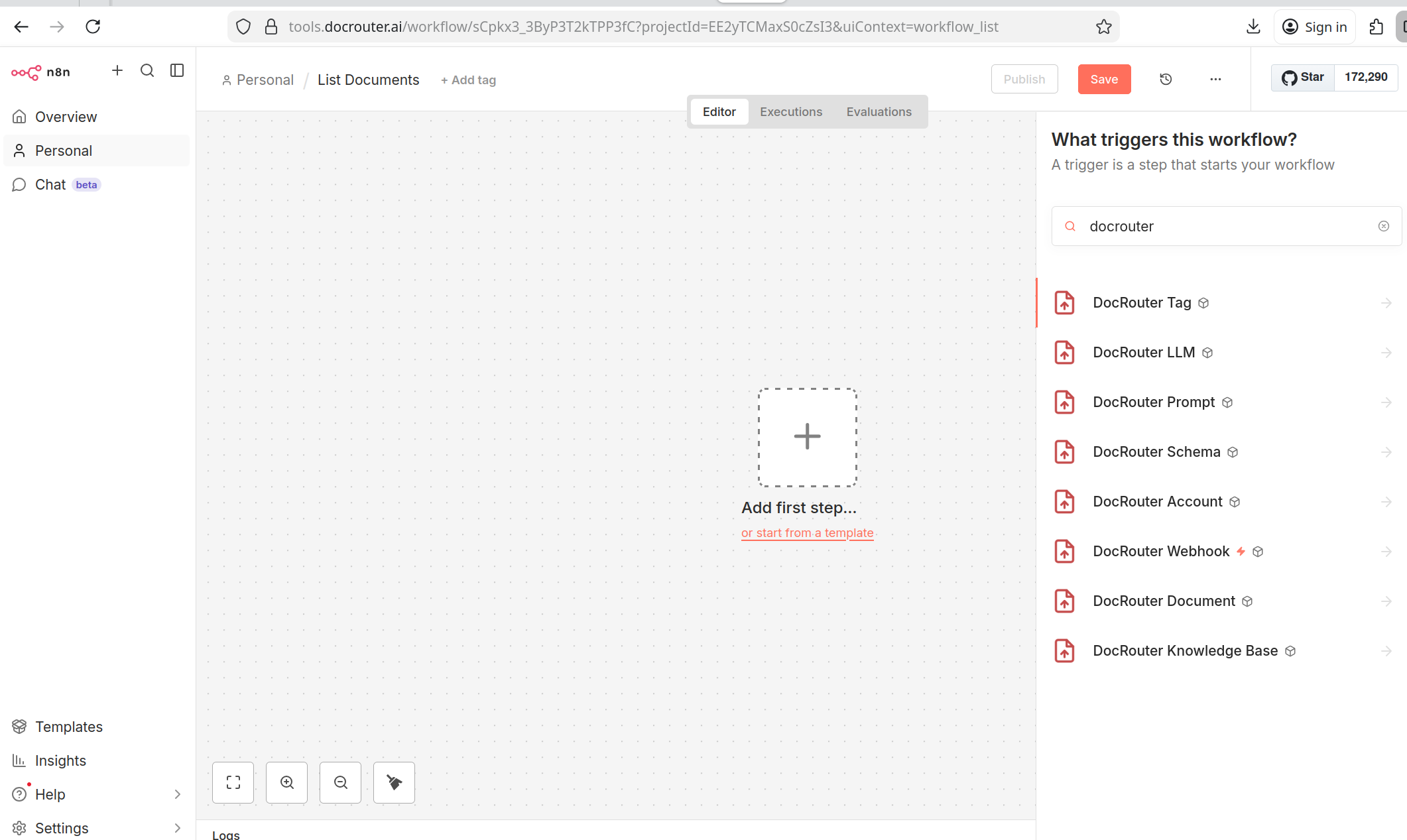
The DocRouter nodes then become available in the node search list.
Credentials
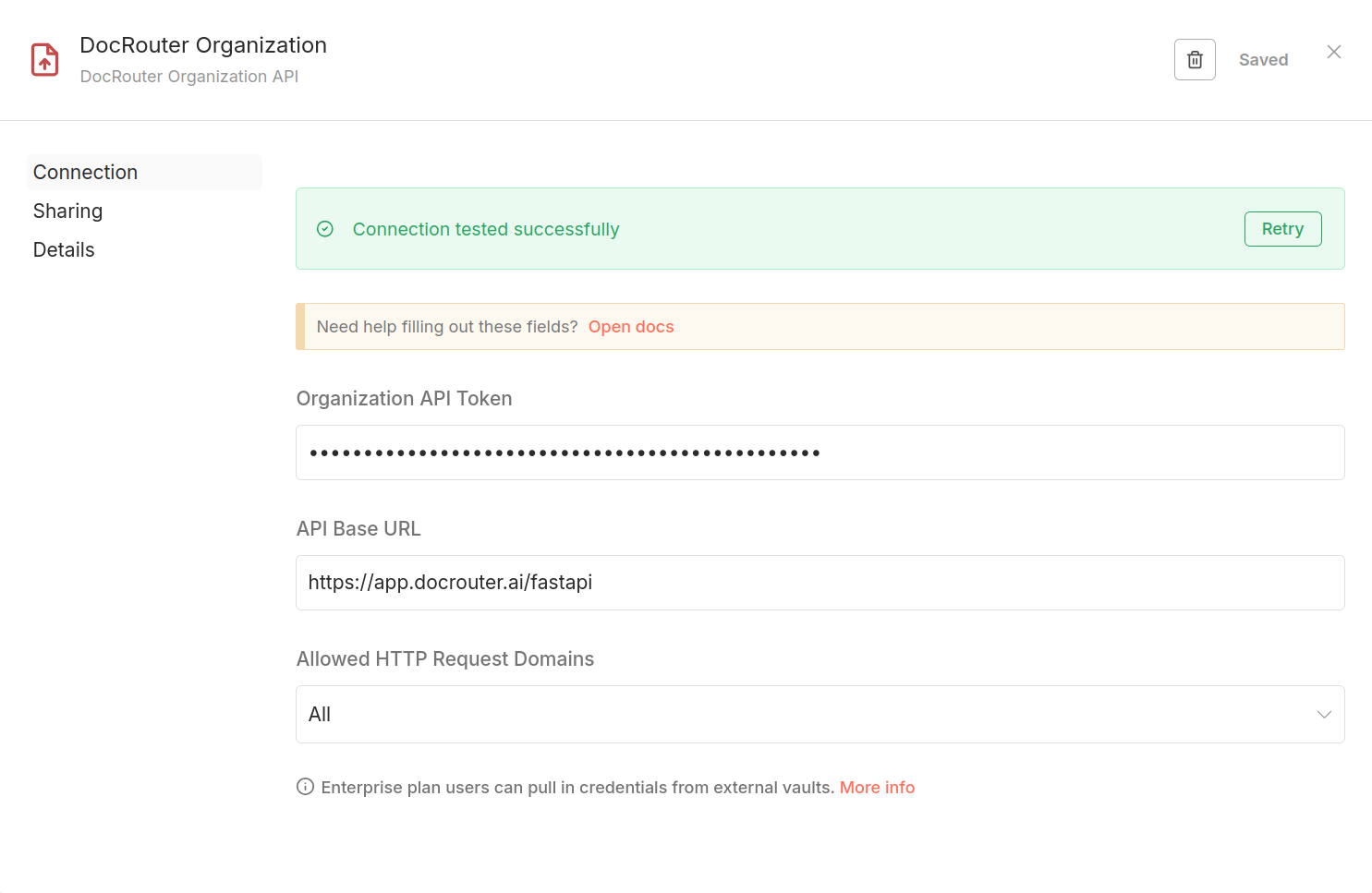
You need one of two credential types:
- DocRouter Organization API – organization-level token. Use it for: Documents, Tags, LLM, Prompts, Schemas, Knowledge Base, Webhook.
- DocRouter Account API – account-level token. Use it only for the DocRouter Account node (users and organizations).
Create the API token in DocRouter (Settings → User → Developer). Then create the credential in n8n (Settings → Credentials or when adding a DocRouter node), paste your API token from DocRouter, and optionally override the base URL for self-hosted or staging (default: https://app.docrouter.ai/fastapi).
Example: List documents and get one
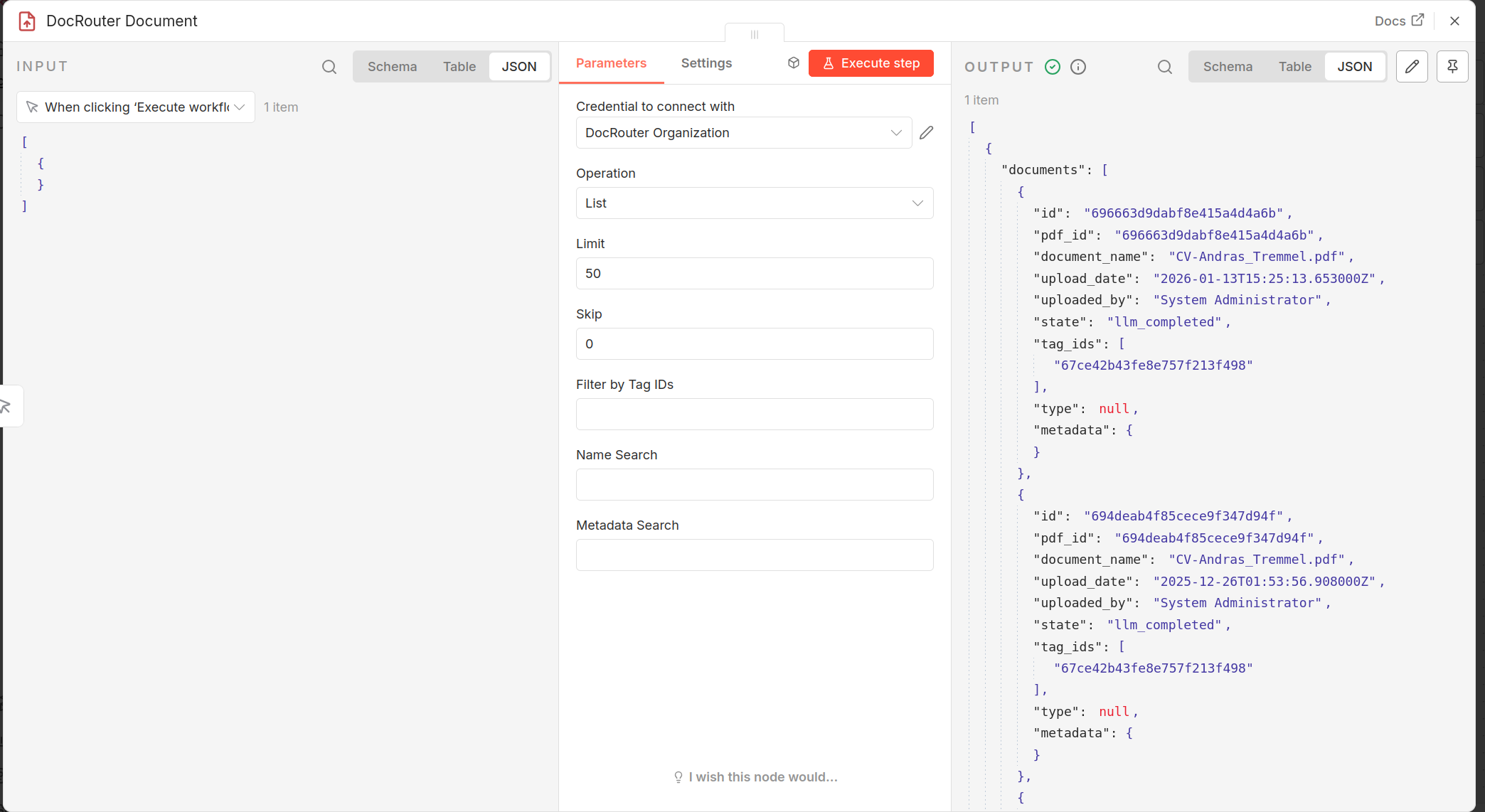
- Add a DocRouter Document node.
- Choose credential: DocRouter Organization API.
- Operation: List (optional: limit, skip, name search).
- Run the workflow → you get a list of documents (and total count).
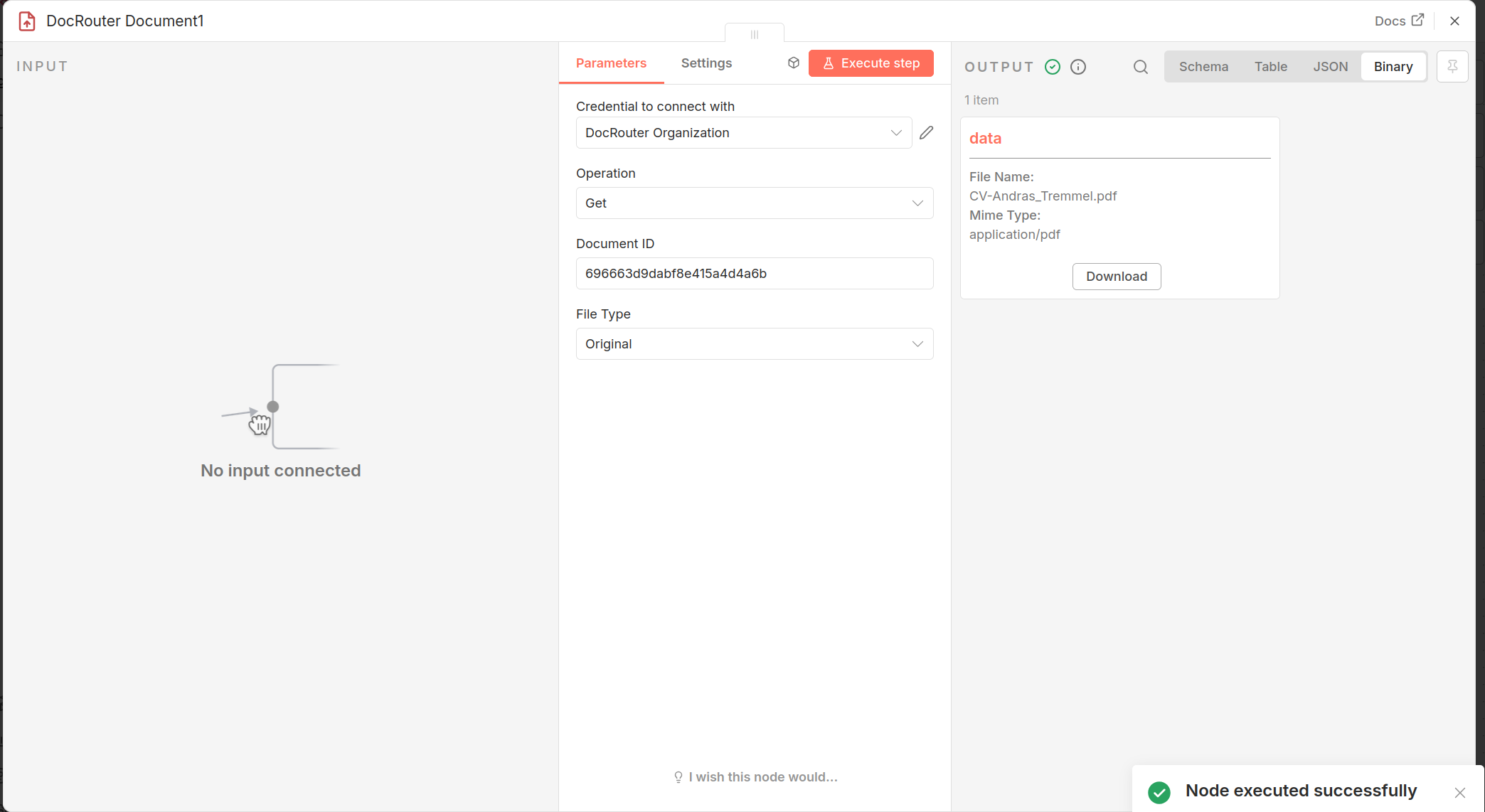
- Add another DocRouter Document node, Operation: Get, set Document ID (e.g. from the first node’s output:
{{ $json.id }}). - Run → you get that document’s metadata; if it has content, it’s in binary (downloadable).
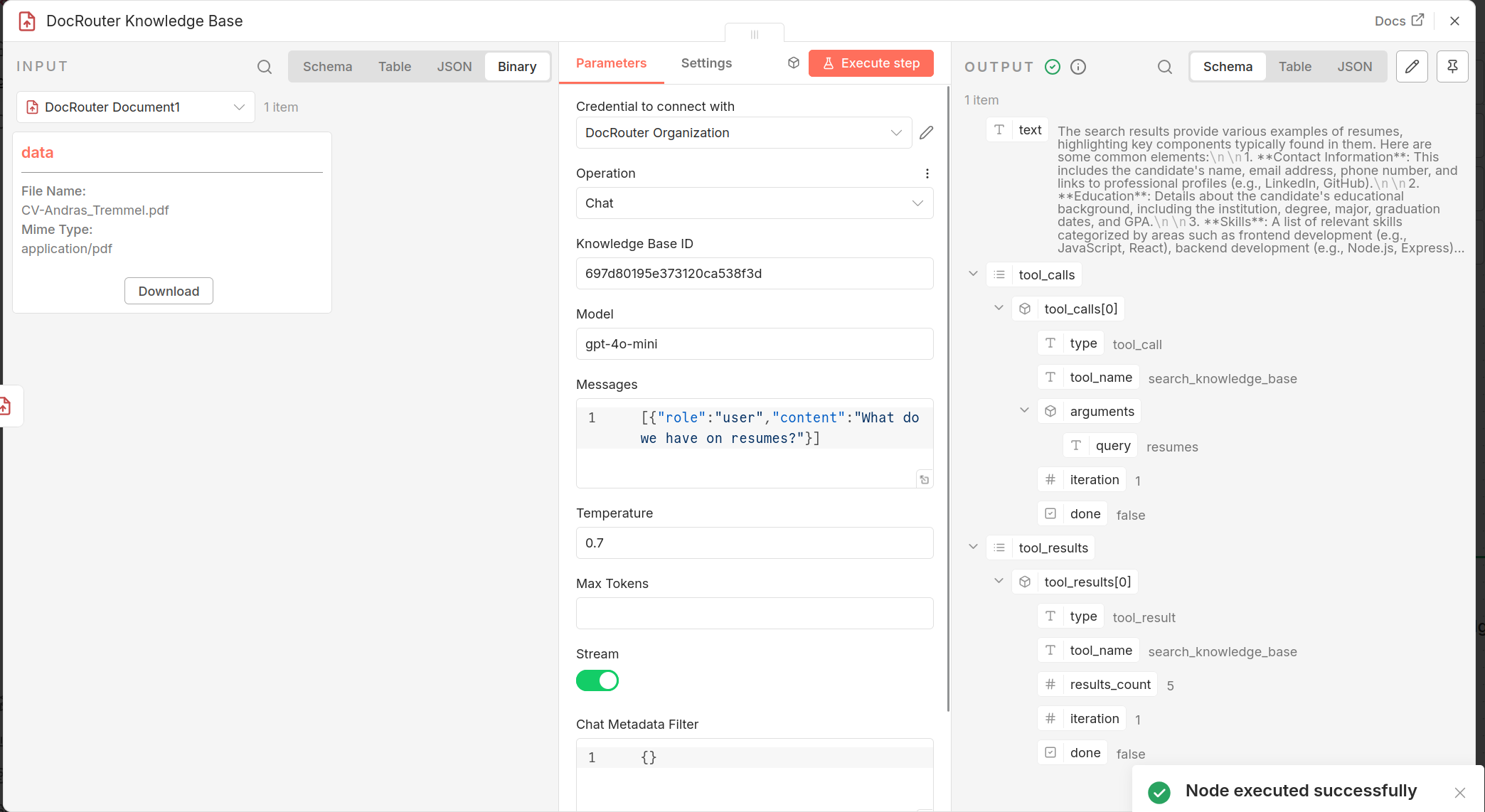
Example: Chat with a knowledge base
- Add a DocRouter Knowledge Base node.
- Credential: DocRouter Organization API.
- Operation: Chat.
- Set Knowledge Base ID, Model (e.g.
gpt-4o-mini), Messages (JSON array, e.g.[{"role":"user","content":"What do we have on resumes?"}]). - Stream: off → you get a single JSON object with
text,tool_calls,tool_results. Stream on → you get the same shape after the node parses SSE for you. - Run → the output has the assistant’s answer and any tool calls (e.g.
search_knowledge_base) and results.
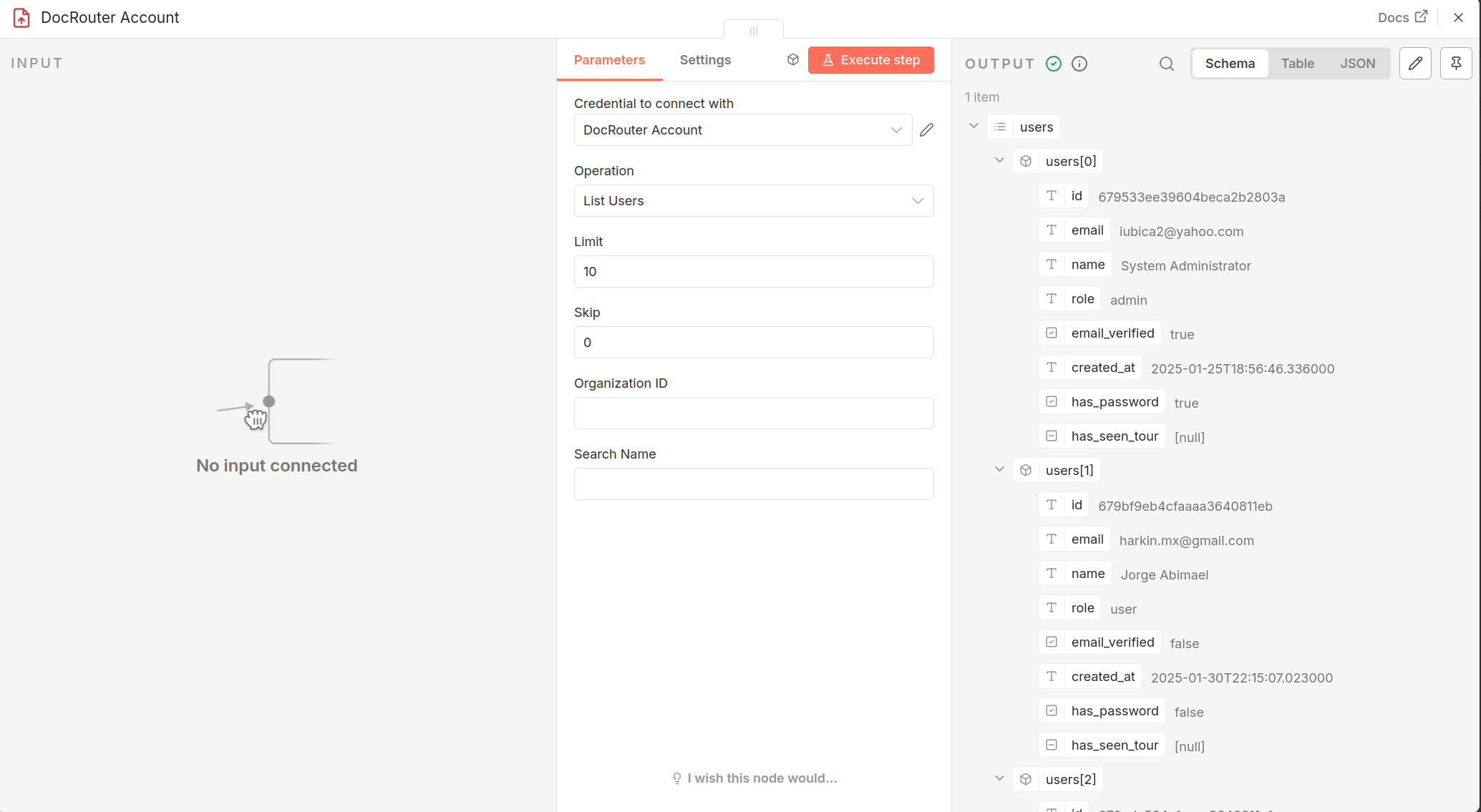
Example: Manage users (account admin)
- Add a DocRouter Account node.
- Credential: DocRouter Account API (account-level token).
- Operation: List Users (optional: limit, skip, organization ID filter, search name).
- Or Create User (email, name, password), Update User (user ID + optional name, password, role, etc.), Delete User (user ID).
Same node supports List / Get / Create / Update / Delete Organizations with the same account credential.
Example: Webhook trigger
- Add a DocRouter Webhook node (trigger).
- Configure Webhook path and, if you use HMAC in DocRouter, the Secret and optional Timestamp tolerance.
- When DocRouter sends an event to that URL, the workflow runs; you can verify the signature and use the payload in the next nodes.
For a deep-dive into DocRouter’s webhook implementation, see How We Built Webhooks With Cursor and Claude Code.
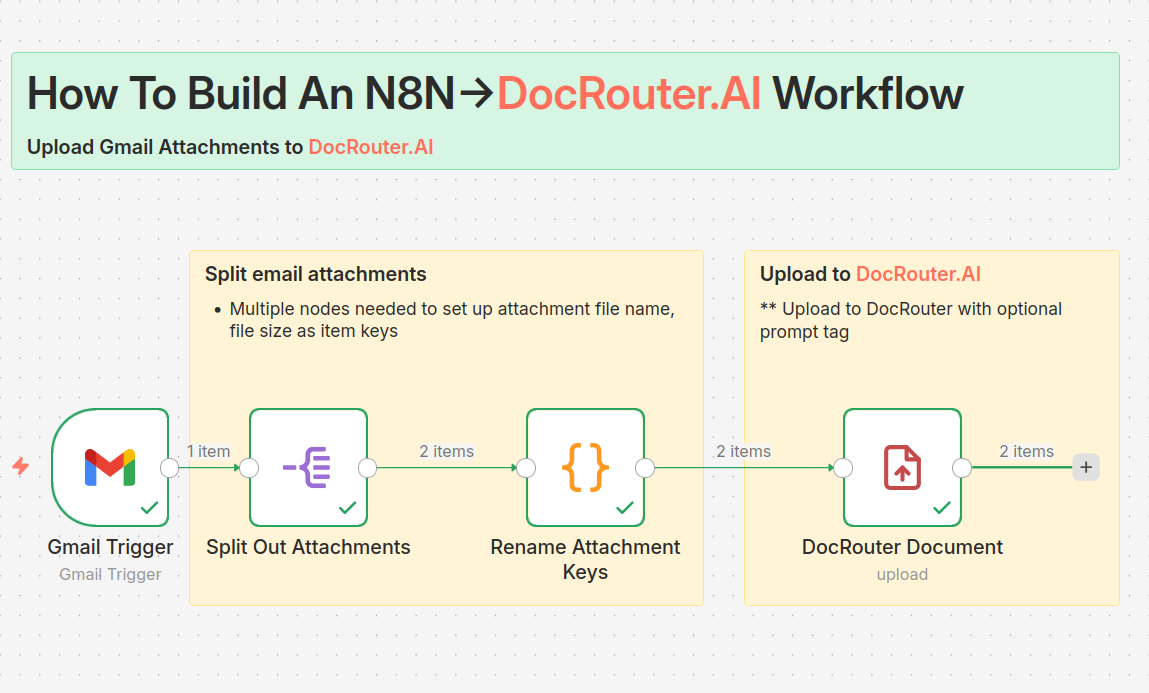
Example: Gmail to DocRouter
This workflow uploads Gmail attachments to DocRouter:
- Gmail Trigger (with “download attachments”) → Split Out on
$binaryso each attachment becomes its own item. - Code node renames the binary key to
attachment. - DocRouter Document node uploads each file to DocRouter.
You need Gmail OAuth2 and DocRouter Organization API credentials.
Other nodes (DocRouter Tag, LLM, Prompt, Schema) follow the same pattern: pick operation (List, Get, Create, Update, Delete—or operation-specific ones like Run LLM, Validate Schema, Search KB), fill resource IDs and body fields, run.
How It Was Implemented “In the Open”
The nodes were built in one Cursor thread, with the codebase and the real DocRouter backend in ../doc-router open in the same workspace. That made it possible to implement, then immediately check and fix behavior against the actual API and Python code.
What we had at the start
- An n8n community node repo derived from the n8n starter (with Example and GitHub Issues nodes).
- DocRouter Organization API credentials type already present.
- A goal: “Build n8n nodes for DocRouter.ai” and, step by step, add all the APIs we use.
Prompts and steps (in order)
Roughly, the conversation went like this:
-
Document node and binary content
Ask: what’s the right n8n pattern for document content—binary vs base64? Answer: use the binary property. Then: add an “Output Document As” option; later: remove it and only support binary when content exists. -
Webhook trigger
Ask: add a trigger node for DocRouter webhooks with HMAC verification and optional timestamp check. Implemented; then we hit_a.trim is not a functionbecause the secret wasn’t always a string—fixed with a type guard (typeof rawSecret === 'string' ? rawSecret.trim() : ''). -
Tags, then “Custom API Call”
Ask: add a node for DocRouter tags (List, Get, Create, Update, Delete). After that, “remove the Custom API Call option.” That option comes from n8n core for credential-based nodes. We can’t remove it from the UI, so we handled__CUSTOM_API_CALL__in the switch and threw a clear error telling users to use the HTTP Request node for custom calls. That pattern was reused in every DocRouter node. -
GitHub nodes gone
Ask: remove all GitHub-related nodes, credentials, and icons. We deleted those files and cleaned uppackage.json. -
LLM, Prompts, Schemas, Knowledge Base
One after the other: “Add a node for DocRouter LLM (run, get, update, delete result),” “Add a node for DocRouter Prompts (all APIs),” “Add a node for DocRouter Schemas (including validate and list versions),” “Add a node for DocRouter Knowledge Base (list, get, create, update, delete, list documents/chunks, search, chat, reconcile).” Each time we followed the same structure: operations, parameters, one List/Get-style “run once” path and per-item paths for Create/Update/Delete, plus the__CUSTOM_API_CALL__branch. -
Knowledge Base Chat and streaming
In use we saw: with stream on, the result was parsed correctly; with stream off, the API was still returning SSE. Prompt: “When stream is off, the result is still sent as stream, is that correct?” We fixed the n8n node first: detect SSE-shaped responses and always parse them into one object (text,tool_calls,tool_results) so the output is consistent. Then: “Look under ../doc-router, is stream=false supported as a parameter?” We checked the Python API: the parameter existed but the KB chat handler always returned a streaming response. So the next prompt was: “Fix it in ../doc-router.” We added a non-streaming path inrun_kb_chat: whenrequest.streamis false, run the same agentic loop but collect into a single dict and return JSON instead ofStreamingResponse. After that: “Fix the n8n node now to expect non-streaming response in non-streaming mode”—so when stream is off we use the response as-is (one JSON object) and only parse SSE when stream is on. -
Account node
“Create a docrouter node for accounts, with all apis for account/users and account/organizations.” We already had DocRouter Account API credentials. We added the DocRouter Account node with List/Get/Create/Update/Delete for both Users and Organizations, using the account-level API and the same patterns as the other nodes. -
Publishing
“I’d like to publish it as n8n-nodes-docrouter” → we confirmed the name, fixed the README to match the real package contents, removed the wrongmainfield frompackage.json, and left publish steps (includingnpm publish --otp=...for 2FA). Then: “Publish it.” TheprepublishOnlyscript was stilln8n-node prerelease, which blocked publish and said to usenpm run release. We changed it tonpm run buildsonpm publishbuilds and publishes; publish then succeeded. “OK - the README was not updated to reflect the correct package contents” → we rewrote the README with the actual nodes and credentials, installation, and usage. “What version is the package now” → 0.1.0. “Bump version and release” → we bumped to 0.1.1 and rannpm publishagain (tagv0.1.1was created in git).
Hooking up to ../doc-router
Having the doc-router source code in the same workspace (as ../doc-router) was critical:
- Stream parameter: We didn’t assume the API “must” support
stream=false; we searched the Python routes andrun_kb_chatand saw the parameter existed but the handler always returned a stream. So we fixed the backend first, then the node. - Optional parameters: The Knowledge Base node had “Could not get parameter” for optional fields like
coalesceNeighborsSearchandmaxTokens. We avoided callinggetNodeParameterfor those unless the parameter key existed inthis.getNode().parameters, matching how n8n omits optional params. - SSE shape: We matched the backend’s SSE format (
data: {"type":"tool_call",...},data: {"chunk":"H",...}, etc.) so the node’s parser could aggregate tool calls, tool results, and text chunks correctly.
So: implement in the node repo, verify and fix against the real API and backend in doc-router. No guessing the contract.
How this blog post was written
You’re reading the result of another Cursor prompt in the same “in the open” style:
-
Request: Write a markdown blog post that (1) at the top explains how to use the DocRouter n8n nodes with examples, (2) in the middle explains step-by-step how the nodes were created in this Cursor thread, what prompts were used, and how we hooked up to the ../doc-router sandbox to review and fix things, and (3) explains how the blog post itself was written.
-
What Cursor did: It read a couple of existing posts for front matter and tone, and created a new one, as a synthesis of the conversation summary and the steps we just walked through: usage first, then implementation story and prompts, then “how this post was written.” So this post is both the doc and the meta-story of how it was generated.
-
… Then, a few manual touch-ups finished the blog post.
n8n-nodes-docrouter on npm · Source on GitHub · DocRouter docs
Footnotes
-
Alternative ways to install (npm or Docker): Where n8n is installed, run
npm install n8n-nodes-docrouterand restart n8n. For Docker, setN8N_COMMUNITY_PACKAGES=n8n-nodes-docrouter. ↩