
DocRouter n8n Integration — Automate Workflows
n8n is a visual workflow tool. Use it to connect DocRouter to other apps and services (ERP, CRM, email, databases).
If you want visual workflow automation inside DocRouter without a separate n8n instance, see DocRouter Flows.
If you use Microsoft Power Automate instead, see the Power Automate integration page for the DocRouter Organization custom connector and a sandbox sample flow on GitHub.
DocRouter nodes
- Package: n8n-nodes-docrouter — community nodes and credentials for Documents, Tags, Prompts, Schemas, Knowledge Base, Webhooks, and more.
- Install: In n8n: Settings → Community Nodes → Install, enter
n8n-nodes-docrouter. Or:npm install n8n-nodes-docrouterand restart n8n. - Credentials: Create an API token in DocRouter (Settings → User → Developer), then add a DocRouter Organization API credential in n8n.
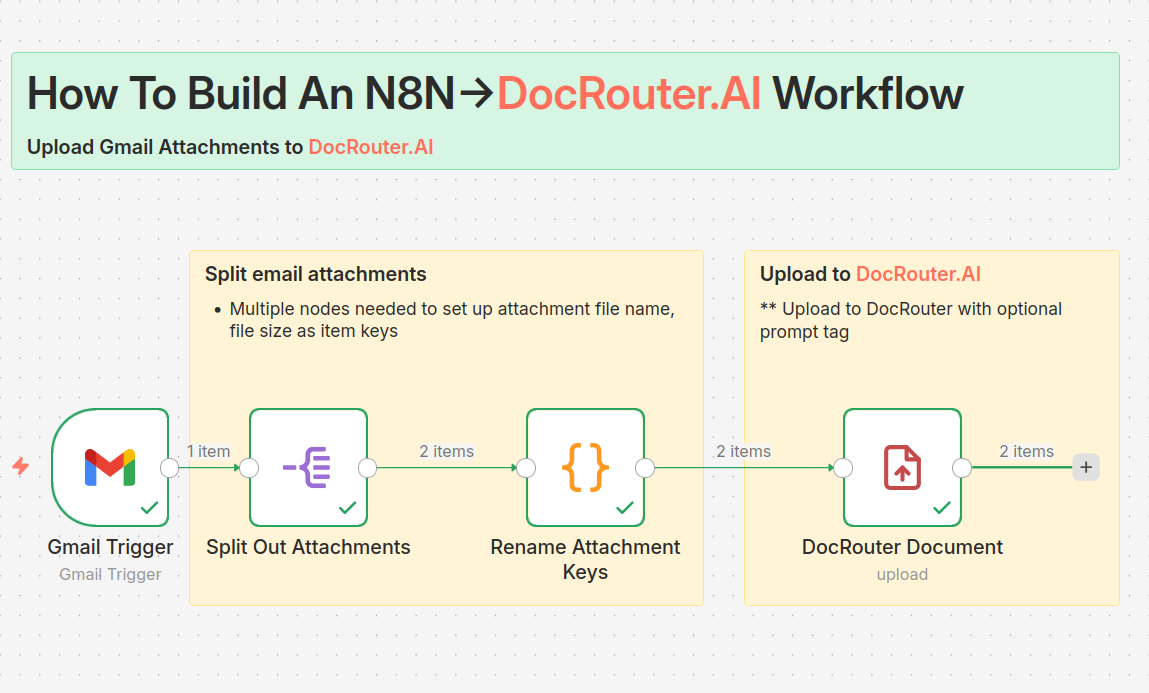
For install steps, examples (e.g. Gmail → DocRouter, webhook triggers), and usage, see How We Built the DocRouter n8n Nodes With Cursor.
Webhooks + n8n
Use a DocRouter Webhook trigger node in n8n, or create a generic Webhook node and paste its URL into DocRouter → Organization Settings → Webhooks. Select events such as llm.completed to receive extracted data. Use other n8n nodes to send that JSON to your ERP, CRM, or database.
See also
- DocRouter Flows — Built-in visual automation inside DocRouter
- Power Automate — Custom connector for Microsoft Power Automate
- Webhooks — Event types, payloads, authentication
- Workflows — Overview of workflow options
- Integrations — All integration options