
Document Agent
Configure schemas, tags, and prompts with AI
Set up extraction in plain language. The AI creates or edits schemas, prompts, and tags, then runs extraction—all in the context of the current document.
What it is
The Document Agent is an AI assistant scoped to one document. Use it to go from “I have a document” to “I have a schema, prompt, and extracted data” by talking instead of filling forms. Open any document in the DocRouter app, then open the Document Agent (Chat / Agent tab).
What you can do
Ask the AI to:
- Create or edit schemas — e.g. “Create a schema for this invoice with vendor, date, line items, and total.”
- Create or edit prompts — e.g. “Write a prompt to extract vendor and total” or “Use the Invoice schema we just created”; the AI can link prompts to schemas and run extraction.
- Manage tags — Create tags, add them to the document, or list existing tags.
- Run and review extraction
- Update document metadata — Rename, set tags, or edit metadata.
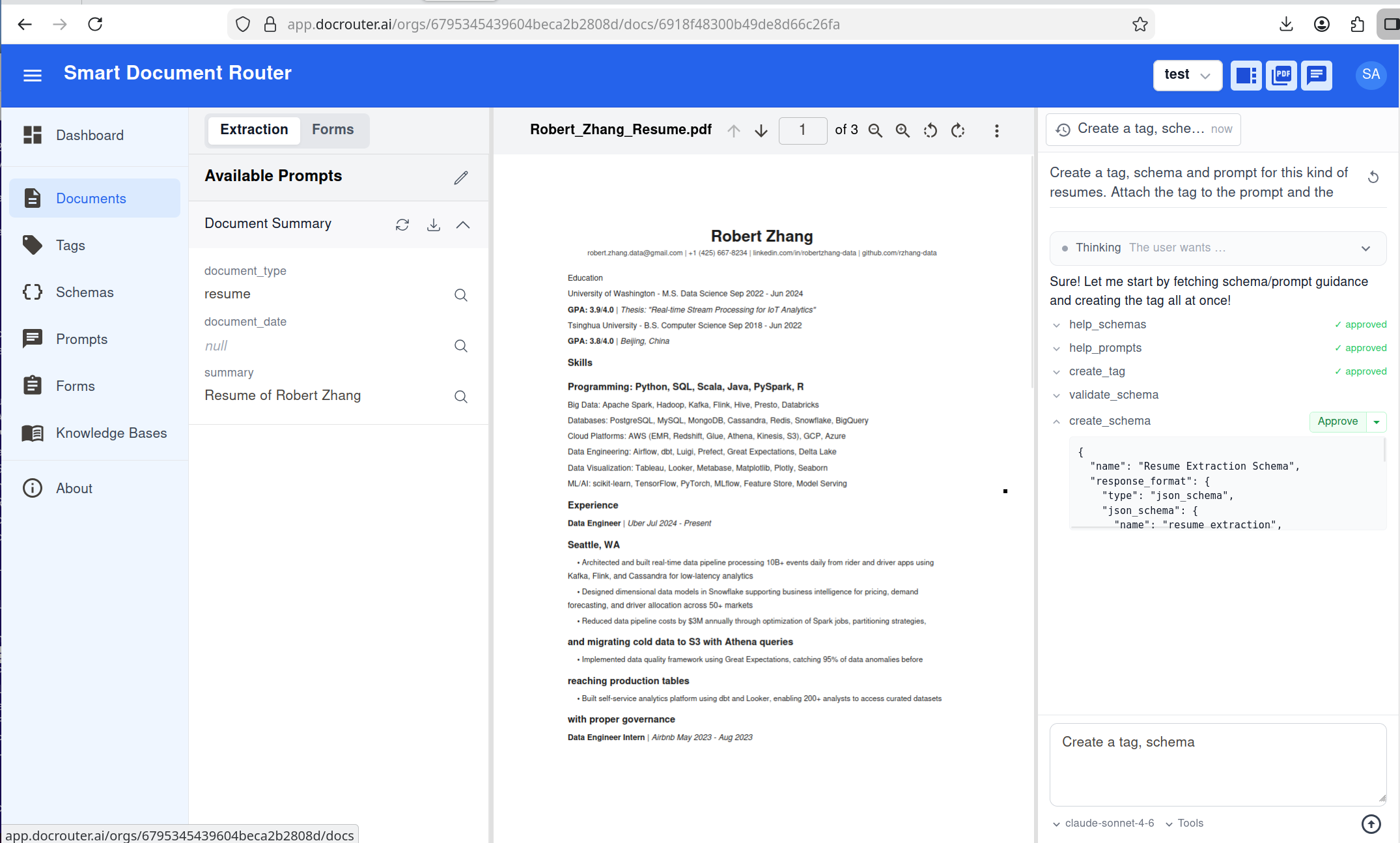
Read-only actions run automatically. Write actions (create/update schema, prompt, tag; run extraction; update document) can require approval so you confirm each change before it runs.
How to use it
- Open a document in the DocRouter app.
- Open the Document Agent (Chat / Agent tab on the document page).
- Say what you want in plain language (e.g. “Create a schema for this invoice…”, “Run extraction”).
- Approve when the AI proposes a change; you can iterate in the same thread or start a new one per document.
Conversations are saved in threads per document so you can resume later.
How it works
The agent is a tool-calling LLM with access to the document’s OCR text, optional @-mentions (schemas, prompts, tags), and working state (last extraction, schema/prompt revs). It can read and write schemas, prompts, tags, document metadata, and extraction results. It validates schemas before create/update and uses help tools when needed. Read-only tools run automatically; write tools can be gated behind your approval.
REST API
Same agent, available for custom UIs and automation:
- Base path:
.../v0/orgs/{organization_id}/documents/{document_id}/chat - POST …/chat — Send
messages, get replies (optional streaming). When approval is required, response includesturn_idandtool_calls; call the approve endpoint next. - POST …/chat/approve — Submit approvals:
turn_id,approvals([{ "call_id", "approved" }]). - GET …/chat/tools — Returns
read_onlyandread_writetool names. - Threads: GET/POST
.../chat/threads, GET/DELETE.../chat/threads/{thread_id}.
Use an organization API token. Full request/response and SSE events: interactive API docs (tag: agent).
Related docs
- Prompts — Extraction prompts and how they work
- Schemas — Structured output and validation
- Tags — Document tags and routing
- Knowledge Base Chat — Chat over many documents (RAG)
- REST API — Authentication and API reference