 DocRouter.AI
DocRouter Microsoft Power Automate Integration
Microsoft Power Automate (cloud flows) connects to DocRouter through the DocRouter Organization custom connector—an independent-publisher connector that wraps the same organization-scoped REST API as the n8n nodes (/v0/orgs/{organization_id}/...).
Open-source connector
The connector source, OpenAPI definition, C# script (org id injection), and helper scripts live on GitHub:
github.com/analytiq-hub/power-automate-docrouter
- Deploy with the Power Platform CLI (
paconn) usingcreate.sh/update.sh. - Authentication: Organization Token (API key) and Organization ID (same concepts as in DocRouter and n8n).
Sandbox sample flow
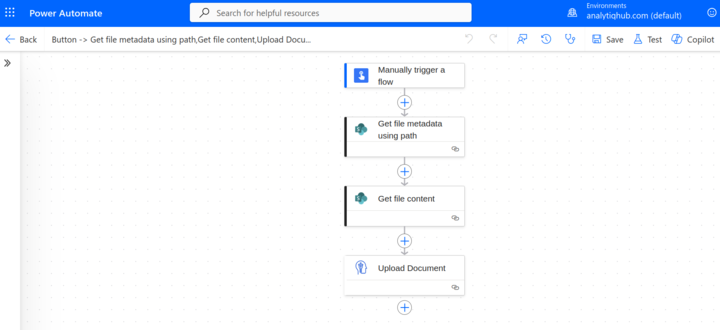
The repo README documents a small reference flow you can reproduce in Power Automate: manual trigger → get file content from your storage connector → Upload Document to DocRouter (file name + Base64). Full setup steps are in the README: Sandbox sample flow →
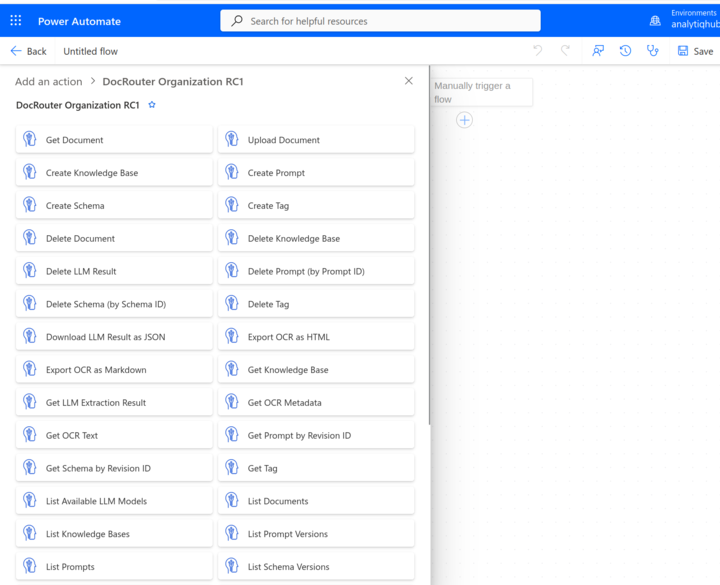
DocRouter actions in Power Automate
When you add an action from DocRouter Organization RC1, the designer lists the same organization-scoped operations as in the OpenAPI definition (documents, tags, prompts, OCR, LLM, knowledge bases, webhooks, and more).
Capabilities
The connector exposes DocRouter operations for documents (upload, list, get, update, delete), tags, prompts, schemas, knowledge bases, OCR, LLM extraction, and webhook triggers—aligned with the REST API surface for organizations.
See also
- n8n — Community nodes for the same APIs in n8n
- Workflows — Webhooks and automation overview
- Webhooks — Event types and payloads
- Integrations — All integration options