
n8n helped popularize a developer-friendly way to build automation workflows: a visual, node-based canvas where users connect steps into a pipeline, run the workflow, inspect inputs and outputs, and iterate quickly. DocRouter Flows applies that broader visual workflow pattern to intelligent document processing.
DocRouter is an open-source Intelligent Document Processing (IDP) platform, released under the Apache 2.0 license. It is designed for extracting structured data from unstructured documents — PDFs, scanned forms, emails with attachments — using OCR, LLMs, and human-in-the-loop review. Flows is the automation layer that connects those capabilities into end-to-end document pipelines.
Before: Upload documents in DocRouter, connect webhooks to n8n or custom code, and glue OCR and LLM steps together yourself.
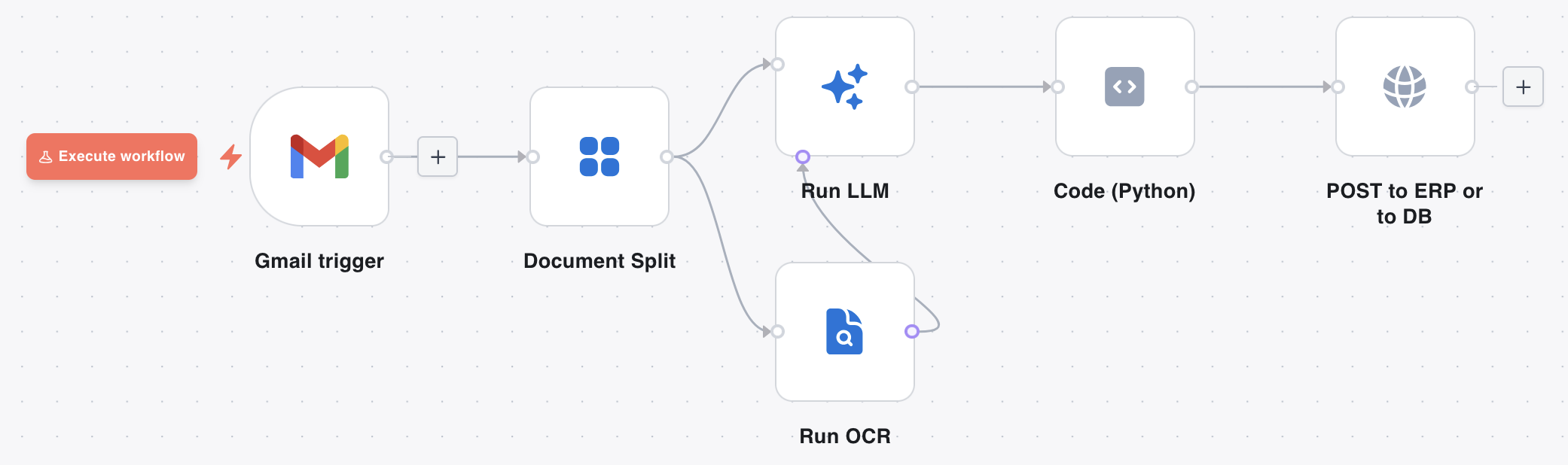
Now: Build a document-native pipeline on a visual canvas — Gmail → Split → OCR → LLM → ERP — with one product and a full execution log.
Here is what a workflow looks like in the DocRouter Flows editor — a visual canvas of connected nodes, with per-step input and output you can inspect after each run:
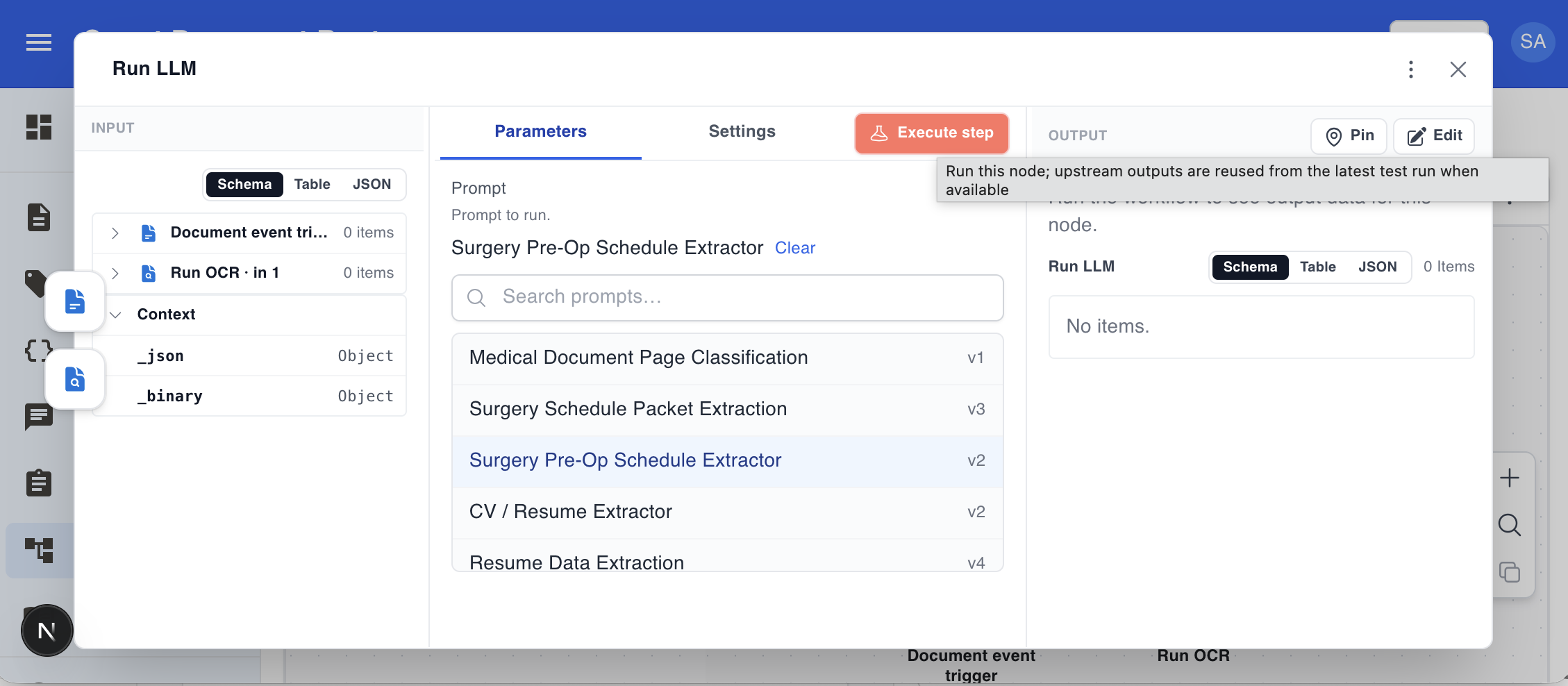
And here is how you configure a node. Click any node to open its panel on the right. The Run LLM node, for example, lets you select one of your organisation’s configured DocRouter prompts from a searchable list. It runs that prompt against the binary input items arriving from upstream nodes — typically one PDF page or attachment per item. When an OCR node is connected to the second input port, the model also receives the matching page text alongside the binary.
Familiar workflow concepts in DocRouter Flows
DocRouter Flows uses workflow concepts that will feel familiar to users of modern visual automation tools, including n8n, Zapier, Make, and similar systems.
Visual flow design. Flows are built on a graph-based canvas. You drag nodes from a palette, drop them onto the canvas, and connect outputs to inputs.
Typed input and output items. Every node receives and produces a list of items. Each item can carry structured JSON data and binary attachments such as PDFs, images, or other files. This lets a workflow pass extracted text and the original document together through the pipeline.
Expressions. Node parameters can reference upstream data — prefixed with = — so a later step can dynamically use fields extracted earlier in the flow. For example, a parameter can pull a patient name from an LLM node’s output without writing custom glue code.
Pinned data. Node outputs can be saved as test fixtures. Downstream nodes reuse pinned data instead of re-executing upstream steps — essential when iterating on one part of a flow without re-running expensive OCR or LLM calls.
Execution logs. Every flow run records per-node status, timing, inputs, outputs, code-node print output, and errors. The visual editor lets you inspect what happened at each step after a run.
Per-node error handling. Each node has an on error setting: stop the run (default) or continue and pass an error-envelope item downstream, allowing workflows to degrade gracefully.
Merge and branch nodes. Branch nodes route items based on conditions. Merge nodes combine inputs from multiple paths. Together they cover common control-flow patterns without custom code.
Code and HTTP nodes. A Python code node supports custom transformations in a sandboxed runtime. A generic HTTP node connects to REST APIs that do not yet have dedicated connectors.
Triggers. Flows can start from webhooks, schedules, document events, or polling connectors such as email and cloud storage sources.
Credential management. OAuth tokens and API keys are stored at the organization level and injected at runtime, keeping secrets out of the workflow graph.
Disabled nodes. Any node can be disabled and skipped during execution, making it easy to test one part of a flow without running every step.
What is different: DocRouter is an IDP platform
General-purpose automation tools excel at connecting SaaS apps. DocRouter is purpose-built for intelligent document processing, and that shapes both which node types exist and how the platform is licensed.
Document-native node types
DocRouter adds nodes designed for document pipelines:
- Document Split — splits a multi-page PDF into one item per page, with configurable start, stop, and step slicing.
- OCR — runs optical character recognition on PDF pages using configurable providers. Produces per-page text output on a typed port.
- LLM Run — sends items to a configured LLM prompt. Accepts OCR text on a second typed port so the model always sees the right page’s text alongside the item. Supports batching.
- Document event trigger — fires automatically when a document is uploaded to DocRouter, filtered by tag or other criteria. This is the entry point for fully automated document processing pipelines.
The typed port between OCR and LLM nodes is worth highlighting: the OCR node’s output handle is a distinct type that only connects to the LLM node’s second input. This prevents wiring mistakes and makes the pairing — one OCR result per page, matched to the corresponding LLM input item — explicit in the graph.
Apache 2.0 license
DocRouter is Apache 2.0: you can embed it in any product, modify it, and redistribute it without restriction. This makes it suitable for ISVs building document automation into vertical SaaS products, healthcare platforms, legal tech, or financial services applications.
Use Case 1: Connecting Cloud Document Sources
DocRouter includes trigger and action nodes for the four most common enterprise document sources.
| Source | What the trigger does | What the action nodes do |
|---|---|---|
| Gmail | Poll for new messages matching a search query | Send, reply, update labels |
| Microsoft Outlook | Poll for new messages by received date | Send, reply, forward, move, flag |
| Google Drive | Watch a folder for new or updated files | Search, download, create folder, move, delete |
| Microsoft OneDrive | Watch a path for new or updated files | Search, list, download, upload |
The four connectors above are examples, not a closed list. Once the connector architecture is in place — manifest schema, credential types, poll triggers, and the declarative HTTP executor — adding a new integration is a matter of minutes. Each connector follows the same pattern: define parameters, wire OAuth or API-key credentials, and describe the HTTP calls the node makes. The platform handles the rest (polling, item emission, binary attachment handling, execution logging).
That consistency is what makes AI coding assistants like Cursor so effective here. Point an assistant at an existing connector and the target API’s documentation, and it can scaffold a new node package quickly: the conventions are explicit, the examples are right there in the repo, and there is little bespoke glue to invent. We have used this workflow ourselves — see How We Built the DocRouter n8n Nodes With Cursor — and the same approach applies inside DocRouter Flows. Need a Box, Dropbox, or Salesforce connector? The platform patterns are already built; filling in the next one is routine.
Setting up a connector takes three steps:
- Create a credential. Go to Settings → Credentials, choose the connector type (e.g. Gmail OAuth2), and complete the OAuth flow. DocRouter stores the refresh token for your organisation.
- Add the trigger node. Drag the trigger onto the canvas, select the credential, set a poll interval, and optionally filter (e.g. Gmail search query
from:vendor@acme.com has:attachment). - Wire the rest of the flow. The trigger emits one item per new email or file. Binary attachments arrive in the item’s
binarypayload, ready to pass directly to a Document Split or OCR node.
A minimal connector flow looks like this:
[Gmail trigger]
      │  (binary: pdf attachment)
      ▼
[Document Split]      ← one item per page
      │
   ┌──┴─────────────┐
   ▼                ▼
[Run OCR] ─────▶ [Run LLM]   ← OCR output pairs with LLM input
                    │
                    ▼
        [Code (Python)]        ← validate and shape fields for your ERP schema
                    │
                    ▼
          [HTTP Request]       ← POST to ERP or database
The code node is where you adapt LLM output to whatever your downstream system expects — field renaming, type coercion, dropping low-confidence rows, or collapsing per-page results into one payload:
def run(items, context):
    """Normalize LLM extraction fields before posting to ERP."""
    out = []
    for item in items:
        data = item.get("extraction") or item
        out.append({
            "vendor_name": (data.get("vendor_name") or "").strip(),
            "invoice_number": data.get("invoice_number"),
            "invoice_date": data.get("invoice_date"),
            "total_amount": float(data.get("total_amount") or 0),
            "currency": data.get("currency") or "USD",
            "line_items": data.get("line_items") or [],
        })
    return out
The HTTP Request node then references these fields with expressions — for example, ={{ $json.invoice_number }} in the POST body — and sends the result to your ERP or database endpoint.
The same pattern works identically starting from an Outlook, Google Drive, or OneDrive trigger — only the first node changes.
Use Case 2: Multi-Step Document Processing with Human-in-the-Loop
Full automation is not always appropriate. A field may be missing, LLM confidence may be low, or a regulation may require human sign-off before data enters a system of record. DocRouter handles this by combining the branch node, the code node, and webhook callbacks into a review pattern.
The scenario
A hospital receives pre-surgery document batches by email. Each batch is a single PDF that mixes pages for multiple patients: surgery schedules, consent forms, insurance cards, lab results — in no guaranteed order. The pipeline must:
- Split the PDF into pages.
- Run OCR and LLM extraction on each page to identify the patient and document type.
- Group pages by patient.
- Auto-file records where the grouping is confident.
- Route records with ambiguous page assignments to a human reviewer.
The flow
[Document event trigger]   ← fires on document.uploaded, filtered by tag
          │
          ▼
[Document Split]           ← one item per page
          │
    ┌─────┴─────────┐
    ▼               ▼
[Run OCR] ─────▶ [Run LLM]     ← extract patient name, DOB, MRN, document type
                    │
                    ▼
        [Code (Python)]    ← group pages by patient; flag unknowns
                 │
                 ▼
           [Branch]        ← route on human_review flag
              │   │
              │   └──▶  [HTTP Request]   ← auto-file to EHR (clean records)
              │
              └──▶  [HTTP Request]       ← post to review queue / Slack / ticketing
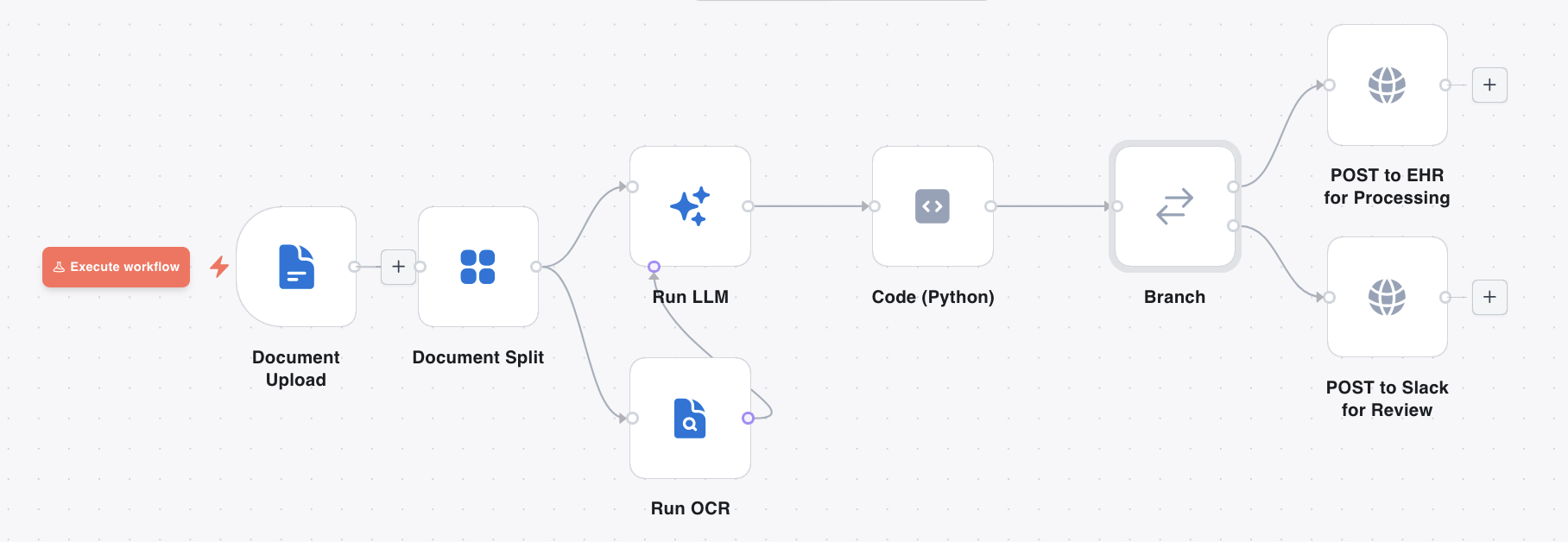
The code node runs a patient-grouping algorithm: it normalises names, dates of birth, and medical record numbers, assigns pages to patient groups using MRN as the primary key (falling back to name + DOB), and marks any page that could not be placed as an unknown. If any unknowns remain, it sets a human_review flag on the output item.
The branch node reads that flag. Clean records flow automatically to the EHR integration. Records with unknowns are posted to a review queue — a Slack channel, a ticketing system, or a custom review UI — where a human can examine the flagged pages and resolve the grouping.
Synchronous approval with a webhook
For cases where the flow must wait for a human response before continuing, a second flow handles the approval callback:
- The first flow posts a review request to an external approval service, including a callback URL pointing to a DocRouter webhook trigger.
- The reviewer inspects the document in their tool and clicks Approve or Reject.
- The external tool calls the callback URL with the approval payload.
- The webhook trigger fires the approval flow, which routes approved records to the EHR and rejected records to a correction queue.
The result is a complete human-in-the-loop cycle with a full audit trail: every execution records per-node inputs, outputs, timing, and logs, visible in the Executions panel.
Summary
DocRouter Flows brings visual workflow automation to intelligent document processing. It uses a familiar node-and-canvas model, but the platform is purpose-built for documents: OCR, LLM extraction, document splitting, document event triggers, review routing, audit logs, and human-in-the-loop workflows.
Tools like n8n are excellent general-purpose automation platforms. DocRouter Flows focuses on a narrower problem: turning unstructured documents into structured, actionable data inside production document pipelines.
DocRouter is Apache 2.0 licensed, so teams can embed, modify, and deploy it in commercial or internal systems where document automation is a core product capability.