
DocRouter Architecture
DocRouter is a multi-tenant document intelligence platform: ingest documents, run OCR, extract structured data with LLMs, and automate the path into downstream systems. This page describes how the pieces fit together. For deploy and cloud keys, see On-Prem Installation and Platform. For the product walkthrough, see How It Works.
System overview
| Layer | Role |
|---|---|
| Frontend (Next.js) | Document library, prompts/schemas/tags, PDF review, Flows canvas, admin settings |
| Backend (FastAPI) | REST API: documents, OCR, LLM results, prompts, schemas, tags, flows, webhooks, account config |
| Workers | Async consumers for OCR, LLM extraction, knowledge-base indexing, webhooks, and flow runs |
| MongoDB | App state, versioned prompts/schemas, encrypted credentials, flow definitions and executions, work queues |
| Blob storage | Document binaries and OCR output |
| LLM providers | Inference via LiteLLM (OpenAI, Anthropic, Bedrock, Vertex, Azure, …) |
Figure 1: DocRouter system architecture — application services, cloud APIs, and OCR/LLM providers.
On-prem, the same services run under Docker Compose or Kubernetes and call managed cloud APIs for storage, OCR, email, and models. See the on-prem architecture diagram.
Request path
- UI or SDK/REST client calls the FastAPI backend (org-scoped routes under
/v0/orgs/{org_id}/…). - Synchronous work (auth, CRUD, reads) completes in the API process.
- Heavy work (OCR, LLM, flow execution, outbound webhooks) is enqueued; workers process messages and update MongoDB (and document state).
- Optionally, multi-step workflows are triggered
- Clients poll status, subscribe via webhooks, or rely on workflow nodes to send result to target system
Worker pool sizes are configurable per queue (ocr, llm, kb_index, webhook, flow_run).
Document pipeline
The default extraction path is tag- and prompt-driven:
- Upload — Document stored; tags select which prompts apply (Tags, Quick Start).
- OCR — Org OCR mode runs (e.g. Textract); normalized OCR payload stored for extraction and search (Platform).
- LLM extraction — Matching prompts and optional schemas produce structured results via LiteLLM.
- Opional Workflow steps, including human-in-the-loop triggers
- Export / notify — REST/SDK download, webhooks, or push to ERP.
Statuses progress through states such as ocr_completed → llm_completed. Flows and external workflows extend or replace the “what happens after upload” story.
Automation layer (workflows)
Customers need more than a fixed Upload → OCR → LLM path: branching, schedules, email/drive triggers, agents, and delivery to ERP or review queues. DocRouter supports built-in and external workflows.
Built-in: DocRouter Flows
DocRouter Flows is a first-party visual DAG editor and runtime in the same deployment (no separate Temporal/n8n cluster required).
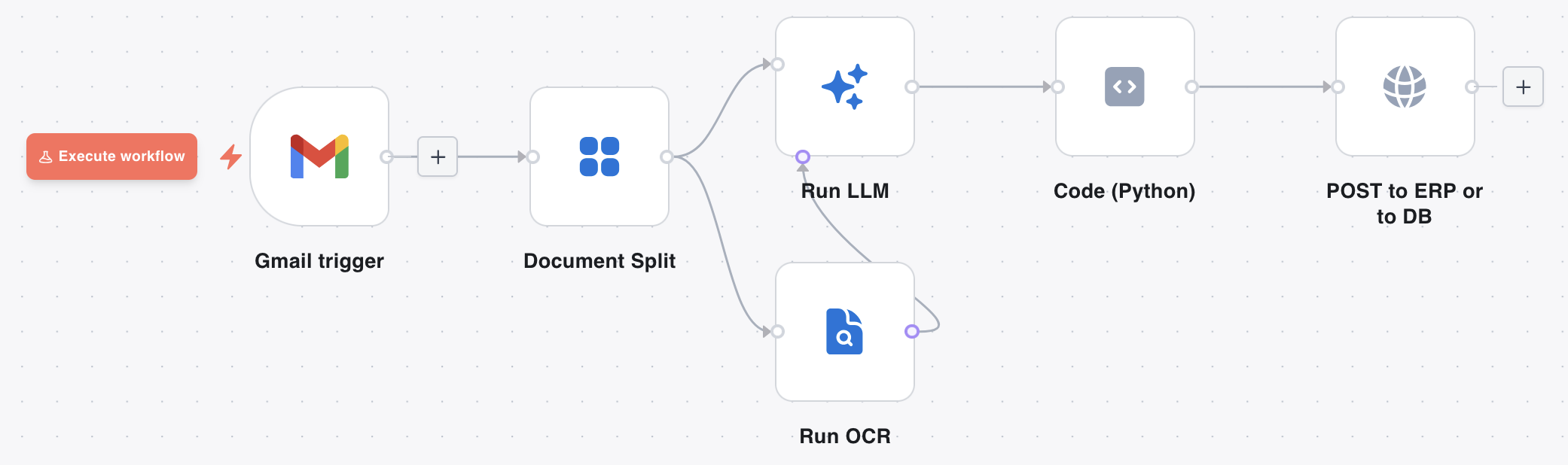
Triggers include manual, schedule, webhook, chat, poll, and document events. Execution history (inputs, outputs, timing, logs) is available in the UI. Details: Flows and the Flows blog post.
External workflow platforms
When automation lives outside DocRouter, treat DocRouter as the document/OCR/LLM service and orchestrate from elsewhere:
| Platform | Role |
|---|---|
| n8n | Visual flows with community nodes and SaaS connectors |
| Power Automate | Microsoft cloud flows via the DocRouter custom connector |
| Temporal | Durable coded orchestration |
| Webhooks + REST API | Event-driven or pull-based custom backends |
Product webhooks (extraction completed, etc.) are distinct from Flow webhook triggers.
Deployment topology
| Mode | What you run | Cloud / LLM config |
|---|---|---|
| Hosted SaaS | Nothing — app.docrouter.ai | Provided for you (Platform) |
| Self-hosted | Frontend, backend, workers, MongoDB, reverse proxy | You supply AWS/GCP/Azure and LLM keys (On-Prem Installation) |
Self-host via Docker Compose or Kubernetes. DocRouter does not require AWS Lambda/ECS/EKS for on-prem; it uses cloud APIs (S3, Textract, SES, Bedrock, Vertex, Foundry, etc.) as configured.
Security & credentials
- Documents and secrets use encryption in transit and at rest where configured for the deployment.
- Deployment-wide cloud credentials live in MongoDB
cloud_config(AWS, GCP, Azure); per-provider LLM keys in encryptedllm_providers. - Org and role-based access control scopes documents, prompts, and flows.
- Audit-oriented logging supports compliance review; enable CloudTrail (and equivalents) in your cloud accounts for infrastructure audit.
Admin UIs: Account → Development for AWS / GCP / Azure setup and LLM Manager. See LLM Configuration.
Integration patterns
How DocRouter typically sits in a larger stack (not alternate product architectures):
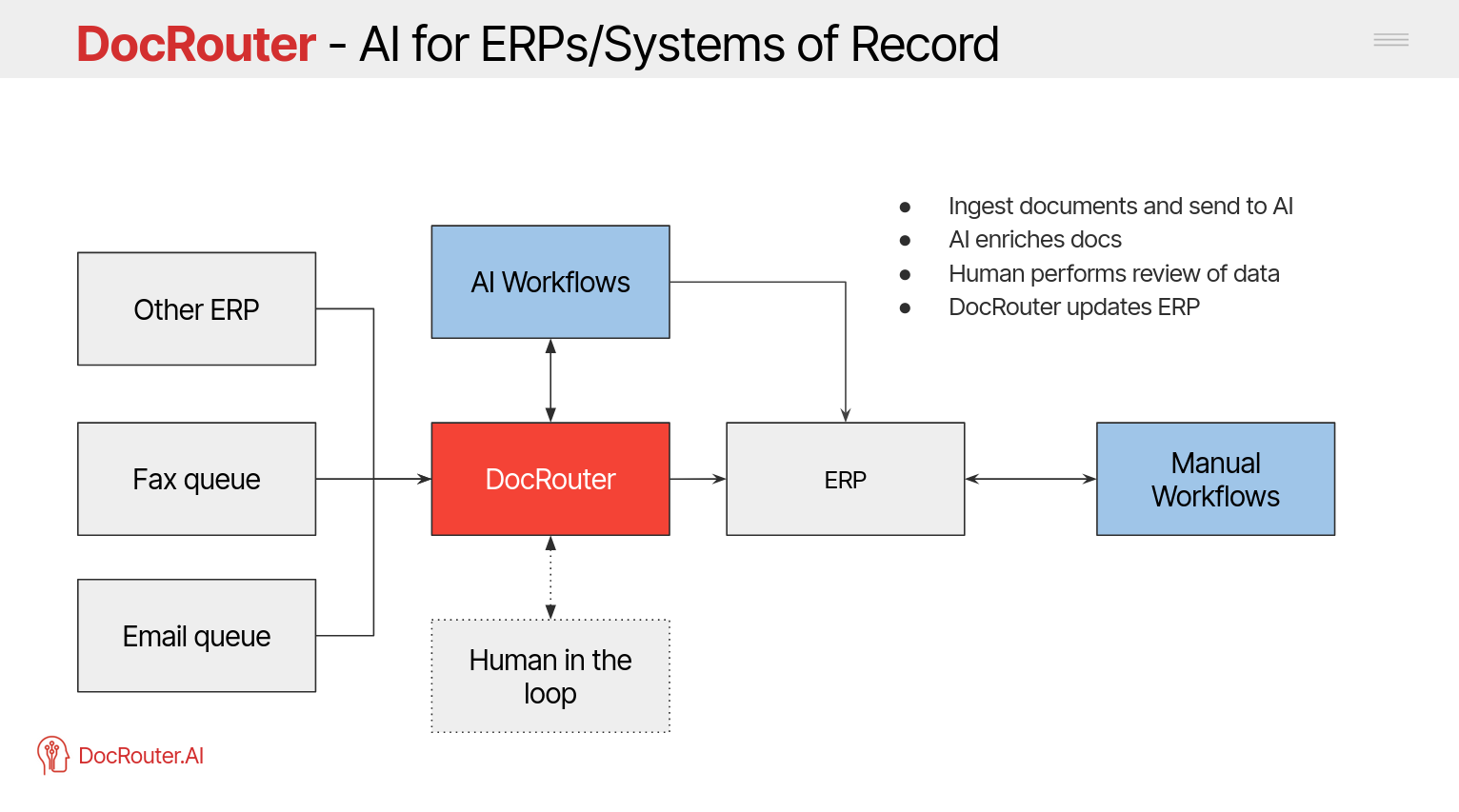
ERP / ops systems — Extract with prompts or Flows, then POST or sync into ERP, EHR, or databases.
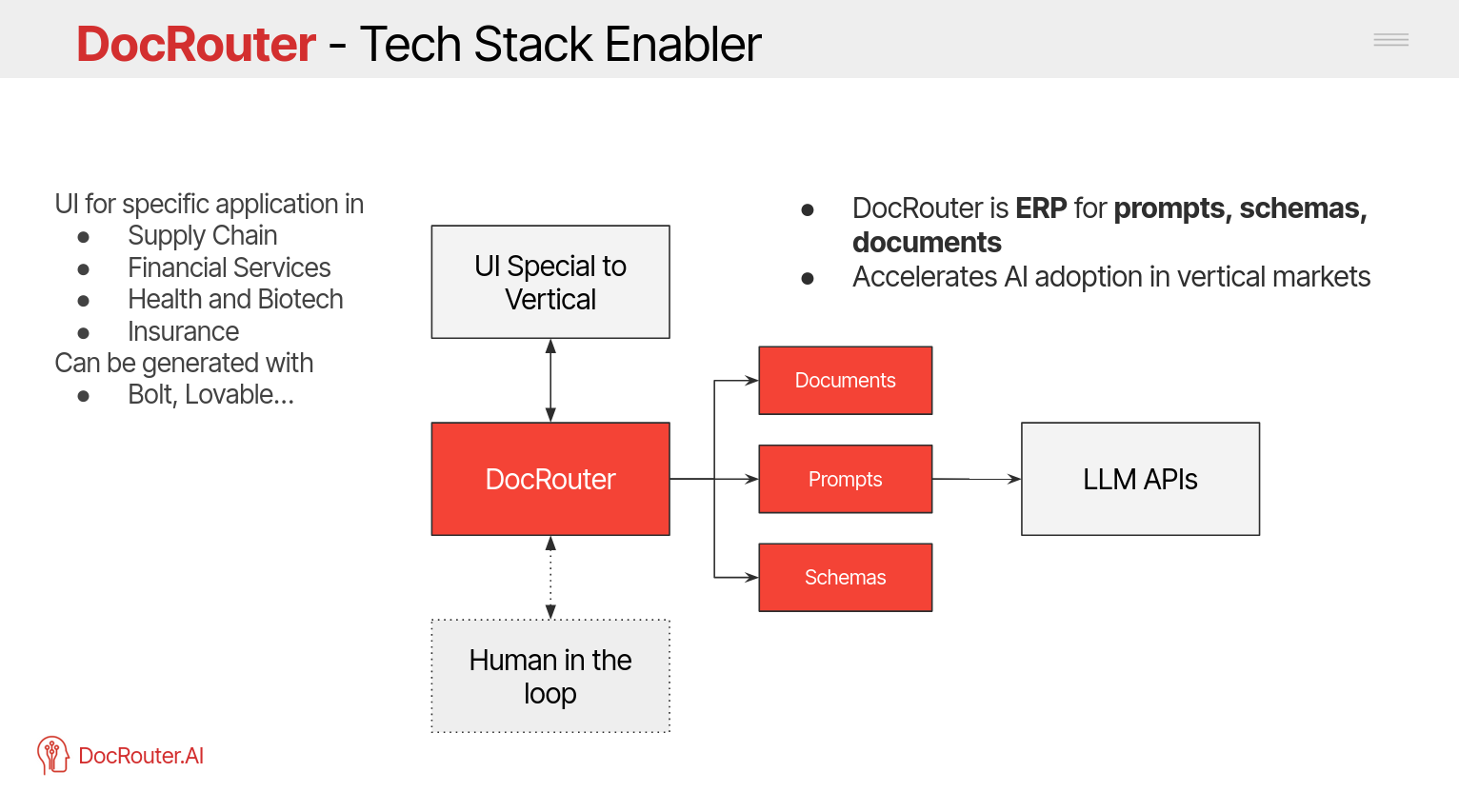
AI application layer — Use DocRouter as the document understanding service behind your own product UI and agents.
Related docs
- How It Works — User-facing pipeline
- Workflows / Flows — Automation
- Platform — Clouds, LLMs, OCR modes
- On-Prem Installation — Install and cloud setup
- Open Source — License and source
- REST API / Python SDK / TypeScript SDK — Programmatic access